Shopify custom pricing lets you show different prices to different buyers—wholesalers, VIPs, distributors—based on their account, order volume, or contract terms. With B2B GMV on Shopify up 96% in 2025, it’s the foundation of any serious B2B operation on the platform, and it almost always requires a third-party app to work properly.
This guide covers what custom pricing actually does, how it differs from native Shopify discounts, and which apps handle B2B pricing best in 2026.
What Is Shopify Custom Pricing
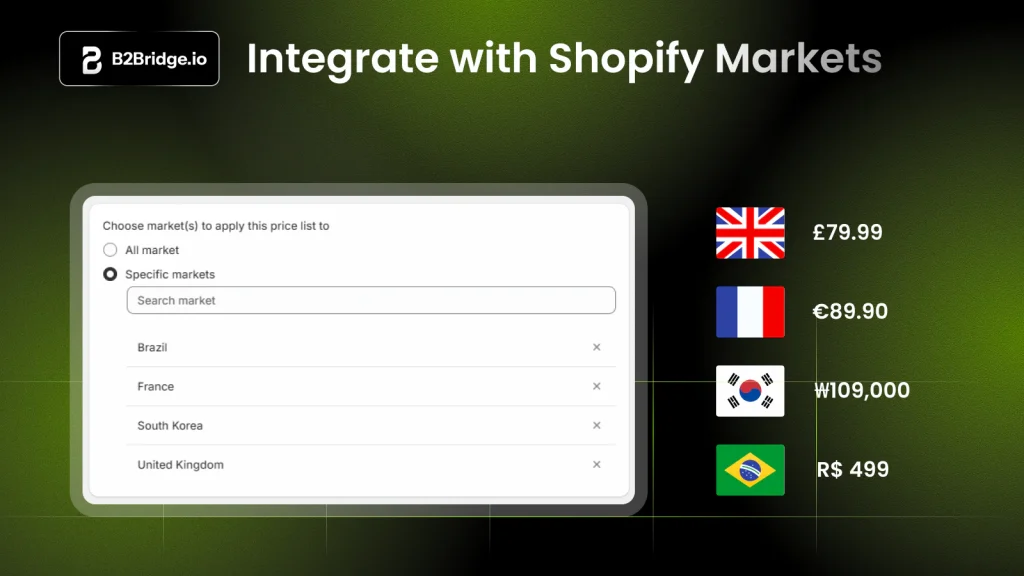
Shopify custom pricing lets merchants display different prices to specific customers—wholesale buyers, VIP accounts, distributors. You can apply quantity-based discounts using apps, customer tags, or native B2B features. Common approaches include installing apps like Bold Custom Pricing or B2Bridge, using Shopify Markets for regional pricing, or creating draft orders for one-off quotes.
By default, Shopify shows the same price to every visitor. Custom pricing changes that dynamic by assigning unique price lists to different buyer segments. Your Gold-tier wholesaler sees one price while a first-time retail shopper sees another.
Most merchants rely on third-party apps to make custom pricing work. Shopify Plus includes some native B2B tools, but setups with volume tiers, hidden wholesale rates, or ERP sync typically require a dedicated app.
Why B2B Merchants Need Custom Pricing on Shopify
Wholesale buyers operate differently than retail consumers. They expect wholesale pricing tied to their account and volume incentives that reward larger orders. Rates should reflect contract terms rather than flat retail prices.
Shopify’s default pricing model was designed for direct-to-consumer sales. That creates friction for B2B operations where margin protection and buyer expectations collide.
- Buyer expectations: Wholesale customers assume they’ll see personalized pricing based on their relationship, purchase history, or contract
- Margin protection: Without minimum order quantities and tiered pricing, you risk losing margin on small orders that don’t justify handling costs
- Operational efficiency: Manual price quotes slow down sales cycles and introduce errors that frustrate both your team and your buyers
With Gartner projecting 80% of B2B sales in digital channels, wholesale customers emailing for quotes or calling to confirm pricing, means you’re creating unnecessary work and leaving revenue on the table.
How Custom Pricing Differs From Native Shopify Discounts
Shopify’s built-in discount tools—discount codes, automatic discounts, and basic promotions—work well for retail. However, they weren’t designed for B2B pricing complexity.
Here’s where custom pricing apps fill the gap:
| Capability | Native Shopify Discounts | Custom Pricing Apps |
|---|---|---|
| Customer-specific prices | No | Yes |
| Volume/tiered pricing | Limited | Yes |
| Hidden wholesale prices | No | Yes |
| MOQ enforcement | No | Yes |
| Price list management | No | Yes |
The key difference is persistence. Native discounts apply temporarily and universally. Custom pricing apps create account-specific pricing that follows your buyer through every session without requiring codes.
Key Features to Look For in a Shopify Custom Pricing App
Not every app handles B2B pricing the same way. Before installing anything, here’s what to evaluate.
Customer group and tag-based pricing
Customer tags are labels you assign to buyer accounts in Shopify—like “Wholesale,” “Distributor,” or “VIP.” Customer groups bundle tags into segments.
The best apps let you create separate price lists for each group. Your distributors automatically see distributor pricing the moment they log in.

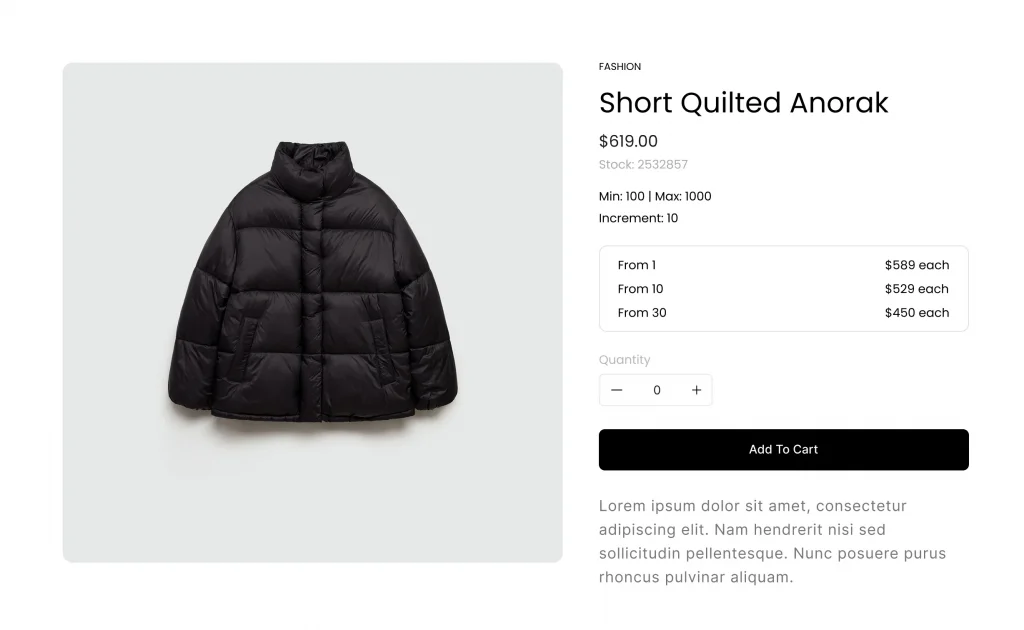
Tiered and volume discount rules
Volume pricing follows a simple principle: buy more, pay less per unit. A buyer ordering 100 units might pay $8 each, while someone ordering 10 pays $10.
This structure incentivizes larger B2B orders and rewards your best customers without manual negotiation.

Quantity limits, increments, and case packs
Minimum order quantities (MOQs) set the floor for how few units a buyer can purchase. Maximum limits cap orders. Increments force purchases in specific multiples—like case packs of 12.
Quantity rules protect your margins and enforce packaging constraints that matter in wholesale fulfillment.

Hidden wholesale pricing and login gating
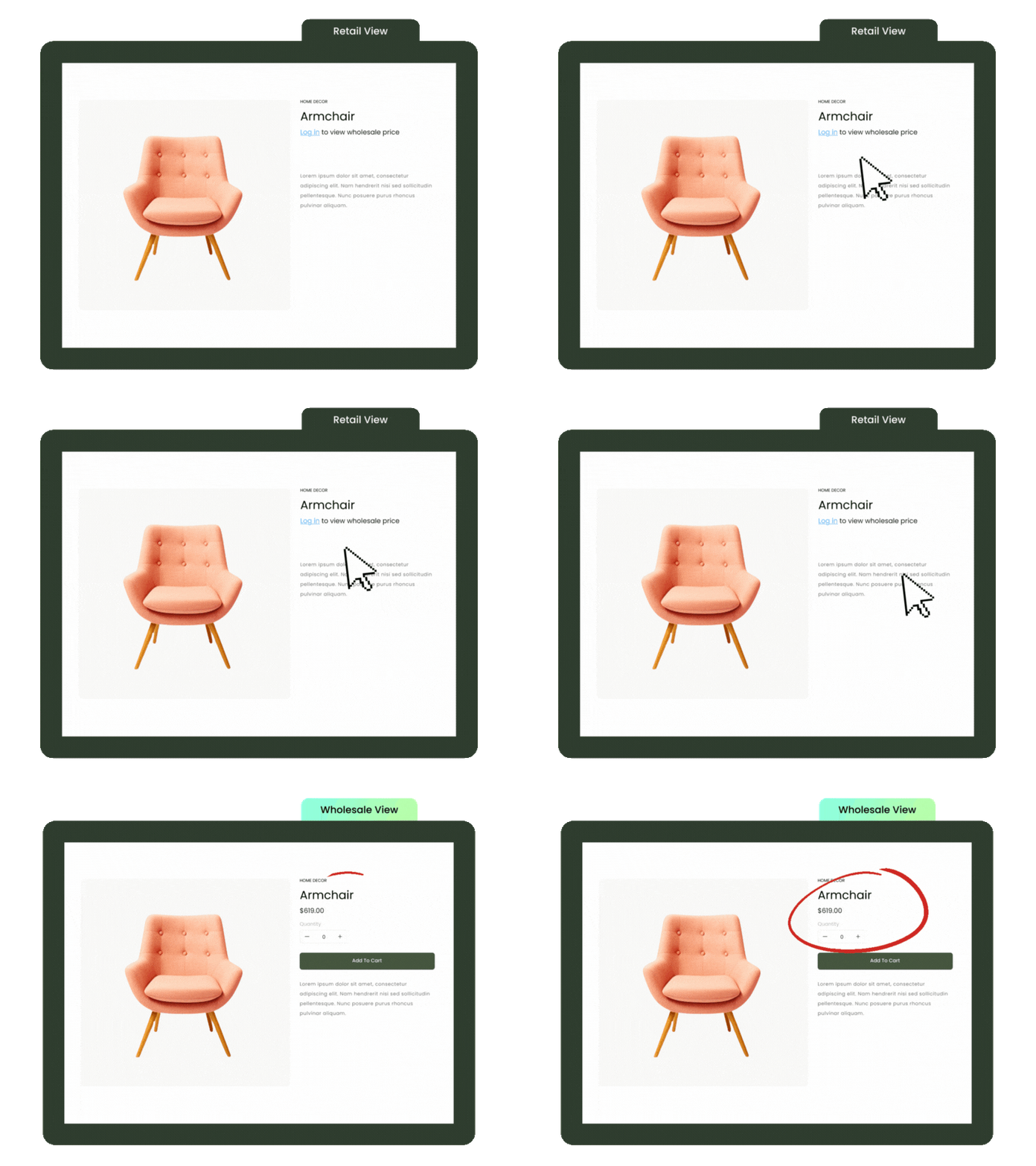
Most B2B merchants don’t want retail visitors—or competitors—seeing wholesale rates. Price hiding displays “Login for Pricing” or retail prices to guests, while logged-in B2B customers access Shopify with wholesale rates visible.
CSV import and export for bulk price lists
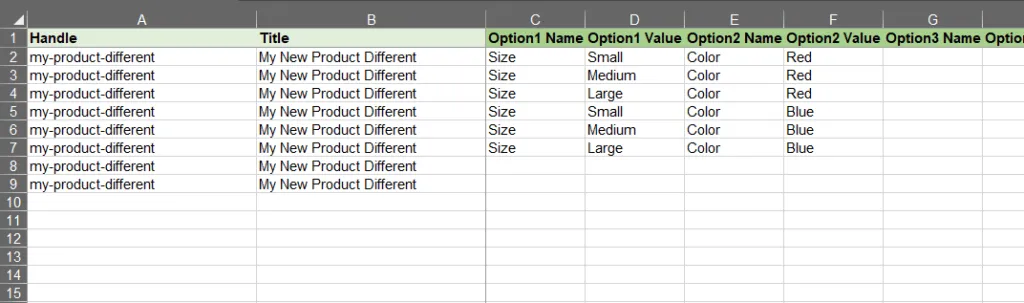
If you’re managing hundreds or thousands of SKUs, manual price entry isn’t realistic. CSV upload lets you update entire price lists in minutes, which becomes essential as your catalog grows.
ERP and CRM integration
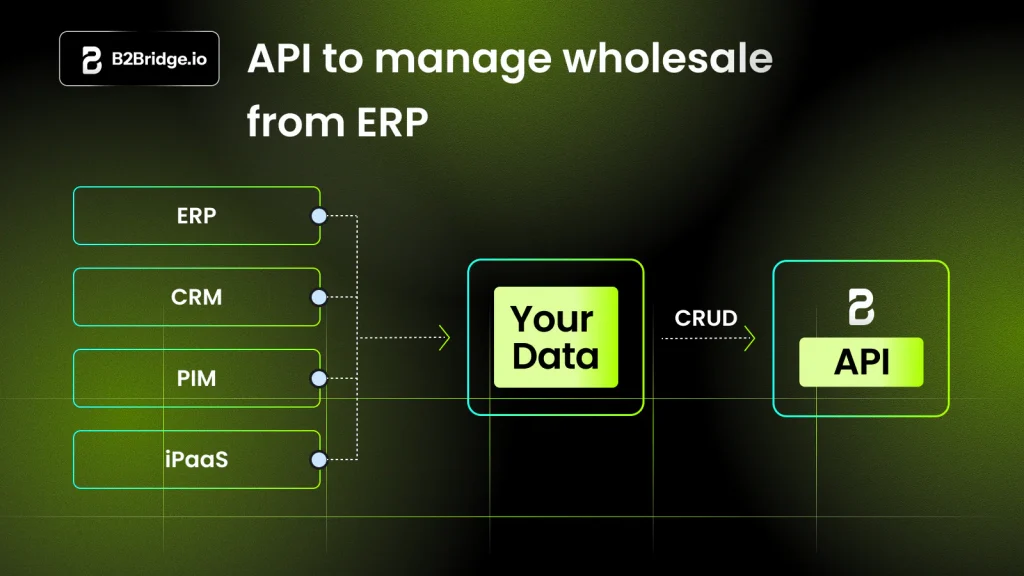
Your ERP (enterprise resource planning system) or CRM likely holds your master price lists and customer data. Apps that sync with systems like NetSuite, Zoho, or Odoo eliminate double-entry and keep pricing consistent across channels.
Multi-currency and tax-exempt support
Global B2B operations often require selling in multiple currencies and handling tax exemptions for business buyers. Look for apps that support both without workarounds.
Best Shopify Custom Pricing Apps for B2B Wholesale
Here’s a curated list of apps built for B2B pricing on Shopify. Each has different strengths depending on your operation’s complexity.
B2Bridge
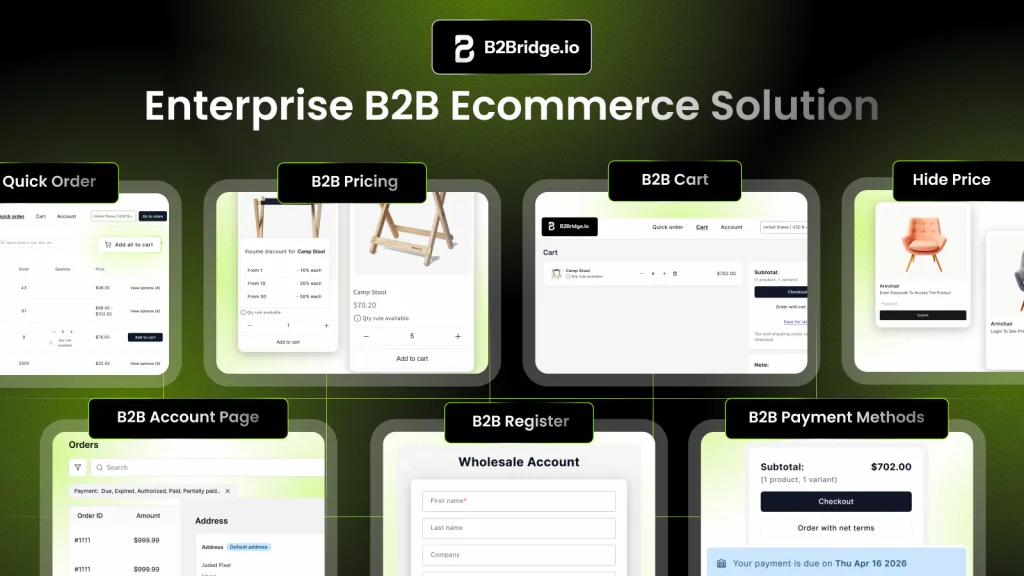
B2Bridge is an enterprise B2B pricing engine with deep ERP integration, built for manufacturers and distributors running complex wholesale operations.
Standout features: Unlimited price lists by customer or group, volume rules, quantity increments, and net payment terms (Net 30/60) with credit limits. Quote-to-order workflows and unified B2C + B2B store included.
Best for merchants who want ERP sync, flexible pricing logic, and a full B2B portal without Shopify Plus.
Uncap Quotes
Uncap Quotes is the full CPQ workflow built natively for Shopify B2B. It gives merchants account-specific pricing with automatic tiering and volume breaks, then lets an approved quote become a Shopify order in a single click.

SparkLayer
SparkLayer adds a B2B ordering layer alongside your existing Shopify store, with quick order forms and customer-specific pricing.
Best for brands wanting a self-service B2B portal with minimal disruption to their current setup.

Wholesale Gorilla
An established wholesale app offering tiered pricing, net terms, and wholesale registration workflows.
Best for mid-market wholesalers looking for proven quantity break and minimum order value features.

Bold Custom Pricing
Flexible discounting based on customer tags and product groups, with quantity breaks and CSV import/export.
Best for merchants who want tag-based pricing without a full B2B portal.

B2B Wholesale Hub
Simple wholesale pricing tied to customer tags, with percentage or fixed discounts by product or collection.
Best for smaller operations wanting straightforward tag-based discounts.

BSS B2B Solution
All-in-one B2B app with customer group pricing, quantity rules, and B2B registration.
Best for merchants seeking bundled pricing and access control in one app.

How to Add a Custom Price in Shopify
Setting up custom pricing follows a predictable sequence. Here’s how it typically works.
1. Choose a custom pricing app
Select an app based on your B2B requirements—volume tiers, ERP sync, hidden pricing—using the feature checklist above. Install it from the Shopify App Store.
2. Create customer groups and tags
Define your buyer segments: Gold Wholesale, Silver Wholesale, Distributor, Retail. Then assign tags to customer records in Shopify so the app knows who belongs where.
3. Build price lists by variant or collection
Create separate price lists for each customer group. Assign prices at the product, variant, or collection level depending on how granular you want to get.
4. Set volume tiers and quantity rules
Configure tiered pricing—buy 10+ for a lower unit price, buy 50+ for an even lower rate. Add MOQs or increments if your fulfillment requires them.
5. Test the B2B buyer experience
Log in as a tagged B2B customer and verify the correct prices display on product pages, in the cart, and at checkout. This step catches configuration errors before your buyers do.
How to Control Access to Shopify B2B Catalogs
Beyond pricing, you’ll often want to control who can see your wholesale products or rates in the first place.
- Login-only access: Require account login before showing B2B prices or products—guests see retail or nothing at all
- Customer group rules: Show different catalogs to different buyer segments, so distributors see distributor-only products
- Hide price vs. hide product: Choose whether to hide pricing only (showing “Login for Pricing”) or hide entire product listings from non-B2B visitors
Apps like B2Bridge B2B Lock let you gate specific content without locking your entire store. This matters if you’re running a hybrid B2C + B2B operation.
Common Patterns Across the Top Custom Pricing Apps
After reviewing the leading apps, a few patterns emerge consistently:
- Customer tagging as the foundation: Nearly every app uses Shopify customer tags to segment buyers and assign pricing
- Price list flexibility: Top apps support variant-level, collection-level, and customer-specific pricing—not just store-wide discounts
- Volume incentives: Tiered pricing and quantity breaks appear in most B2B-focused apps
- Access control integration: Leading apps bundle pricing with gating or lock features
- Bulk management: CSV import/export is standard for scaling price list management
If an app doesn’t support at least three of the features listed above, it’s probably not built for serious B2B operations.
Actionable Steps to Launch Custom Pricing for B2B
Ready to implement? Here’s a practical roadmap.
1. Map customer segments and pricing tiers
Document your buyer types and the pricing rules each segment receives. This becomes your configuration blueprint.
2. Centralize price lists in your ERP or CRM
If you use an ERP, make it the source of truth for pricing. Sync to Shopify via API to avoid manual updates. Learn more about custom pricing options without coding.
3. Gate wholesale pricing behind B2B registration
Set up a registration form to capture business credentials—tax IDs, resale certificates—before granting B2B access.
4. Add net terms and quote workflows
Offer Net 30 or Net 60 payment terms. Enable RFQ for large orders to match what B2B buyers expect.
5. Monitor conversion and refine rules
Track wholesale order volume and average order value. Adjust pricing tiers or MOQs based on what the data tells you.
How B2Bridge Powers Custom Pricing for B2B Shopify Stores
B2Bridge brings enterprise-grade custom pricing to Shopify without requiring Shopify Plus or a separate B2B storefront.
The B2B Pricing Engine supports unlimited price lists, volume rules, quantity increments, and customer-specific rates—all managed from your Shopify admin or synced from your ERP. Deep integrations with NetSuite, Zoho, Odoo, and custom ERPs keep pricing, customers, and orders aligned across systems.
Beyond pricing, B2Bridge includes B2B Lock for access control, B2B Registration for wholesale verification, and B2B Payment for net terms and RFQ workflows. The result is a complete B2B operation running inside your existing Shopify store.

FAQs About Shopify Custom Pricing
How do I add a custom price in Shopify?
Install a custom pricing app from the Shopify App Store and create customer groups with tags. Build price lists for each group and assign prices at the product or variant level.
Can I run Shopify custom pricing without Shopify Plus?
Yes. Shopify recently extended native B2B features to all plans, but third-party apps like B2Bridge remain essential for full custom pricing functionality—unlimited price lists, ERP sync, and advanced configurations—without requiring Shopify Plus.
How do I hide wholesale prices from retail shoppers on Shopify?
Use a B2B app with price-hiding or login-gating features. Price-hiding apps display wholesale prices only to logged-in customers assigned to B2B groups—everyone else sees retail prices or “Login for Pricing.”
Do Shopify custom pricing apps support net payment terms and RFQ?
Many B2B-focused apps include net terms (Net 30, Net 60) and request-for-quote workflows that let buyers submit orders for approval before payment.
How do Shopify custom pricing apps sync with ERP systems?
Enterprise-grade apps offer API integrations or native connectors to ERPs like NetSuite, Zoho, and Odoo. Price lists and customer data sync automatically, eliminating manual updates.

As a Product Marketing Executive at B2Bridge, I focus on the Enterprise B2B Ecommerce domain. I leverage my understanding of product and user psychology to deliver customer-centric content that addresses business challenges and fuels growth.