Shopify B2B is Shopify’s built-in wholesale toolkit. It gives you company accounts, B2B catalogs with their own prices, quantity rules, net payment terms and a self-serve buyer portal, all inside the store you already use for retail. Since April 2026 it’s included on every paid plan, with a three-catalog limit below Shopify Plus.
That change removed the main reason wholesale brands skipped Shopify or budgeted for Plus. It also left a narrower question for every merchant: what does native B2B handle on your plan, and where does it stop?
This guide answers that question feature by feature. You’ll see how each native tool works day to day and where each plan draws the line. If you’re starting from zero, the setup overview and the topic guides near the end show you the next step.
What Are Shopify B2B Features?
Shopify B2B features are native wholesale tools built into the Shopify admin. They let you manage company accounts, custom catalog pricing, net payment terms, and B2B order rules from the same store you use for retail customers. Since April 2026, these tools are available on Basic, Grow, and Advanced plans as well as Shopify Plus.
Before April 2026, these capabilities were locked behind Shopify Plus. Shopify’s April 2026 announcement confirmed that foundational B2B features are now available on Basic, Grow, and Advanced plans at no extra cost. Shopify’s decision to extend foundational B2B features to these merchants is a fundamental shift in how the platform supports wholesale operations.
Here’s what the native Shopify B2B stack covers at a high level:
- Company profiles: Dedicated accounts for wholesale buyers with multiple locations and authorized users per company
- Custom catalogs: Product lists with B2B-specific pricing, assigned to B2B markets on every plan and directly to companies on Plus
- Volume pricing and quantity rules: Tiered pricing, minimum order quantities, and order increments
- Net payment terms: Deferred payment options like Net 30, Net 60, and Net 90
- B2B checkout and payments: Vaulted credit cards on every plan, plus ACH payments for US merchants
The mechanics work like this: you create a company profile for each wholesale buyer, build a catalog with the prices that buyer should see, and assign it. Below Plus, the catalog goes to a B2B market that holds the company. On Plus, you can assign it to the company directly. When that buyer logs in, they see their negotiated prices automatically (no discount codes, no manual calculations).
>> Check out: 15 Shopify B2B Examples: Real Wholesale Stores and What They Get Right
Key Shopify B2B Features Explained
Company Accounts and Locations
Company accounts are the foundation of Shopify’s B2B system. Each company profile groups together one or more wholesale buyers (individual Shopify customer accounts) under a single entity, with settings that apply across all authorized users.
Each company can have multiple locations, which is useful for distributors and resellers with several shipping addresses or regional offices. You can assign different payment terms, tax exemptions, and catalog access per location, which gives you granular control over large wholesale accounts.
Standout capabilities:
- Multiple buyer logins per company account
- Per-location payment terms and tax settings
- Self-serve buyer portal for order history and reorders
- Sales staff permissions that assign reps to specific companies

Custom Catalogs and Pricing
Shopify’s catalog system lets you define which products a B2B buyer can see and at what price. You can configure catalog prices as a fixed amount, a percentage off the retail price, or a completely custom price per variant.
This is a clean approach compared to using discount codes or customer tags to manage wholesale pricing. Prices are set at the catalog level and apply automatically when the buyer logs in and adds items to cart.
Price types available:
- Fixed price per variant
- Percentage off original retail price
- Volume/quantity-based tiered pricing (e.g., different unit price for 1–9 units vs. 10–49 units vs. 50+)

Volume Pricing and Quantity Rules
Shopify B2B supports tiered pricing at the variant level. The displayed price changes dynamically as a buyer adjusts their order quantity. This gives wholesale buyers the transparency they need to calculate resale margins before placing an order.
Quantity rules let you enforce order minimums, maximums, and increments. For example, you can require a minimum order of 12 units, cap orders at 500 units, and restrict purchasing to multiples of 12 (case packs). These rules apply per variant or across the full catalog.
Quantity rule options:
- Minimum order quantity (MOQ)
- Maximum order quantity
- Order increments (e.g., buy in multiples of 6)
- Variant-level or catalog-level application

Net Payment Terms
Net payment terms allow wholesale buyers to complete checkout without paying immediately. Shopify supports Net 15, Net 30, Net 60, and Net 90 terms, with each term assigned at the company or location level.
When a buyer checks out with net terms, the order is created in Shopify with a “payment due” date set to the agreed term. You can track outstanding balances and send payment reminders from within the Shopify admin. On Shopify Plus, dynamic payment terms via Shopify Functions allow more complex logic. For example, you can automatically assign Net 60 only to buyers with a clean payment history.

B2B Checkout Experience
Shopify’s B2B checkout is separate from the standard retail checkout and surfaces only the payment options assigned to each buyer’s company. Buyers with net terms see the option to pay later; buyers without it see standard payment methods only.
Vaulted credit cards allow returning wholesale buyers to save their card for future orders, reducing checkout friction on repeat purchases. US merchants can also accept ACH (Automated Clearing House) payments on every plan, a lower-cost option for high-value wholesale orders.

B2B Buyer Portal
Logged-in wholesale buyers get access to a self-service account portal where they can view their full order history, track shipments, and reorder from previous purchases without contacting your sales team. This reduces the load on your operations and support staff, which is particularly useful for distributors and resellers who place frequent repeat orders.
Tax Exemption
You can enable tax exemption per company, which removes sales tax from orders placed by that company. When enabled, the exemption applies automatically across all authorized buyers in that company and syncs to each customer’s Shopify admin profile.
This is essential for B2B operations. Most wholesale buyers do not pay sales tax on purchases for resale and will expect your checkout to reflect their tax-exempt status.
Shopify B2B Features by Plan
As of April 2026, here’s how native Shopify B2B features are distributed across plan tiers:
| Feature | Basic / Grow / Advanced | Shopify Plus |
|---|---|---|
| Company profiles | Yes | Yes |
| Custom catalogs | Yes (up to 3) | Yes (Unlimited) |
| Volume / tiered pricing | Yes | Yes |
| Quantity rules (MOQ, increments) | Yes | Yes |
| Net payment terms (Net 30/60/90) | Yes | Yes |
| Vaulted credit cards | Yes | Yes |
| Tax exemption | Yes | Yes |
| B2B buyer portal | Yes | Yes |
| Catalog assigned via Shopify Markets | Yes | Yes |
| Direct catalog assignment to companies | No | Yes |
| Unlimited catalogs | No | Yes |
| Partial payments and deposits | No | Yes |
| ACH payments | Yes (US only) | Yes (US only) |
| B2B checkout customization | Limited | Full extensibility |
| Quick order list | Yes | Yes |
| Contextual checkout and storefront (Shopify Markets) | Advanced only | Yes |
| Payment requests per fulfillment | No | Yes |
| API rate limits | Standard | Up to 10x higher |
The three-catalog limit on non-Plus plans is the first ceiling most growing wholesale operations hit. If you sell to multiple buyer tiers (distributor, reseller, key account) or multiple regions, three catalogs runs out fast. Shopify Plus starts at $2,300/month on a 3-year term, or $2,500/month on a 1-year term, according to Shopify’s pricing page.
>> See more: 7 Shopify Plus B2B Alternatives for Wholesalers in 2026
Is Shopify Good for B2B?
Yes, for most wholesale brands that already sell on Shopify. Native B2B covers company accounts, catalogs with custom pricing, quantity rules, net terms and a buyer portal on every paid plan. A merchant with a handful of trade accounts can launch wholesale without extra software or a second store.
The fit depends on your pricing and sales process. Shopify handles B2B well when:
- you run three or fewer price levels across all B2B markets
- buyers order online on their own, from a catalog you publish
- retail and wholesale share the same products and inventory
- buyers pay by card, ACH or standard net terms without credit limits
The fit gets weaker once you need customer-specific pricing for many accounts, negotiated quotes before an order, a sales team ordering for buyers, or pricing that your ERP owns. On non-Plus plans, each of those sits outside the native toolkit. Shopify Plus lifts the catalog cap from about $2,300 a month, while a B2B app covers those gaps on your current plan. The next section shows where each limit appears.
Where Native Shopify B2B Features Fall Short
Shopify’s native B2B stack handles the basics well. But several gaps become significant once you move past simple wholesale setups.
The Three-Catalog Ceiling
The most immediate constraint is the catalog limit on non-Plus plans. Three catalogs must cover all your B2B pricing scenarios, across every market, tier, and customer segment. A merchant selling to Bronze, Silver, and Gold distributor tiers has used all three catalogs before they’ve touched international pricing.
The only native path past this limit is Shopify Plus. For merchants who don’t need the full Plus feature set, that’s a steep jump for what amounts to catalog expansion.
No Request for Quote (RFQ) Workflow
Shopify has no built-in RFQ system. A Request for Quote (RFQ) workflow lets wholesale buyers submit a quote request for custom pricing and lets you review, negotiate, and convert that quote into an order. For manufacturers and distributors with negotiated contract pricing, the absence of a native quoting layer means building one out of manual emails or patching together third-party tools.
No B2B Registration and Approval Workflow
Shopify doesn’t provide a native form for prospective wholesale buyers to apply for a B2B account. You can create a company manually in the admin, but there’s no built-in application form, approval queue, or automated onboarding flow that assigns buyers to the right pricing tier on approval.
For brands that actively recruit new wholesale accounts, this forces a manual process or requires a separate app.
No Wholesale-Specific Storefront Lock
Shopify doesn’t include native tools to hide prices or product availability from non-logged-in visitors. If you want to show retail visitors a “log in to see wholesale pricing” message, or block access to certain collections entirely, you need a third-party solution.
Limited ERP and CRM Integration Depth
Shopify’s API rate limits on standard plans restrict how frequently external systems can sync data. For merchants running NetSuite, Zoho, Odoo, or a custom ERP, syncing large catalogs and real-time inventory can hit rate limits during peak periods. Shopify Plus raises those Admin API limits by up to 10x, according to Shopify’s developer changelog, which resolves this at higher cost.
Quick Order Stops at the Product Page
Shopify includes a quick order list on every plan, so buyers can enter quantities for all variants of one product at once. There’s no single page to search the whole catalog by SKU, paste a list or upload a CSV. Buyers reordering dozens of products still add them one product at a time.
Sales Staff Tools Stop at Draft Orders
Shopify lets you give staff sales permissions and assign them to companies on every plan. Those reps can create draft orders and send invoices for their accounts. What’s missing is a rep-facing view: reps work in the admin, not the storefront at each buyer’s prices, and Shopify tracks no commission per rep.
How to Fill the Gaps in Shopify’s Native B2B Stack
The gaps above don’t mean Shopify is the wrong platform for wholesale. They mean the native tools are a starting point that complex B2B operations outgrow. Here’s how to address each gap:
Unlimited Price Lists and Customer Segmentation
Every B2B option on Shopify charges you more as your wholesale channel grows. Shopify native stops you at three active catalogs. SparkLayer prices by order volume, so a strong month raises your bill. Shopify Plus lifts the caps and costs around $2,300 a month to do it.
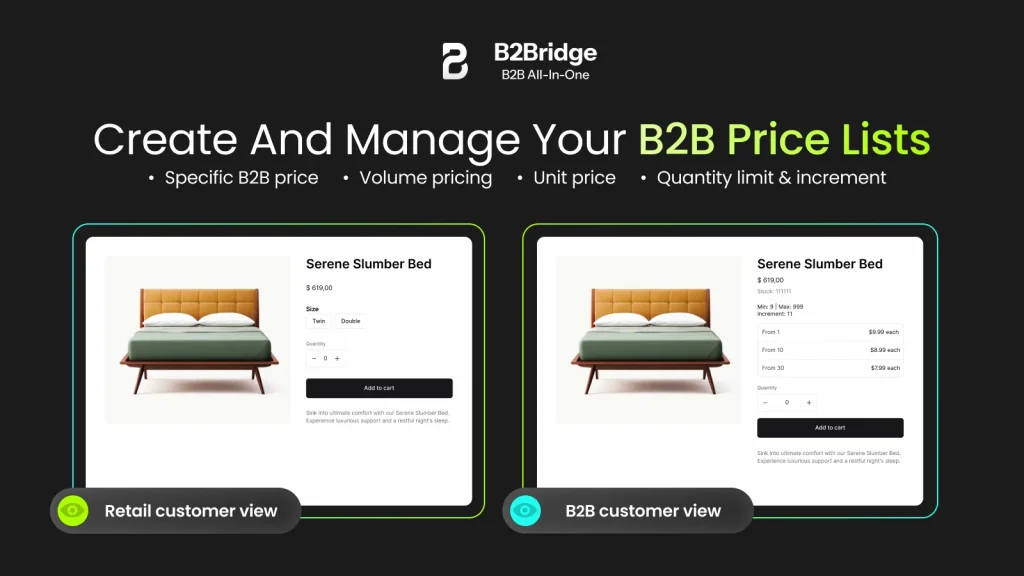
B2Bridge manages pricing outside Shopify’s native catalog system, which removes the cap on price lists and customer groups alike, with no limit on B2B order volume either. You assign price lists to customer groups using Shopify customer tags and set different pricing rules per segment, with no Shopify Markets setup required.
Trailer Valet came to B2Bridge for exactly this, running price lists alongside flexible net terms on their existing Shopify store.
| Solution | What Happens as You Scale | Price |
|---|---|---|
| Shopify B2B native (non-Plus) | Capped at 3 active catalogs | Free with your plan |
| SparkLayer | Priced by order volume | Tiered by orders |
| Shopify Plus | No caps | About $2,300/mo |
| B2Bridge | No cap on price lists, orders, or customer groups | Flat $99 to $299/mo |
RFQ and Quote-to-Order Workflow
A native RFQ module replaces “Add to Cart” with “Request a Quote” for designated products or buyer segments. The merchant reviews quote requests, negotiates pricing, and converts accepted quotes directly into Shopify draft orders. This creates a traceable, auditable quoting workflow inside your existing Shopify admin.

B2B Registration and Buyer Onboarding
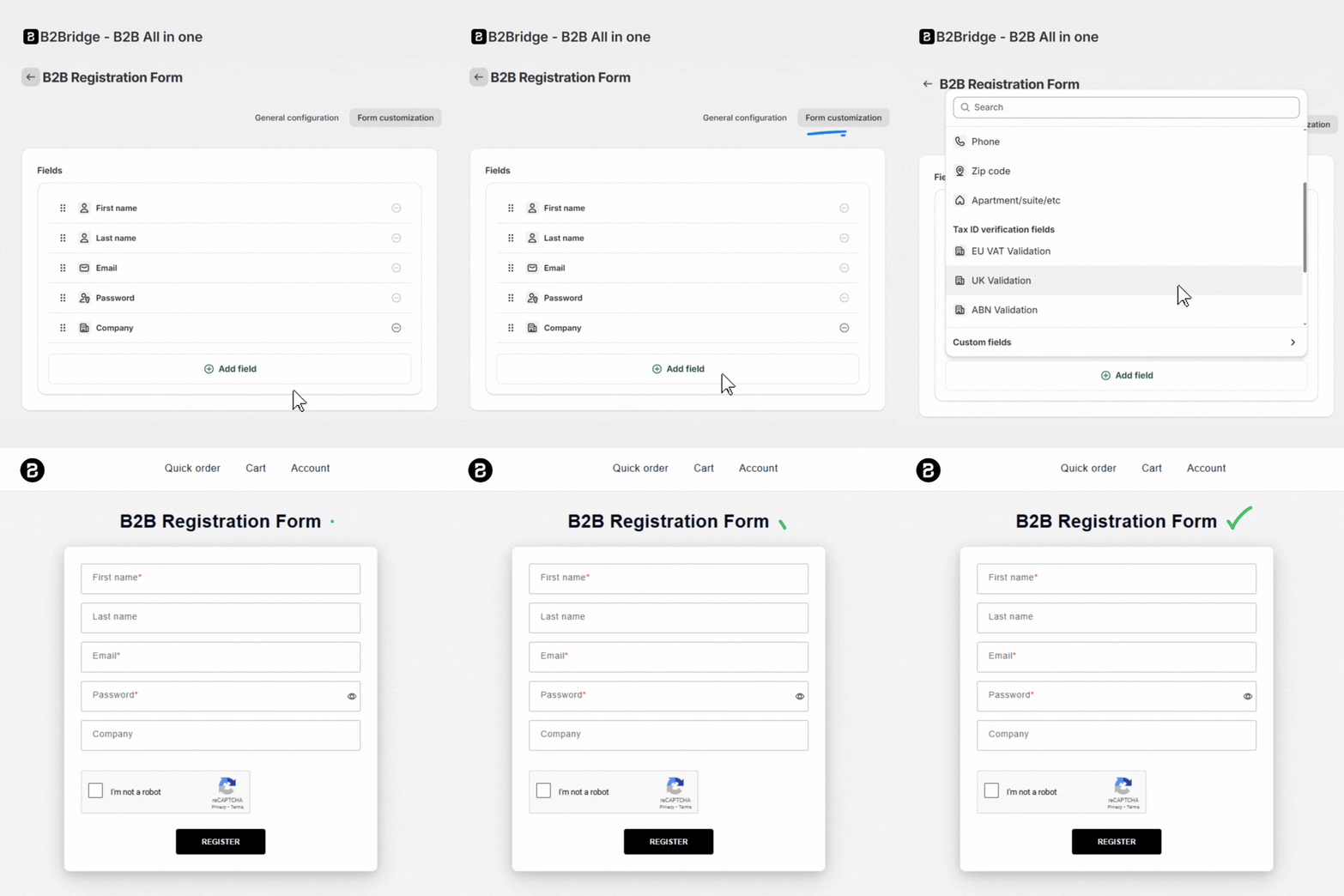
A customizable B2B registration form collects business credentials (company name, tax ID, resale certificate, order volume) and routes applications into an approval queue. On approval, the buyer is automatically tagged, assigned to the correct price list, and given access to wholesale pricing. This replaces a manual onboarding process with an automated, self-serve workflow.
Sales Rep Portal and Order-on-Behalf
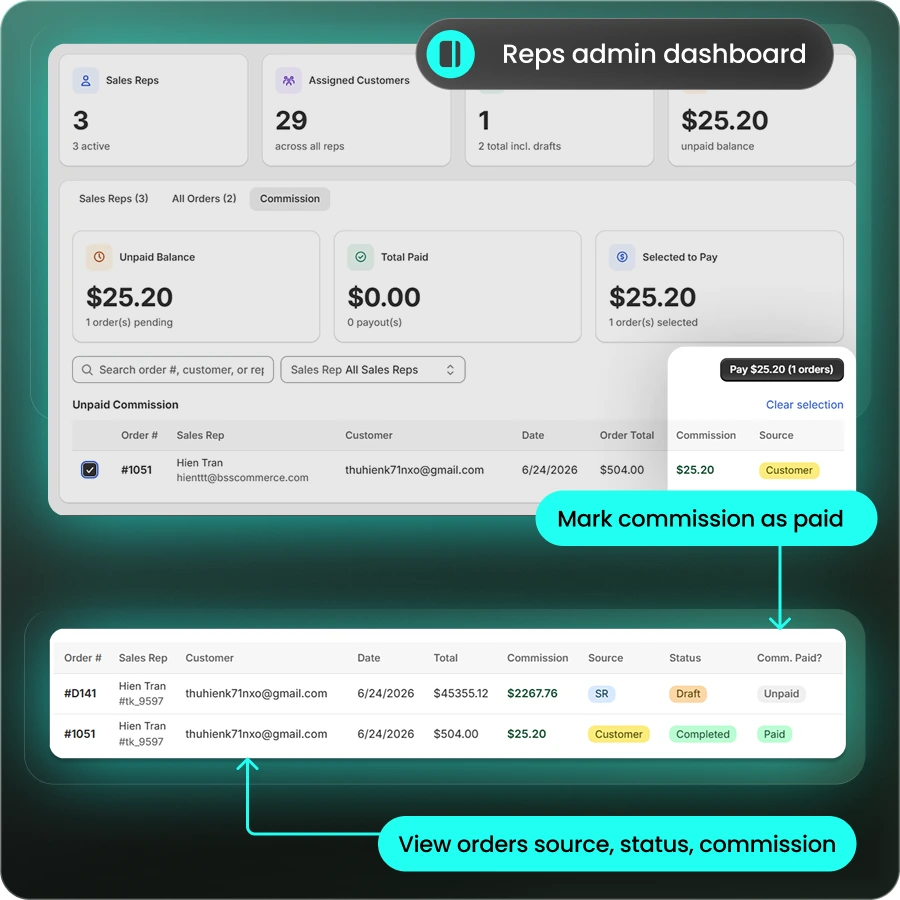
A sales rep portal gives each rep a login where they browse the catalog at the customer’s assigned prices, build a cart for that customer, and submit the order straight into Shopify. The order lands in your admin attributed to the buyer and to the rep who placed it.
Commission tracking runs on top of that attribution, so you set a rate per rep and report on it without exporting anything. B2Bridge includes the sales rep portal from the Growth plan upward.
Price Gating and Storefront Lock
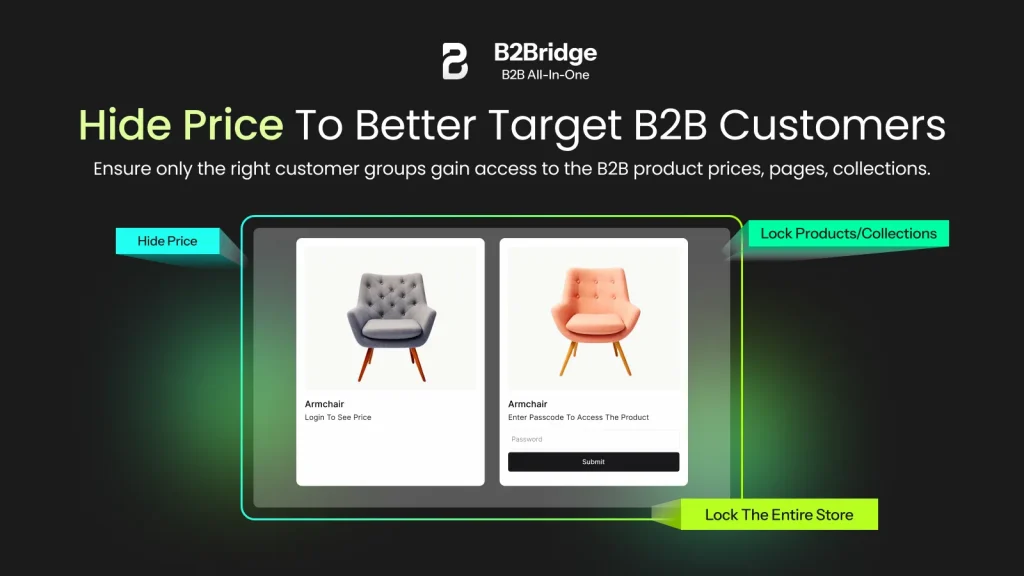
A B2B lock tool hides wholesale prices and restricts product or collection visibility until the buyer logs in. Locked pages can display a custom “Register for wholesale access” message, turning your price-gating into a lead generation mechanism. Midan, a premium LED lighting distributor, uses this to restrict their store to verified wholesale buyers.
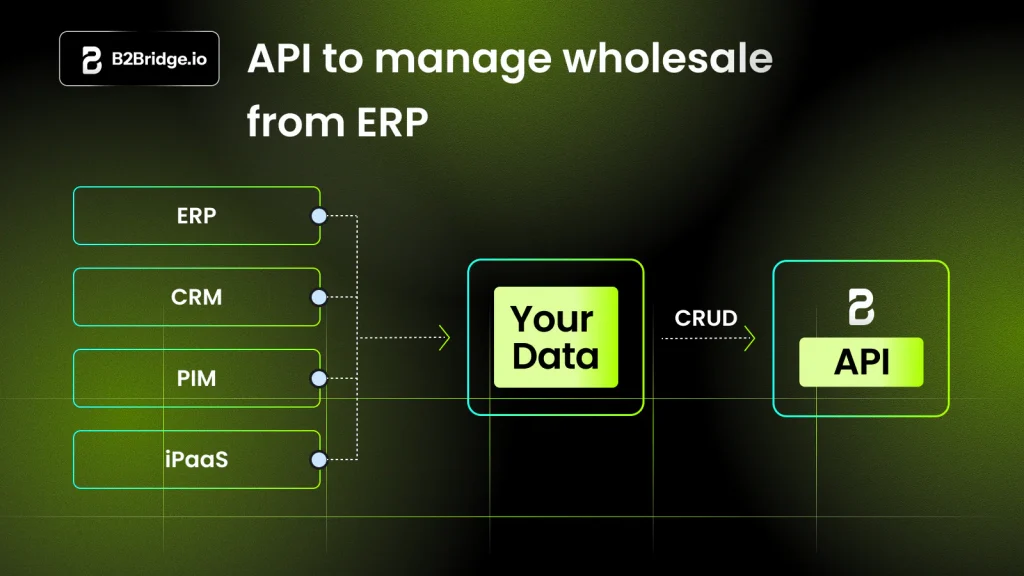
ERP Sync and Public API
For merchants running pricing and customer data in an ERP, a B2B app with a Public API allows programmatic management of price lists and customer groups, syncing changes from NetSuite, Zoho, Odoo, or a custom system directly into Shopify without manual re-entry. Brooklyn Bicycle runs this setup, syncing their NetSuite catalog into Shopify without re-keying prices by hand.
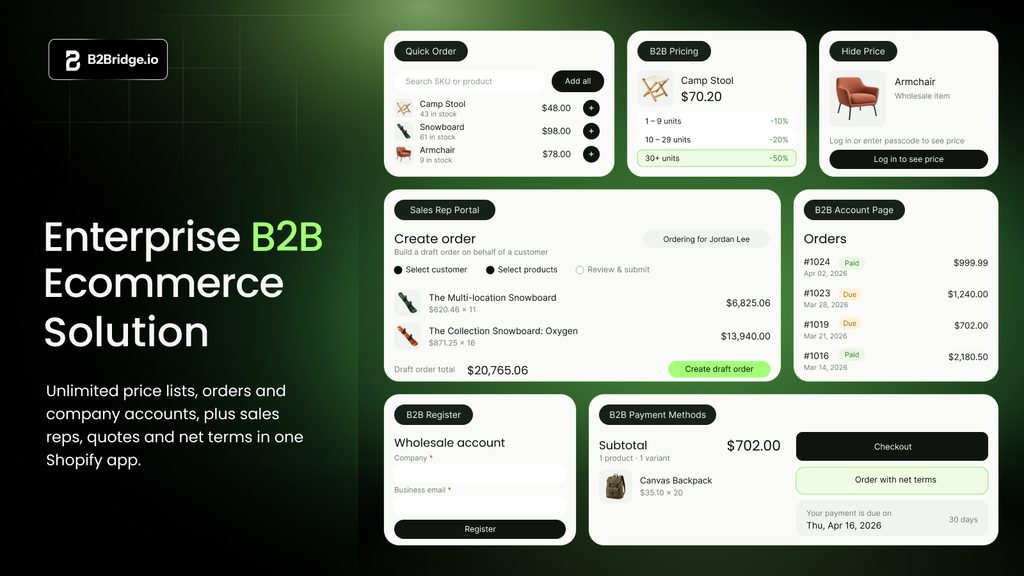
B2Bridge covers every gap above in one app. You get unlimited price lists, RFQ and quote-to-order, B2B registration with an approval queue, storefront lock, a quick order page, the sales rep portal, and a Public API for ERP sync.
What changes as you grow is the part that matters. Shopify native stops at three catalogs, SparkLayer bills by order volume, and Plus runs about $2,300 a month. B2Bridge stays flat at $99 to $299 whether you run three price lists or three hundred.
How to Set Up Shopify B2B
Where do you start once you’ve decided native B2B fits your wholesale program? Setting up Shopify B2B takes four steps in the admin, and each one depends on the step before it. The step-by-step Shopify B2B setup walkthrough covers every screen. Here’s the short version.
1. Move to New Shopify Markets and Create a B2B Market
On Basic, Grow and Advanced, B2B catalogs only work with the new Shopify Markets. Switch first, then create a B2B market for each region or buyer group you price differently. The three-catalog limit applies across all your B2B markets combined.
2. Create Companies, Locations and Buyers
Add each wholesale customer as a company. Then add its locations and the people who order for it. Payment terms, tax exemptions and catalog access attach per location, so a distributor with five warehouses becomes one company with five locations.
3. Build Catalogs With Prices and Quantity Rules
Create one catalog per pricing level. Set prices as a percentage off retail or a fixed price per variant, then add minimums, increments and quantity price breaks. Assign the catalog to a B2B market, or directly to a company if you’re on Plus.
4. Set Payment Terms and Test as a Buyer
Assign net terms, vaulted cards or ACH per location. You can also have checkout create a draft order for your approval. Then log in as a test buyer for each catalog and confirm prices, quantity rules and payment options before inviting real accounts.
Shopify B2B Guides by Topic
Each part of Shopify B2B has its own deep-dive guide. Use the table to jump to the one that matches the decision in front of you.
| Topic | Guide | Read it when |
|---|---|---|
| Pricing and cost | Shopify B2B pricing and cost per plan | You’re budgeting or comparing plans |
| Buyer portal | How a Shopify B2B portal works | You’re planning the buyer login and ordering experience |
| Setup | Shopify B2B setup, step by step | You’re configuring B2B for the first time |
| Launch | Shopify B2B launch checklist | You’re about to invite your first buyers |
| Non-Plus plans | Shopify B2B without Plus | You’re on Basic, Grow or Advanced |
| Plus upgrade | Shopify B2B vs Shopify Plus | You’re weighing whether Plus is worth it |
| Limits | Shopify B2B and wholesale limitations | You’ve hit a native limit and need a workaround |
| Hybrid stores | B2B and B2C in one Shopify store | Retail and wholesale share one catalog |
| Price lists | Shopify B2B price lists | You need more price levels than three catalogs allow |
| Payments | Shopify B2B payment methods | You’re choosing how wholesale buyers pay |
| Net terms | Shopify net terms | You’re offering Net 30, 60 or 90 |
| Examples | Shopify B2B examples | You want to see how real wholesale stores run |
| Apps | Best Shopify B2B apps | Native B2B no longer covers your workflow |
FAQs about Shopify B2B Features
Do I need Shopify Plus to use B2B features?
No. Since April 2026, company profiles, up to three catalogs, volume pricing, quantity rules, and net terms are free on Basic, Grow, and Advanced. Plus adds unlimited catalogs and higher API limits.
What is the difference between a Shopify B2B catalog and a price list?
A Shopify catalog is a product selection with custom pricing assigned to one company or Market. A price list in B2Bridge does the same job with no cap on how many you create.
Can I run B2B and B2C from the same Shopify store?
Yes. Shopify’s B2B system is designed to work alongside a standard retail storefront. Wholesale buyers log in and see their assigned catalog prices; retail visitors see standard prices. With an access control app, you can also hide B2B prices from non-logged-in visitors entirely, keeping your wholesale pricing confidential.
Does Shopify B2B support net payment terms on all plans?
Yes. Net payment terms (Net 15, Net 30, Net 60, Net 90) are available on all paid Shopify plans as of April 2026. You assign terms at the company or company-location level. Shopify Plus adds more advanced term logic through Shopify Functions, such as conditionally assigning terms based on buyer history.
What happens when a wholesale buyer exceeds their minimum order quantity?
Shopify enforces quantity rules at checkout. If a buyer tries to complete a purchase below the configured minimum order quantity (MOQ), the checkout will block the transaction and prompt the buyer to adjust their order. These rules apply per variant or across the full catalog, depending on how you configure them.
Can I sync Shopify B2B pricing with my ERP system?
Shopify’s standard API supports ERP syncing, but rate limits on non-Plus plans can restrict how frequently large catalogs update. For high-volume ERP integration (syncing thousands of SKUs or real-time customer data from systems like NetSuite, Zoho, or Odoo) a B2B app with a dedicated Public API is the more reliable and scalable path.
How much does Shopify B2B cost?
Nothing beyond your Shopify plan. Native B2B is included on Basic, Grow and Advanced since April 2026, capped at three active catalogs below Plus. See the full Shopify B2B pricing breakdown.
Is Shopify good for B2B?
Yes, for most wholesale brands. Shopify covers company accounts, three catalogs, volume pricing, net terms, and a buyer portal. Brands running more pricing tiers, quotes, or a sales team need an app like B2Bridge on top.
Can sales reps place orders for customers on Shopify?
Partly. Staff with sales permissions can create draft orders for assigned companies on every plan. There’s no rep-facing storefront or commission tracking, which B2Bridge’s Sales Rep Portal adds from the Growth plan.
Run a Complete B2B Operation Inside Shopify
Shopify’s native B2B features give every merchant a real foundation. Company accounts, three custom catalogs, volume pricing, net terms, and a self-serve buyer portal now come built in at no extra cost, which is a meaningful upgrade for anyone starting a wholesale channel.
Growth is where that foundation runs out. More buyer tiers mean more catalogs than Shopify allows. Negotiated pricing needs a quoting workflow. New wholesale accounts need an application and approval process. A sales team needs its own ordering view and commission tracking. Native Shopify covers none of those fully on non-Plus plans.
B2Bridge is built for that stage. You get unlimited price lists, orders, and customer groups at a flat price, with RFQ, registration, storefront lock, quick order, the sales rep portal, and ERP sync running in one app. Your bill stays the same as your wholesale channel grows.
Book A Demo: see how B2Bridge extends Shopify’s native B2B into a complete wholesale operation

As a Product Marketing Executive at B2Bridge, I focus on the Enterprise B2B Ecommerce domain. I leverage my understanding of product and user psychology to deliver customer-centric content that addresses business challenges and fuels growth.


