Choosing between Shopify Plus and commercetools often comes down to a single question: do you want a platform that works out of the box, or one that lets you build everything from scratch? Both are enterprise-grade, but they solve fundamentally different problems.
This comparison breaks down architecture, cost, implementation timelines, and B2B capabilities so you can match the right platform to how your business actually operates.
Shopify Plus vs Commercetools at a Glance
Shopify Plus is an all-in-one enterprise platform built for rapid deployment and high-volume B2C and B2B commerce. Commercetools takes a different approach—it’s an API-first, composable platform designed for maximum flexibility and complex custom architectures.
The core difference comes down to how each platform is built. Shopify Plus bundles hosting, checkout, payments, and admin into one managed package. Commercetools provides backend commerce APIs only, which means you build or integrate your own frontend.
| Criteria | Shopify Plus | Commercetools |
|---|---|---|
| Architecture | Monolithic with extensibility options | API-first headless (MACH) |
| Best For | Fast-scaling brands, hybrid B2B/B2C | Complex multi-brand enterprises |
| Time to Launch | 10–20 weeks typical | 6–12 months typical |
| Developer Needs | Lean teams, minimal dev required | Dedicated engineering capacity |
| B2B Capabilities | Native features + app ecosystem | Custom implementation required |
Two terms worth knowing here: headless commerce, a market projected to reach $7.16 billion by 2032, separates the frontend presentation layer from the backend commerce engine. Composable commerce goes further—you select best-of-breed services for each function (payments, search, inventory) and connect them via APIs.
What Is Shopify Plus
Shopify Plus is Shopify’s enterprise tier, built for high-growth merchants who want powerful commerce capabilities without building from scratch. As a SaaS platform, Shopify handles hosting, security, and infrastructure while you focus on selling.
The architecture is monolithic-but-extensible. You get a pre-built storefront, checkout, and admin panel out of the box. At the same time, you can customize through Shopify Functions, Checkout Extensibility, and the Hydrogen framework for headless builds.
Standout features:
- Shopify Flow: Automates repetitive tasks like tagging customers and triggering fulfillment workflows
- Checkout Extensibility: Customizes checkout with apps and custom logic without touching core code
- Shopify Markets: Manages multi-currency, multi-language, and regional selling from one admin
>> You may also like: Overview of Shopify Plus B2B Features

What Is Commercetools
Commercetools is a cloud-native, API-first headless commerce platform built on MACH principles: Microservices, API-first, Cloud-native, and Headless. Unlike Shopify Plus, commercetools doesn’t include a storefront—you get backend commerce APIs and build your own frontend.
This approach gives you complete control over every touchpoint. You can power websites, mobile apps, IoT devices, or in-store kiosks from the same commerce backend. The trade-off is that you’re responsible for building and maintaining significantly more infrastructure.
Standout features:
- MACH architecture: Each commerce function operates as an independent microservice
- Composable modules: Select and swap individual components without platform lock-in
- Multi-tenant cloud infrastructure: Auto-scaling and global distribution handled at the platform level

Key Differences Between Shopify Plus and Commercetools

Architecture and Approach
Shopify Plus delivers a complete commerce stack with optional headless capabilities. You can use the default Liquid-based storefront or go headless with Hydrogen and the Storefront API.
Commercetools is headless by default. There’s no frontend included, so you’ll integrate with a CMS, build a custom React or Next.js frontend, or use a digital experience platform.
- Shopify Plus: Pre-built storefront with optional headless via Hydrogen
- Commercetools: No frontend—requires custom build or CMS integration
Scalability and Performance
Both platforms handle enterprise-scale traffic, though the approach differs. Shopify Plus uses managed infrastructure that automatically scales during traffic spikes. You don’t manage servers.
Commercetools relies on cloud-native autoscaling across microservices. Performance is strong, but you’re also managing more moving parts and dependencies.
Customization and Flexibility
Shopify Plus offers deep customization through its theme ecosystem, app marketplace, and extensibility APIs. For most commerce use cases, this covers what you’ll encounter.
Commercetools provides unlimited customization because you’re building everything yourself. This matters when your business model doesn’t fit standard commerce patterns—think complex subscription logic, multi-sided marketplaces, or IoT-driven ordering.
Integration and Ecosystem
Shopify Plus has a massive app marketplace with thousands of pre-built integrations. Connecting your ERP, CRM, or marketing tools often takes hours rather than weeks.
Commercetools requires custom integrations via APIs. You’ll typically use middleware or an iPaaS (integration platform as a service) to connect systems.
- Shopify Plus: App store, pre-built connectors, Shopify Flow automations
- Commercetools: Custom integrations via APIs, requires middleware or iPaaS
Internationalization and Multichannel Support
Shopify Markets makes multi-region selling straightforward. You manage currencies, languages, duties, and local payment methods from one admin.
Commercetools offers native multi-store and channel management through APIs. You get more granular control, but you’re building the orchestration layer yourself.
Internal Team and Developer Requirements
This factor often decides the platform choice. Shopify Plus can be managed by lean teams with minimal dedicated development resources. Commercetools requires ongoing engineering capacity for both initial build and continuous maintenance.
| Requirement | Shopify Plus | Commercetools |
|---|---|---|
| In-house developers | Optional for most operations | Required, often multiple |
| Agency dependency | Lower, apps handle most needs | Higher, custom work ongoing |
| Ongoing maintenance | Minimal, platform-managed | Significant, you own the stack |
Total Cost of Ownership Compared
Total cost of ownership (TCO) includes platform fees, implementation, integrations, hosting, and ongoing development. The two platforms differ significantly here.
Shopify Plus has predictable subscription pricing. You know your monthly costs, and most functionality comes included or via apps. Implementation is faster, which means lower upfront investment.
Commercetools pricing varies based on GMV and API calls. On top of platform fees, you’re paying for custom frontend development, integration work, and ongoing engineering. For enterprises with existing dev teams, this investment can pay off—but the total is substantially higher than Shopify Plus.
Key takeaway: Shopify Plus typically delivers lower TCO for most commerce scenarios. Commercetools makes sense when your requirements genuinely demand custom architecture and you have the team to support it.
Time to Market and Implementation Effort
A Shopify Plus store can launch in 10–20 weeks. A commercetools implementation typically takes 6–12 months.
The gap comes down to what’s included versus what you build. Shopify Plus gives you themes, checkout, and integrations ready to configure. Commercetools gives you APIs, and everything else is your responsibility.
- Shopify Plus timeline drivers: Pre-built themes, native checkout, app integrations
- Commercetools timeline drivers: Frontend build, API integrations, QA cycles, middleware setup
When Shopify Plus Is the Better Choice
Shopify Plus works well in scenarios where speed, simplicity, and ecosystem matter more than unlimited customization.
- Fast-growing DTC brands: Scale without rebuilding infrastructure every quarter
- Merchants prioritizing speed to market: Launch in weeks, then iterate based on real data
- Teams without dedicated engineering resources: Manage your store with marketing and ops staff
- Businesses running hybrid B2B and B2C operations: Apps like B2Bridge extend enterprise B2B capabilities without custom builds

When Commercetools Is the Better Choice
Commercetools fits when your requirements exceed what a managed platform can deliver.
- Enterprises requiring fully custom frontends: IoT ordering, VR commerce, or highly specialized UX
- Organizations with complex multi-brand or multi-region architectures: Dozens of storefronts, each with unique logic
- Companies with large in-house engineering teams: Capacity to build and maintain a custom stack
- Businesses already invested in composable commerce stacks: Assembling best-of-breed services with a headless commerce core
Shopify Plus vs Commercetools for B2B Ecommerce
B2B requirements often become the deciding factor in platform selection in a global B2B ecommerce market valued at $36 trillion. Here’s how each platform handles wholesale operations.
Customer Specific Pricing and Price Lists
Shopify Plus, which saw 96% B2B GMV growth in 2025, offers native B2B catalogs and customer-specific pricing through built-in B2B features. You can also extend capabilities with wholesale apps.
Commercetools requires custom implementation for pricing logic. You’ll build price list management, customer group assignment, and display logic yourself.
Solutions like B2Bridge add advanced pricing engines to Shopify, including volume discounts, tiered pricing, and contract price lists—without custom development.
Net Payment Terms and RFQ Workflows
Net terms (Net 30, Net 60) let buyers pay after delivery rather than at checkout. RFQ (Request for Quote) workflows allow buyers to request custom pricing on large orders.
Shopify Plus supports net terms and RFQ through apps and draft orders. Commercetools requires custom development for both.
ERP and CRM Synchronization
B2B operations depend on keeping pricing, inventory, and customer data synchronized across systems. Disconnected data creates pricing errors and fulfillment delays.
Shopify Plus integrates via apps and APIs—many ERP connectors are available in the app store. Commercetools integrates via custom middleware, giving you more control but requiring more build work.
Hybrid B2B and B2C Storefronts
Running both channels from one platform reduces operational complexity. Shopify Plus supports unified stores with gated B2B access—wholesale buyers see different prices and products than retail customers.
Commercetools can power multiple storefronts, but each requires separate frontend builds.
How to Choose Between Shopify Plus and Commercetools
1. Map Your Catalog Complexity and Channel Needs
How many SKUs, regions, currencies, and sales channels do you actually support? If you’re running a single brand with standard commerce flows, Shopify Plus handles it well. If you’re orchestrating dozens of storefronts with unique logic per region, commercetools’ flexibility becomes relevant.
2. Estimate Total Cost Over Three to Five Years
Build a TCO model that includes implementation, ongoing development, integrations, and platform fees. Commercetools’ lower platform fees can be misleading—custom development costs often exceed subscription savings.
3. Audit Your Internal Engineering Capacity
Do you have developers who can build and maintain a headless frontend? If the answer is “we’d hire” or “we’d rely on an agency,” Shopify Plus is likely more sustainable.
4. Score Time to Market Against Business Pressure
How quickly do you launch or migrate? If you’re racing to capture market share or replace a failing platform, Shopify Plus’s faster timeline becomes a strategic advantage.
5. Validate Vendor and Partner Ecosystem Fit
What apps, integrations, and agency partners do you work with? Shopify’s ecosystem is massive. Commercetools’ partner network is smaller and more specialized.
Running Enterprise B2B on Shopify Without Replatforming
Merchants who choose Shopify Plus for speed and simplicity can still achieve enterprise-grade B2B capabilities. You don’t sacrifice wholesale functionality for faster time-to-market.
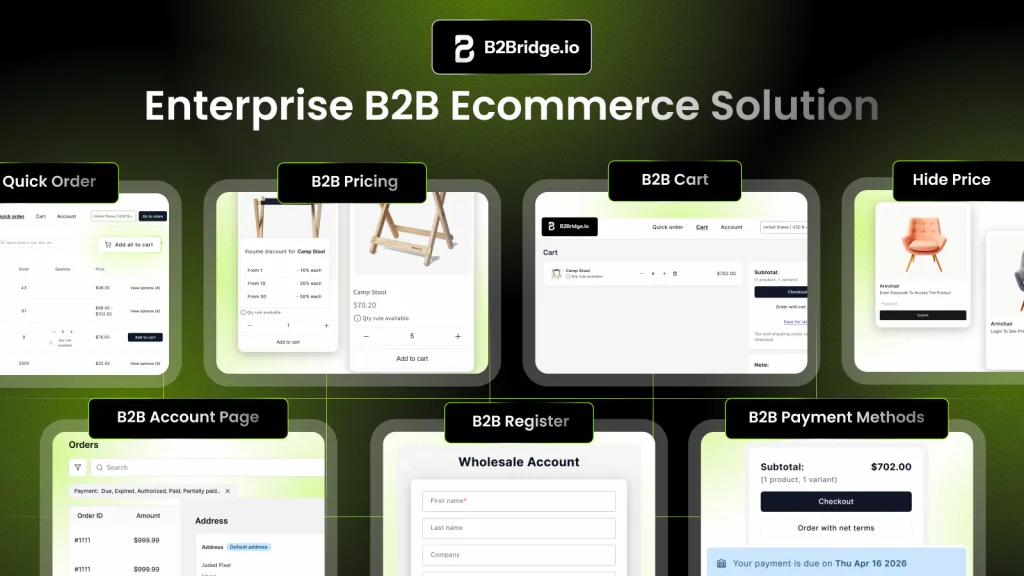
B2Bridge embeds complex wholesale operations directly into Shopify: pricing engines, ERP sync, net terms, gated access, and B2B UX. You get enterprise B2B without requiring Shopify Plus or a separate B2B platform.
What B2Bridge adds to Shopify:
- B2B Pricing Engine: Role-based pricing, volume discounts, contract price lists, and customer-specific catalogs
- B2B UX: Wholesale Bulk Order, reorder, B2B cart, Company Account portal
- ERP and CRM Integration: NetSuite, Zoho, Odoo sync keeps pricing and orders aligned
- B2B Payment Options: Net terms and RFQ workflows built into checkout
- Unified B2B and B2C Store: Gated access and customer group management from one admin
Frequently Asked Questions About Shopify Plus vs Commercetools
Is commercetools more expensive than Shopify Plus?
Commercetools typically involves higher total cost of ownership due to custom frontend development, integration work, and ongoing engineering maintenance. Platform fees vary based on contract terms and transaction volume, but build costs create the real difference.
Can Shopify Plus support headless commerce architectures?
Yes. Shopify Plus offers Hydrogen, a React-based framework for building custom headless storefronts, along with the Storefront API for decoupled frontend development.
How long does a typical commercetools implementation take?
Commercetools implementations generally take 6–12 months because they require custom frontend builds, API integrations, and extensive QA. Shopify Plus stores can launch in 10–20 weeks with comparable functionality.
Does Shopify Plus support composable commerce strategies?
Shopify Plus supports composable elements through extensibility features, APIs, and the app ecosystem. It’s not a fully modular MACH-architecture platform like commercetools, but you can integrate best-of-breed services for specific functions.
Which platform is better for global multi-region ecommerce operations?
Both platforms support international selling. Shopify Plus offers Shopify Markets with built-in multi-currency and localization. Commercetools provides native multi-store and channel management APIs that require custom implementation. The right choice depends on your team’s capacity to build versus configure.

As a Product Marketing Executive at B2Bridge, I focus on the Enterprise B2B Ecommerce domain. I leverage my understanding of product and user psychology to deliver customer-centric content that addresses business challenges and fuels growth.