A B2B self-service portal is a login-only section of your Shopify store where approved wholesale buyers see their own pricing, place and reorder bulk orders, and check out on net terms without emailing your team. You build one by setting up company accounts, assigning price-list catalogs, and turning on B2B checkout, then adding quick order and gated pricing so buyers who used to order by spreadsheet can serve themselves.
If your wholesale orders still arrive by phone, email, and filled-in Excel sheets, this guide shows you how to move that work online. It covers what the portal is, what Shopify does on its own, where the native tools run out, and how to set one up step by step.
What a Shopify B2B Self-Service Portal Is
A Shopify B2B self-service portal is a gated area of your store where verified wholesale buyers log in to their company account and see negotiated pricing, assigned products, and B2B checkout. Retail shoppers never see it. It turns a standard storefront into a wholesale channel that runs without a sales rep on every order.
The portal differs from your retail storefront in three ways that matter. Access is restricted to approved buyers, pricing is account-specific, and checkout supports net terms plus purchase order numbers. A buyer logs in once, then sees only their catalog and their prices for the rest of the session.
For a hybrid brand selling retail and wholesale from one Shopify admin, that gated layer is what lets both audiences share a single store. You keep one product catalog and one inventory, and the portal decides who sees what. The result is a wholesale experience that feels custom to each buyer while you manage everything from the same place. Our guide to how a Shopify B2B portal works breaks down the buyer-side view in more detail.
Signs You Have Outgrown Email and Spreadsheet Ordering
You’ve outgrown manual ordering when your team spends more time processing orders than selling. The symptoms are easy to spot once you look for them.
- Buyers email a filled-in spreadsheet, and a rep rekeys every line into Shopify by hand.
- Pricing goes out over email, so two buyers can end up quoted different numbers for the same product.
- Reorders start with “can you send me what I bought last time?”
- Nobody can tell where a quote stalled, or whether anyone answered it.
Each of these is a manual step that a portal removes. When buyers log in and reorder on their own, your reps stop being order-takers and get their time back for selling. Rekeying errors drop too, because the buyer enters the order once and it lands straight in Shopify. Orders that used to wait a day can ship the same afternoon.
The deeper cost is trust. Buyers who see inconsistent prices or slow replies start shopping around. A portal gives every account the same clear pricing and a way to order at any hour.
What Shopify’s Native B2B Portal Covers
What can you set up without an app? More than you could before 2026. Shopify’s native B2B tools cover the core portal on every paid plan, so the starting point is built in.
You get company accounts with buyer roles, customer-specific catalogs, net payment terms, purchase order capture, and self-serve reordering, all managed from one admin.
| Capability | Native Shopify B2B | Note |
|---|---|---|
| Company accounts and roles | Yes | Multiple buyers per company |
| Price-list catalogs | Yes | Three-catalog cap below Plus |
| Net terms and PO number | Yes | Net 30, Net 60, payment reminders |
| Reorder from history | Yes | Basic quick order list |
| Contextual checkout | Advanced and Plus | Uses Shopify Markets |
The ceiling shows up as you scale. Standard plans cap active catalogs at three, and direct company-catalog assignment stays on Plus. If you run more than a handful of price lists, that limit arrives fast. Our full Shopify B2B features breakdown maps every native capability against the plan tiers.
Where the Native Portal Stops
Native Shopify B2B handles routine ordering well, though four wholesale workflows fall outside it. Each is a common reason merchants add an app.
Request for Quote and Quote to Order
Shopify has no native RFQ. Buyers who negotiate quantities before they order need a way to request a quote, get a priced response, and turn the approved quote into an order.
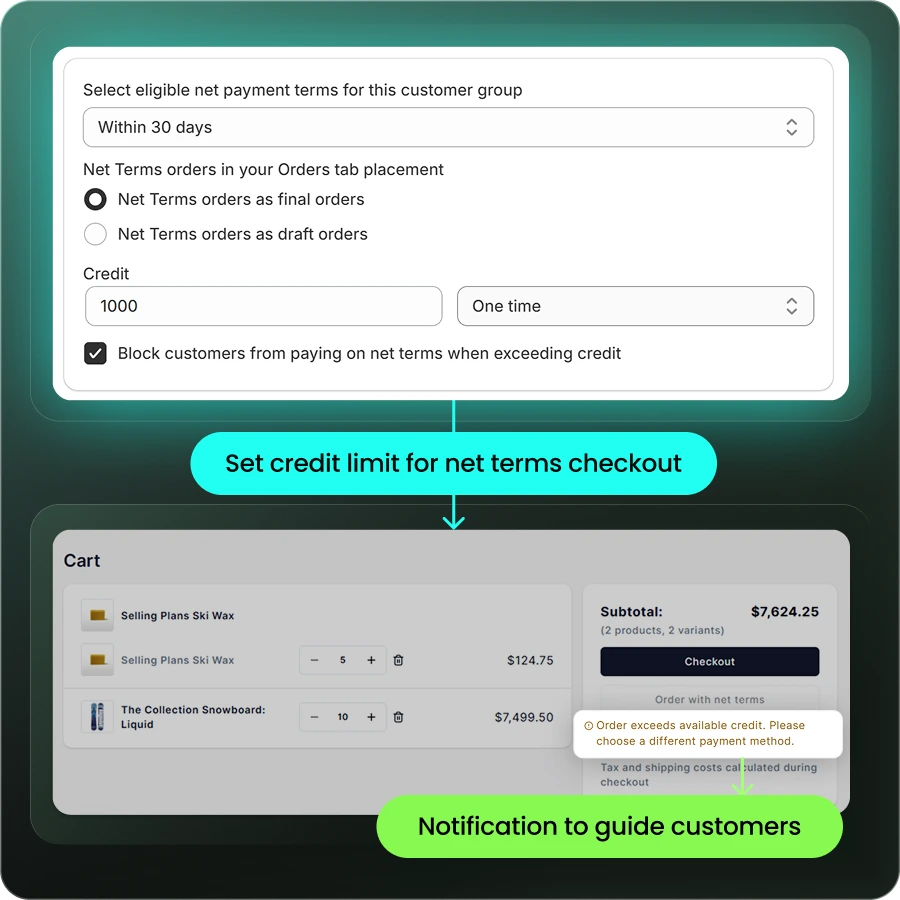
Credit Limits at Checkout
Native checkout won’t stop a buyer from exceeding their balance. A buyer on net terms can keep ordering past their limit unless you enforce credit limits at checkout.
A Spreadsheet-Style Quick Order Form
The native quick order list is basic. Buyers placing 50-line reorders want SKU-and-quantity entry or CSV upload, which is the direct replacement for the Excel sheet they email you today.
Invoice and Statement Access
Buyers can see order history natively, but not invoices, outstanding balance, or account statements. Their accounts-payable team usually wants that financial view, and it takes an app or an integration to provide it.
How to Set Up Your Self-Service Portal Step by Step
Ready to move your buyers online? Setting up the portal is mostly configuration, not development, for a standard wholesale program. Work through these steps in order, because each one builds on the last.
- Map your buyer groups and pricing. Decide who sees which price list and which products before you build anything. Getting this wrong early is what creates rework later.
- Create company accounts and buyer roles. Add a company for each wholesale account, then its buyers with admin, buyer, or viewer roles. Bulk CSV import handles large account lists on the Growth plan.
- Build price-list catalogs. Create a catalog per buyer tier using a percentage discount, fixed prices, or quantity breaks. Assign each catalog to the right companies.
- Turn on B2B checkout and net terms. Enable PO numbers and net payment terms such as Net 30 or Net 60, with reminders for overdue invoices.
- Add a quick order form for fast reordering. Give buyers SKU entry, CSV upload, and one-click reorder. This is the piece that replaces the emailed spreadsheet.
- Test from the buyer side and invite accounts. Log in as a test buyer and complete a full net-terms order. Configuration errors surface in that first order, well before your customers find them.
How to Gate Wholesale Pricing Behind a Login
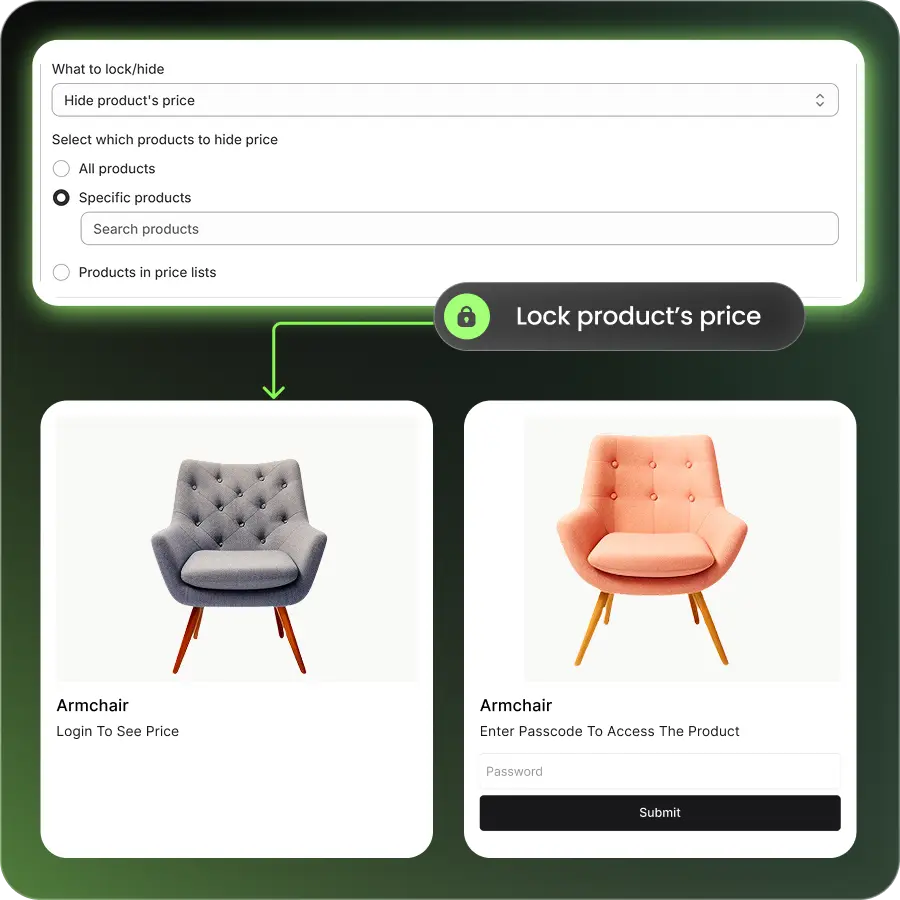
You gate wholesale pricing by hiding prices and products from anyone who isn’t a logged-in, approved buyer. On a hybrid store, retail visitors see public pricing while wholesale buyers see their own rates after they log in.
Two pieces make this work together. A registration form collects business details so you can confirm a real buyer before granting access, and a lock rule hides B2B prices or whole collections from the public. You review the application, assign the buyer to a group, and their pricing appears on next login.
This matters most for hybrid B2B and DTC stores, where retail and wholesale share one storefront. Gating protects your negotiated rates from ending up in front of retail shoppers or competitors.
Keeping the Portal in Sync With Your ERP and CRM
What keeps the prices accurate once buyers start serving themselves? The buyer experience is only as good as the data behind it. Prices, inventory, and net-terms orders have to stay in sync between Shopify and your back-office systems, or buyers see a wrong price or order stock you don’t have.
Connect your ERP so price-list changes flow into Shopify automatically, stock reflects real availability, and net-terms orders reach your accounts-receivable module without manual entry. B2Bridge syncs with NetSuite, Zoho, Odoo, and custom systems through its Public API. That sync is what keeps a growing portal from turning into a second set of books your team reconciles by hand.
What a Self-Service Portal Costs on Shopify
Cost depends on the route you pick. Native B2B adds no app fee, though it caps catalogs at three below Plus. Shopify Plus starts around $2,300 per month. A B2B app runs on top of a standard plan and usually costs less than upgrading to Plus.
B2Bridge starts at Professional $99 per month. Growth $199 unlocks the Sales Rep Portal, request for quote, credit limits, and company accounts, and Advanced $299 adds the Public API for deeper integrations. New stores start on a 14-day free trial before choosing a plan. You can compare tiers on the B2Bridge pricing page.
The right number depends on how many price lists and orders you run. A store with a few accounts fits the native tools. A growing wholesale program usually pays less with an app than with a Plus contract.
Scaling Your Shopify Wholesale Portal With B2Bridge
Moving off email and spreadsheets is the first step. Scaling that portal without hitting a wall is the next one.
B2Bridge runs unlimited price lists, orders, and customer groups at a flat monthly price, so growing your wholesale program never forces a plan upgrade or a per-order penalty. It puts the whole workflow in one app instead of several stitched together:
- Quick order and CSV reordering for fast bulk purchases
- Gated pricing and a registration form to protect wholesale rates
- Request for quote, net terms, and credit limits for real B2B checkout
- A Sales Rep Portal and ERP sync with NetSuite, Zoho, and Odoo
Merchants like Brooklyn Bicycle and Trailer Valet run their wholesale portals on B2Bridge today, keeping retail and wholesale on one Shopify store. Book a Demo to see how it works on your store.

FAQs About B2B Self-Service Portals
Do I need Shopify Plus to run a B2B self-service portal?
No. Native B2B works on every paid Shopify plan, with a three-catalog cap below Plus. A B2B app adds the full portal on a standard plan without a Plus contract.
Can wholesale buyers order by uploading a spreadsheet or CSV?
Yes, with a quick order tool. Buyers upload a CSV or paste SKUs and quantities at once, which replaces the emailed spreadsheet that many wholesale customers still use.
How do I stop retail shoppers from seeing wholesale prices?
Use a lock and price-hide rule. Wholesale pricing shows only to logged-in, approved buyers, while retail visitors see public prices or a prompt to log in first.
How long does it take to move buyers off email ordering?
For a standard program, a few days to a couple of weeks. Most of the work is mapping buyer groups and pricing, then testing a full order before you invite accounts.
Do I need a developer to set up a B2B portal on Shopify?
Usually not. Native setup and most B2B apps are configuration inside your Shopify admin. A developer helps only for custom checkout logic or a theme without B2B support.
Can buyers pay on net terms inside the portal?
Yes. Buyers with net terms assigned to their account check out without paying upfront, enter a PO number, and receive an invoice due within the agreed window.

Hi, I’m Ha My Phan – an ever-curious digital marketer crafting growth strategies for Shopify apps since 2018. I blend language, logic, and user insight to make things convert. Strategy is my second nature. Learning is my habit. And building things that actually work for people? That’s my favorite kind of win.


