The EU withdrawal button is a clearly labelled electronic function that lets EU consumers exercise their 14-day right of withdrawal directly from your store. From June 19, 2026, Directive (EU) 2023/2673 requires it on any online store selling to EU consumers, wherever the business is based. Shopify has no single native “withdrawal button,” but you can meet the requirement by combining customer accounts, self-serve returns and cancellations, and a visible storefront link.
Hybrid B2B and B2C stores need extra care here, because Shopify’s return tools apply to wholesale orders too. This guide explains what the law requires, who is in scope, how to configure Shopify step by step, what happens after a customer clicks, and how the setup affects a store that sells both retail and wholesale.
Disclaimer: This article provides general information and is not legal advice. Review your implementation with a qualified legal professional familiar with the markets where you sell.
What Is the EU Withdrawal Button?
The EU withdrawal button is an electronic function that lets a consumer exercise their right to withdraw from an eligible online purchase in a few clicks. It does not create a new right. The underlying 14-day cooling-off period has existed for EU consumers under the Consumer Rights Directive since 2011.
What changes on June 19, 2026, is how online merchants must support that right. Directive (EU) 2023/2673 inserts a new provision (Article 11a) requiring a dedicated online function that customers can use directly, not a return policy page or a contact form.
Under the directive, the withdrawal function must be:
- Easy to find, prominently displayed, and clearly labelled
- Continuously available throughout the withdrawal period
- Able to collect the customer’s name and the details identifying the order or contract
- Followed by a separate confirmation step
- Able to send a timestamped acknowledgment on a durable medium, such as email
The directive specifies the wording: the first control reads “withdraw from contract here” and the confirmation reads “confirm withdrawal,” or an unambiguous equivalent. A normal contact form or returns page is not enough on its own, because the customer needs a functioning online process to submit and confirm the withdrawal.

Who Needs an EU Withdrawal Button?
You need an EU withdrawal function when three conditions are met: you sell goods, services, or digital content online, the contract is concluded through an online interface, and the buyer is a consumer located in the European Union. Your business does not need to be established in the EU.
Per Shopify, the requirement can apply regardless of where the merchant is located. A common test for “targeting” the EU is whether you ship to the EU, run an EU-language storefront, or price in euros. Any one of those can put a store based in the United States, Canada, Australia, or Singapore in scope.
Does It Apply to B2B Orders?
The EU right of withdrawal is a consumer right, so it generally does not apply to buyers purchasing on behalf of a business. A wholesale buyer placing an order for their company does not automatically receive the same statutory withdrawal right a retail shopper does.
The practical setup is more complicated, though. Shopify’s self-serve returns and cancellations feature works with all orders, including B2B orders, and Shopify does not currently let you activate it only for selected order types. So the legal requirement may apply only to your consumer transactions, while the technical return interface still becomes visible for wholesale ones. That gap is why hybrid stores need a deliberate plan, covered later in this guide.
Which Products Are Exempt?
Certain products generally carry no withdrawal right, so no withdrawal function is required for them. Common examples include custom-made or clearly personalized goods, perishable goods such as food and flowers, sealed hygiene or health items the customer has unsealed, date-specific services such as event tickets or hotel bookings, and fully performed digital content the customer agreed to start.
Do not assume that labelling a product “final sale” removes every legal obligation. Confirm your exclusions with local counsel, because the exemptions and how they apply vary by product and market.
EU Withdrawal, Cancellation, and Return Explained
Withdrawal, cancellation, and return are related but distinct actions, and Shopify handles each differently. A withdrawal is the legal act of unwinding an eligible contract; a return is the physical movement of delivered goods that may follow; a cancellation stops an order before it ships; a refund is the financial adjustment.
| Action | Typical timing | What it means in Shopify |
|---|---|---|
| Withdrawal | Before delivery or within the cooling-off period | Consumer exercises a statutory right to exit an eligible contract |
| Cancellation | Before an item is fulfilled or shipped | Customer asks you not to complete the order |
| Return | After an item is delivered | Customer sends a delivered product back |
| Refund | After you process the financial adjustment | Money is returned to the customer |
Shopify supports the withdrawal flow by combining cancellation requests for unfulfilled items with return requests for delivered items. Customers must be able to withdraw before delivery and for at least 14 days after the final item in the order is delivered.
Does Shopify Have a Native EU Withdrawal Button?
No, Shopify does not provide a single feature named “EU Withdrawal Button.” Shopify’s own admin cancel and refund tools are merchant-side actions, so they do not meet the customer-facing, two-step, labelled requirement on their own. Instead, Shopify frames its return and cancellation tools as helping you meet the requirement.
You have three practical routes to a compliant flow:
| Route | Best for | Handles guest checkout | Effort |
|---|---|---|---|
| Shopify native self-serve returns and cancellations | Stores that already require an account, or accept the account step | Weaker if you allow guest checkout | Low, configuration only |
| Dedicated EU withdrawal app | Stores wanting a purpose-built two-step form and automation | Yes, via a public form | Low to medium |
| Custom build | Teams needing full control of the flow | Yes, if built for it | High |
The native route combines customer accounts, self-serve returns and cancellations, return and cancellation rules, a visible storefront link, and automatic customer email notifications. One caveat matters: the self-serve interface requires Shopify’s New Customer Accounts and asks the customer to sign in. If your store requires an account to buy, signing in to withdraw is consistent. If you allow guest checkout, that sign-in is an extra step, and the directive expects withdrawal to be at least as easy as buying, so many guest-checkout stores add a login-free entry point such as a public form.
How to Set Up the EU Withdrawal Function on Shopify
You configure the native flow in six admin steps plus an optional market rule. Work through them in order, then test both an unfulfilled and a delivered order before you rely on it.
1. Activate Self-Serve Returns and Cancellations
Turn on self-serve requests so customers can act on their own orders. In Shopify Admin, go to Settings → Customer accounts, find Self-serve returns and cancellations, turn it on, open the request-type dropdown, and select Return and cancel requests. Selecting returns only would block cancellations before fulfillment, so enable both.
Outcome: customers can request both a cancellation and a return from one place.

2. Move to Shopify’s New Customer Accounts
Give customers access to the account interface that supports self-serve requests. The self-serve flow does not work inside legacy customer accounts, so upgrade to Shopify’s current customer accounts or add the customer accounts URL to your storefront. Customers sign in with their email and an authentication code, then reach their order history.
Outcome: eligible buyers can open an order and start a request.
3. Configure Cancellation Rules
Set cancellations to stay open until an item ships. Go to Settings → Policies → Return and cancellation rules, turn on cancellation requests, set the cancellation window to Until item is fulfilled, and save. A cancellation request does not cancel the order automatically; you still review it and decide whether to remove and refund the items.
Outcome: customers can request cancellation any time before fulfillment.

4. Configure the Return Window
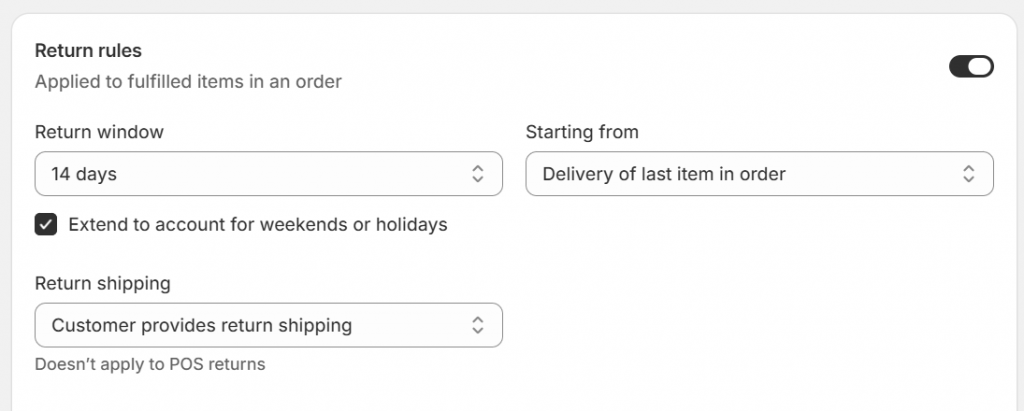
Give the whole order one return window that starts at final delivery. In the same rules section, set the return window to at least 14 days, set Starting from to Delivery of last item in order, turn on Extend to account for weekends or holidays, then configure return shipping costs, restocking fees, and any final-sale exclusions before saving.
Outcome: one clear 14-day window that begins when the last item arrives.
5. Review Final-Sale and Exempt Products
Mark genuinely exempt products so customers cannot request returns or cancellations for them. Shopify lets you flag specific products or collections as final sale, which fits categories like personalized, perishable, or opened personal-care items. Shopify does not automatically identify every legally exempt product, so digital and personalized goods still need your review.
Outcome: your rules reflect the products that legitimately carry no withdrawal right.

6. Add a Visible Withdrawal Link to Your Storefront
Place a clearly labelled link where customers can find it easily. Copy the customer accounts URL from Settings → Customer accounts, then add it to your footer, main navigation, a dedicated returns page, or an EU-specific menu via Content → Menus. For withdrawal purposes, use an explicit label rather than a generic one:
- Withdraw From Contract
- Cancel or Return an Order
- Exercise Your Right of Withdrawal
Outcome: EU consumers reach the withdrawal flow without hunting for it.

7. Set Market-Specific Rules Where Available
Apply a 14-day EU policy without disrupting other regions if your store has the feature. Some merchants can create separate return and cancellation policies per Shopify Market under Settings → Policies → Return and cancellation rules → Add rules. Shopify currently treats market-specific rules as an early-access feature, and self-serve returns remain a store-level setting, so if market rules are unavailable you may need a suitable default across the store or an alternative implementation.
Outcome: EU buyers get a compliant window while other markets keep your standard policy.
What Happens After a Customer Requests Withdrawal?
A customer request starts a workflow that you review; it does not automatically cancel an order, approve a return, or issue a refund. Understanding both sides keeps your team compliant and your refunds inside the legal window.
The Customer Side of the Flow
The customer signs in, opens an eligible order, and selects the items and quantities to cancel or return. Shopify shows the available actions based on fulfillment status, delivery date, the return and cancellation windows, and any final-sale rules. For a return, the form can collect a reason, product condition, and comments, and it shows any return shipping or restocking fees. The customer then reviews and confirms the request, which notifies you.

How the Merchant Processes a Withdrawal
You review each request and decide the outcome. For a return, you see a Return requested card on the order and can approve or decline it, adjust fees, create or upload a return label, receive and inspect the goods, restock, and issue the refund. Direct label creation applies when both the store and the customer address are in the United States; elsewhere you upload a label or send instructions.
For a cancellation, Shopify shows a request banner, and you can remove and refund the items, decline, or mark it resolved. Because a request is not automatic, send a first reply such as “we have received your request” rather than “we confirm your withdrawal,” so you keep room to check eligibility before confirming.

EU Withdrawal Setup for Hybrid B2B and B2C Shopify Stores
Hybrid stores face a specific problem: the withdrawal right protects consumers, but Shopify’s self-serve tools surface for every order, including wholesale ones. Since you cannot separate return rules by order type alone, you cannot simply set a 14-day consumer withdrawal for retail and contract-based terms for wholesale using order type. Market-specific rules can separate regions, but they do not distinguish a business buyer from a consumer in the same market.
The safest operational approach is to treat every customer submission as a request, not an approval. Before acting on a wholesale request, check whether the buyer acted as a consumer or a business, whether contractual B2B return terms apply, whether the item shipped, whether it was made to order, and whether the request is inside the applicable deadline. Shopify’s manual approval flow supports exactly this review.
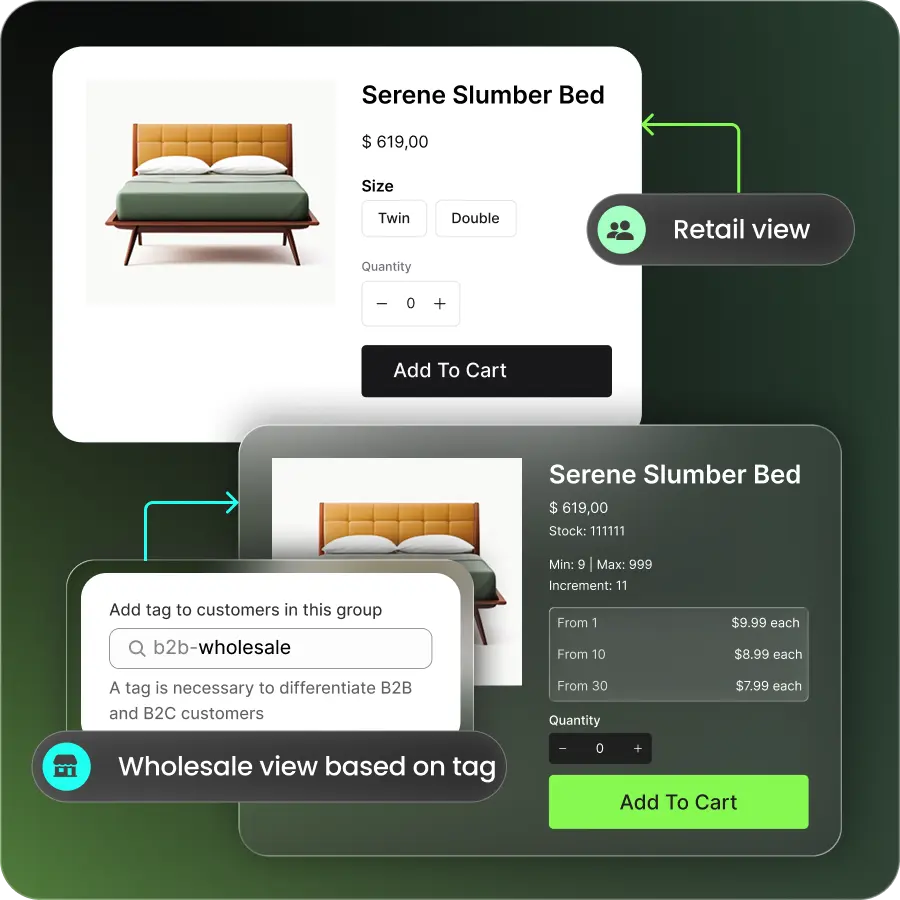
Beyond process, B2Bridge helps in two concrete ways. First, once you enable the return and cancellation rules in your Shopify settings, B2Bridge lets you add a withdrawal or return button directly on the B2B account page, so wholesale buyers can submit a request from the same portal where they view and reorder. The request then flows into Shopify’s standard workflow, where the order continues to be processed, reviewed, and refunded exactly as any other Shopify order, so nothing about your fulfillment or refund handling changes.


Second, B2Bridge keeps the two buyer experiences clearly separated in the first place through customer groups, gated B2B access, customer-specific price lists, and net payment terms, so wholesale buyers see wholesale terms and retail shoppers see retail terms. Because B2Bridge keeps price lists, customer groups, and orders unlimited as you scale, that separation holds up as your wholesale channel grows rather than forcing a costly upgrade. B2Bridge works alongside Shopify’s native rules rather than replacing them, so you get the compliant entry point on the B2B account page plus clearer buyer separation that reduces the policy confusion store-level return tools can create.
>> Explore B2Bridge on Shopify
EU Withdrawal Button Shopify Checklist
Use this checklist before you launch the flow:
- Confirm whether you sell to consumers in EU markets.
- Identify goods, services, and digital products covered by withdrawal rights.
- Review legally exempt product categories with counsel.
- Turn on self-serve returns and cancellations.
- Select Return and cancel requests.
- Set cancellation requests to Until item is fulfilled.
- Set the return window to at least 14 days, starting from delivery of the final item.
- Extend deadlines for weekends and holidays.
- Add an easily visible, clearly labelled withdrawal link.
- Test the flow from a customer account on both unfulfilled and delivered orders.
- Confirm acknowledgment emails are sent on a durable medium.
- Create an internal process for reviewing requests and hitting refund deadlines.
- Check how the rules affect B2B orders.
- Update your written return and refund policy and terms.
- Preserve records of withdrawal requests and responses.
Enabling the tools does not by itself guarantee compliance. Your products, markets, storefront design, policies, and handling process all affect the result.
What Are the Penalties for Non-Compliance?
Missing the requirement after June 19, 2026, can trigger legal warnings, fines, and a longer withdrawal window. Per Shopify’s guidance, consequences can include legal warnings, fines of up to 4% of annual turnover in some EU member states, and an extended withdrawal period, where the 14-day cooling-off window may stretch to 12 months and 14 days.
National caps and enforcement vary by country, and in some markets a missing withdrawal function can also invite competitor warning letters. The button itself is inexpensive to add; the downside of skipping it scales with your EU revenue, which is why treating June 19, 2026, as a hard deadline is the safer call.
Frequently Asked Questions About the EU Withdrawal Button
Is an EU withdrawal button mandatory for Shopify stores?
It is mandatory when a Shopify store concludes eligible online contracts with consumers in the EU. The requirement applies regardless of where the merchant is based, so a non-EU store that sells to EU consumers can be in scope.
When does the EU withdrawal button requirement start?
The electronic withdrawal-function requirement takes effect on June 19, 2026, under Directive (EU) 2023/2673. Member states transposed the directive into national law ahead of that date, so the obligation is live for in-scope stores from that day.
What exactly must the button say?
The first control must read “withdraw from contract here” and the confirmation must read “confirm withdrawal,” or an unambiguous equivalent. After the customer confirms, you must send a timestamped acknowledgment on a durable medium such as email.
Does the button have to appear on the homepage?
No, but it must be prominently displayed, continuously available during the withdrawal period, and easy to reach. Shopify allows access through the customer account or order-status page, provided your storefront includes a visible link to the relevant actions.
Does a customer request automatically cancel the Shopify order?
No. You must review the cancellation request and remove or refund the items yourself; the request does not change the order automatically.
Does Shopify automatically approve returns or issue refunds?
No. You review each return request, approve or decline it, and process the refund after reviewing the request and, where appropriate, receiving the goods.
Does the EU right of withdrawal apply to wholesale orders?
The right generally protects consumers rather than buyers acting for business purposes. However, Shopify’s self-serve return and cancellation tools still work with B2B orders, so hybrid merchants must review wholesale requests manually.
Can Shopify apply different return rules to EU markets?
Some merchants have access to market-specific return and cancellation rules, which Shopify currently labels as an early-access feature available to certain merchants. Self-serve returns and cancellations otherwise remain a store-level setting.
Is Shopify’s native setup enough for compliance?
Not necessarily. Shopify describes its tools as helping merchants meet the requirement, but compliance depends on your full setup, products, markets, and whether you allow guest checkout. Have your implementation reviewed by a qualified legal professional.
Prepare Your Shopify Store for EU Consumers
The new requirement is not just another return-policy link. Your storefront needs to give eligible EU consumers a clear, accessible, documented way to withdraw from an online purchase, and your team needs a process that reviews requests and refunds within the legal window. Shopify’s self-serve return and cancellation tools provide the core workflow; a dedicated app or custom build can fill the guest-checkout gap.
For merchants running retail and wholesale from one Shopify store, the larger challenge is keeping buyer experiences, policies, and approval workflows clear so a store-level return setting doesn’t create wholesale confusion. B2Bridge helps you run distinct B2B and B2C experiences on the same store:
- A withdrawal or return button on the B2B account page once you enable Shopify’s return and cancellation rules, with orders continuing through Shopify’s standard workflow
- Customer groups and customer-specific price lists that keep wholesale terms separate from retail
- Gated B2B access so wholesale pricing and catalogs stay hidden from consumers
- Net payment terms, quotes, and a sales rep portal for how wholesale actually buys
- Unlimited price lists, customer groups, and orders at a flat price, plus ERP sync, so the separation holds as you scale
Book a Demo to see how B2Bridge helps you manage distinct B2B pricing, access, payment, and ordering experiences on Shopify: https://b2bridge.io/contact-us/

As a Product Marketing Executive at B2Bridge, I focus on the Enterprise B2B Ecommerce domain. I leverage my understanding of product and user psychology to deliver customer-centric content that addresses business challenges and fuels growth.


