A credit limit is the maximum amount a wholesale customer can owe you at any one time across unpaid invoices and pending orders. You set it per account, based on that buyer’s financial strength and payment history, and you enforce it at checkout so a single account can never carry more exposure than your business can absorb.
Get the number wrong in either direction and it costs you. Set limits too high and one late-paying distributor ties up the cash you need for inventory. Set them too low and your best buyers hit a wall mid-order and call a competitor instead. This guide covers how to size the number, how to assign it per account, and how to actually enforce it inside a Shopify store rather than tracking it in a spreadsheet.
What Is a Wholesale Credit Limit
A wholesale credit limit is the ceiling on a buyer’s outstanding balance with you at any moment. Your system adds open invoices to the value of any pending order and compares that total against the limit. If the order pushes the account over, the order is held, routed for review, or blocked.
Three terms get confused here, and they control very different things.
| Mechanism | What it does | Who sets it | When it applies |
|---|---|---|---|
| Credit limit | Caps total unpaid balance per account | You, the seller | Continuously, on every order |
| Payment term | Sets how long the buyer has to pay | You, per customer group | Per invoice |
| Store credit | A prepaid balance the buyer spends down | You, as a deposit or refund | Until the balance runs out |
A line of credit, by contrast, is a formal lending agreement with a bank that carries interest and underwriting. Trade credit runs on your own policy, which means you own both the risk and the flexibility.
The distinction that matters most operationally: a payment term without a credit limit gives a buyer unlimited runway. A buyer on Net 60 with $40,000 already outstanding can place another $30,000 order, and nothing stops them unless a limit is enforced somewhere in the flow.
Why Credit Limits Matter for Wholesale Revenue
Credit limits protect cash flow while keeping the door open for larger orders. They cap what any single account can cost you if it defaults, and they give your sales team a clear number to sell against instead of escalating every large order to finance.
Extending credit is not optional in wholesale. Hokodo’s 2024 survey of 500 B2B buyers across the UK and EU found that 83% would abandon an ecommerce purchase if no payment terms were offered at checkout. Buyers expect net payment terms as a baseline, not a perk, which means the real question is how much credit to extend rather than whether to extend it.
Limits also change how the account behaves. When a buyer knows their approved ceiling, they plan purchase orders inside it and disputes drop. When they do not, you end up refusing orders after they have already been placed, which is a far worse conversation.
Outcome: you extend credit confidently to more accounts, because your maximum loss on any one of them is a number you chose in advance.
How to Set Credit Limits for Wholesale Customers
Set credit limits by collecting verified business and financial data at registration, checking creditworthiness through trade references and a commercial credit report, sizing an initial limit with a consistent formula, matching that limit to the payment term you offer, assigning it to the buyer’s customer group, enforcing it at checkout, and reviewing it on a fixed schedule.
1. Collect Business and Financial Data at Registration
Capture what you need before the first order ships. A wholesale registration form should collect legal business name, tax ID or VAT number, years in operation, resale certificate, expected monthly order volume, a bank reference, and at least three trade references. Pair it with a signed credit application that states your terms in writing.
Outcome: every credit decision starts from the same documented baseline instead of a sales rep’s judgment call.

2. Verify Creditworthiness Before You Assign a Number
Pull a commercial credit report from an agency such as Dun & Bradstreet, Experian Business, or Equifax Business, and read past the score to the liens, judgments, and collections history underneath it. Then call the trade references and ask three specific questions: the highest credit extended, the average days to pay, and whether the account ever exceeded its limit.
Look for patterns rather than incidents. A buyer who pays 12 days late every single month is a cash flow problem; one late check during a warehouse move is not.
3. Size the Initial Limit With a Consistent Formula
Pick one sizing method and apply it across every account so decisions stay defensible. The four common approaches are compared in the next section. Whichever you choose, start new accounts conservatively and treat the number as a starting position rather than a permanent grade.
4. Match the Limit to the Payment Term You Offer
Longer terms tie up capital for longer, so the limit has to stretch with them. A buyer ordering $15,000 a month on Net 30 payment terms needs roughly one month of exposure covered. The same buyer on Net 60 will have two invoices open at once and needs roughly double.
A simple sizing model:
Credit limit = Expected monthly purchases × (Payment term in days ÷ 30) × Risk factor
Use a risk factor of 1.0 for accounts with strong references and verified financials, and 0.5 to 0.75 for newer or thinner-file buyers.
Outcome: buyers stop hitting their ceiling halfway through a normal ordering cycle.
5. Assign the Limit to the Right Customer Group
Managing limits one customer at a time stops working somewhere around your twentieth wholesale account. Set a default limit at the customer group level (Standard Wholesale, Distributor, Key Account) and override it for individual buyers who justify a different number. The limit then travels with the same group that controls pricing and payment terms.
6. Enforce the Limit at Checkout, Not After the Order
A limit that lives only in a spreadsheet is a reporting figure, not a control. Real enforcement means the store checks the buyer’s open balance plus the current cart value at checkout and, if the total exceeds the limit, removes the invoice payment option or holds the order for approval.
Outcome: exposure caps itself without anyone in finance manually reviewing orders.

7. Review and Adjust on a Fixed Schedule
Set a review cadence rather than reacting to requests: quarterly for high-risk accounts, twice yearly for stable ones. Raise limits in small increments after three or more consecutive on-time payments, and never on sales pressure alone. Lower them at the first cluster of warning signs, such as broken payment promises, repeated 30-day-plus delays, or a balance that sits permanently at the ceiling.
Credit Limit Formulas and Worked Examples
There is no single standard formula for wholesale credit limits. Most sellers combine one of four methods with a judgment adjustment for industry risk and their own appetite for exposure.
| Method | How to calculate it | Best for | Watch out for |
|---|---|---|---|
| Percentage of net worth | Roughly 10% of the buyer’s net worth from their balance sheet | Established buyers who share financials | Asset-heavy buyers with weak cash flow |
| Percentage of working capital | Roughly 10% of current assets minus current liabilities | Buyers with seasonal cash cycles | Understates limits for fast-growing accounts |
| Multiple of monthly purchases | Average monthly order value × one to two billing cycles | Existing accounts with order history | Based on past demand, not forecast demand |
| Trade reference average | The average of high credits reported by three suppliers | New accounts with no history with you | References are chosen by the buyer and skew positive |
Worked example. A regional retailer forecasts $18,000 in monthly purchases and asks for Net 30. Their three trade references report high credits of $15,000, $22,000, and $20,000, averaging $19,000. Their credit report is clean with no collections activity. A one-cycle limit puts them at $18,000; the reference average puts them at $19,000. You approve $18,000 to start and schedule a review after three orders.
Worked example with longer terms. The same retailer requests Net 60 for a seasonal build. Two invoices will now be open at once, so the exposure roughly doubles to $36,000. If you are not comfortable carrying $36,000 on this account, the correct answer is to keep the limit at $18,000 and hold the term at Net 30, not to grant the term and hope the order volume stays low.
Setting Limits for New Versus Existing Accounts
New accounts get conservative limits based on external data; existing accounts get limits based on their actual payment behavior with you. The difference is evidence, and it should be reflected in every part of the decision.
| Decision point | New accounts | Existing accounts |
|---|---|---|
| Data you rely on | Credit report, trade references, financials | Your own invoice and payment history |
| Starting point | One billing cycle or less | One to two cycles of actual purchase volume |
| Terms offered | Shorter terms, or partial prepayment on first orders | The full negotiated term |
| Review cadence | After the first three orders | Every six to twelve months |
| Trigger to increase | Three consecutive on-time payments | Sustained volume growth plus a clean record |
Extended terms such as Net 90 payment terms belong to the second column. Reserve them for accounts that have already proven they pay, and price the carrying cost into the deal rather than absorbing it.
How Credit Limits Work on Shopify
Shopify does not enforce credit limits natively. You can assign net payment terms to a company location, but the platform will not check a buyer’s outstanding balance before approving another order on those terms. Closing that gap requires either a developer-built checkout validation or a B2B app that handles credit limits directly.
What Shopify B2B Native Covers
Since April 2026, Shopify’s core B2B features are available on Basic, Grow, and Advanced plans at no extra cost, including company profiles, volume pricing, quantity rules, and net payment terms of Net 15 through Net 90. Non-Plus plans are capped at three active catalogs. These are solid foundations for a small wholesale program, and for many merchants launching a first B2B channel they are enough.
Shopify also supports store credit on company locations, which is a prepaid balance the buyer draws down. That is the opposite of a credit limit: it is money already accounted for, not exposure you are carrying.
Where Native Credit Handling Stops
There is no credit limit field on a company account and no checkout block when an account is overextended. Merchants who need enforcement typically build it with metafields plus Shopify Flow to track a remaining balance, and a checkout validation function to block the order. Shopify Functions at checkout is a Shopify Plus capability and a development project, which puts it out of reach for most non-Plus merchants.
The practical consequence is that a buyer with $23,000 outstanding against a $25,000 limit can place a $30,000 order on terms with no platform-level friction at all.
Setting Credit Limits With a B2B App
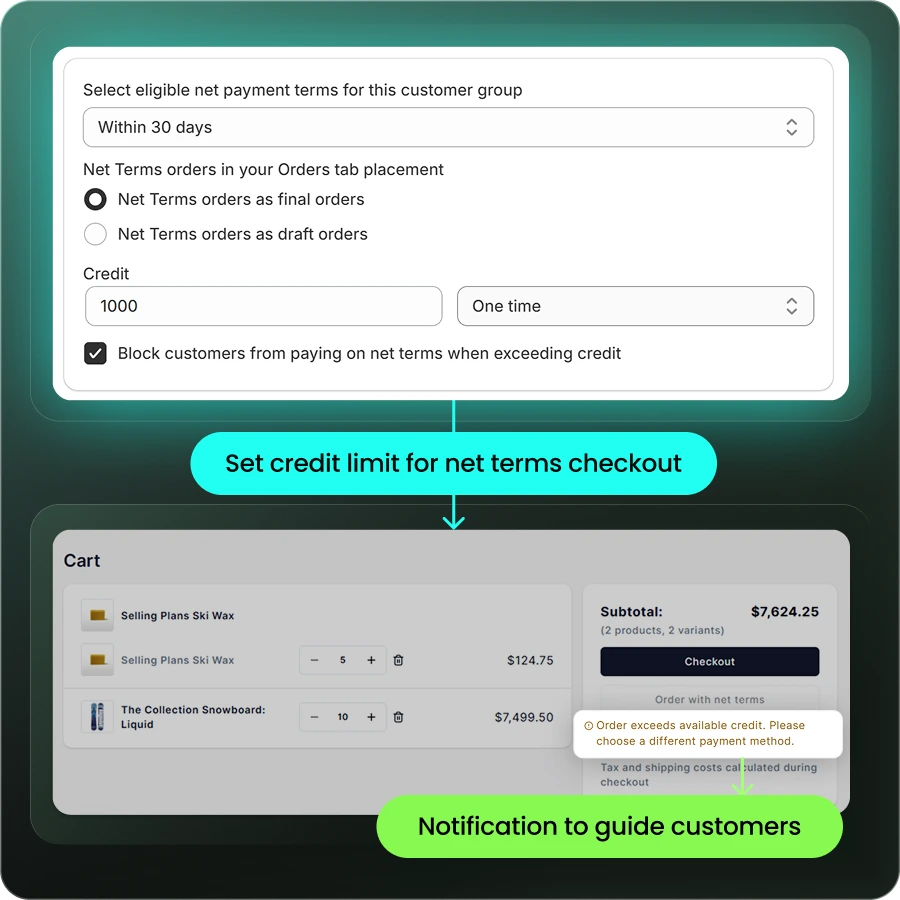
A purpose-built B2B app moves the limit into the same layer that already controls pricing and payment terms. In B2Bridge’s B2B payment module, you enable net terms per customer group and set a credit limit per customer, so the checkout that shows a buyer their negotiated pricing is the same checkout that respects their ceiling.
| Capability | Shopify B2B native | B2Bridge |
|---|---|---|
| Assign net terms | Yes, Net 15 to Net 90 at company location | Yes, per customer group |
| Credit limit per account | No native field | Yes, on net terms accounts |
| Enforcement at checkout | Requires Shopify Functions on Plus, plus development | Built into the B2B checkout |
| Active catalogs or price lists | 3 on non-Plus plans | Unlimited on paid plans |
| Plan required | Included on paid Shopify plans | Growth plan at $199/month for credit limits |
Credit Policies That Protect Cash Flow
A written credit policy turns individual judgment calls into a repeatable process. Four practices do most of the work.
- Document the approval criteria before you need them. Define who qualifies for credit, what evidence is required at each limit band, who signs off above a given threshold, and how exceptions get handled. A policy that lives in one person’s head fails the moment that person is on holiday.
- Separate the sales decision from the credit decision. The person who benefits from the order closing should not be the person approving the exposure. Even in a small team, route limit increases above a set amount through a second approver.
- Price the cost of credit into your terms. Every day of Net 60 is a day of working capital you are financing, which quietly compresses your wholesale profit margin. Offer an early payment discount such as 2/10 Net 30 to give buyers a reason to pay sooner.
- Communicate limits in writing at onboarding. Confirm the approved amount, the term, the consequence of exceeding it, and the review schedule. Get written acknowledgment. Buyers rarely dispute a rule they agreed to before their first order.
What to Do When a Buyer Exceeds Their Limit
Hold the order rather than cancelling it, then give the buyer a route to complete the purchase the same day. Cancelling teaches a good customer to buy elsewhere; holding with a clear path keeps the sale alive while protecting your balance sheet.
Four routes work in practice:
- Partial payment against the oldest invoice. The buyer clears enough of the open balance to bring the new order under the ceiling.
- Card or prepayment for the overage. The order splits: the portion inside the limit ships on terms, the remainder is paid upfront.
- A one-time temporary increase. Appropriate for a seasonal spike from an account with a clean payment record, documented with an expiry date.
- A quote instead of an order. Route the request through a quote workflow so your team can negotiate deposit terms before anything is committed.
Whichever route you take, put the reason in writing and restate the standing terms. Reducing a limit is a commercial decision, not a punishment, and framing it that way keeps the relationship intact.
Common Mistakes When Setting Wholesale Credit Limits
- Treating the limit as permanent. A number set at onboarding and never revisited is either strangling a good account or under-protecting a deteriorating one.
- Approving terms without a limit. Payment terms alone define when a buyer pays, not how much they can owe.
- Sizing limits from requested volume rather than verified capacity. What a buyer plans to order and what their balance sheet supports are different figures.
- Enforcing manually. Manual review works at ten accounts and quietly breaks at fifty.
- Ignoring concentration risk. One account holding 40% of your receivables is a risk to the business even if every individual limit looks reasonable.
Manage Wholesale Credit Limits With B2Bridge
If your wholesale channel has grown past the point where a spreadsheet and a monthly AR review can keep up, the limit needs to live where the order is placed. B2Bridge is an enterprise B2B solution for Shopify that puts credit limits, net terms, pricing, and buyer approval into a single app on any Shopify plan.
- Unlimited price lists, customer groups, and orders on every paid plan, so adding wholesale accounts never triggers a catalog cap or an order-count upgrade
- Credit limits per customer on net terms, available on the Growth plan at $199 per month, alongside Net 15, 30, 60, and 90 terms configured per customer group
- B2B registration with an approval workflow that collects tax IDs, resale certificates, and trade information before a buyer ever sees wholesale pricing
- One app instead of several, covering pricing, gated access, quotes, company accounts, and a sales rep portal in the same system
- ERP and CRM sync with NetSuite, Zoho, Odoo, or a custom system through the Public API, so credit and AR data stay aligned with your financial system of record
Outcome: your sales team quotes against a real ceiling, your finance team stops reviewing orders by hand, and your buyers get terms without your exposure growing quietly in the background.
Book a Demo to see how B2Bridge handles wholesale credit limits and net terms on your Shopify store.
FAQs About Wholesale Credit Limits
What is a good starting credit limit for a new wholesale customer?
Start at one billing cycle of the buyer’s expected monthly purchase volume, or less if their references are thin. For a buyer forecasting $10,000 a month on Net 30, a $10,000 opening limit is a reasonable position. Review it after three orders and raise it once a payment pattern exists.
How do you calculate a credit limit from monthly sales?
Multiply the buyer’s average monthly purchases by the number of billing cycles that will be open at once under your terms. Net 30 means roughly one cycle; Net 60 means roughly two. Then apply a risk factor between 0.5 and 1.0 based on their credit report and references.
Can you set credit limits on Shopify without Shopify Plus?
Yes, but not with Shopify’s native features alone. Shopify assigns net payment terms on all paid plans and does not include a credit limit field or checkout enforcement. A B2B app such as B2Bridge adds per-customer credit limits on standard Shopify plans without a Plus upgrade or custom development.
What happens when a wholesale customer exceeds their credit limit?
The order should be held rather than processed, with the invoice payment option removed at checkout. Give the buyer a same-day route forward, such as paying down the oldest invoice, prepaying the overage by card, or converting the request into a quote. Document any temporary increase with an expiry date.
How often should you review wholesale credit limits?
Review high-risk accounts quarterly and stable accounts every six to twelve months. Trigger an off-cycle review whenever order volume jumps sharply, payments slow, or the buyer’s ownership or financial position changes.
Do you need a credit check to offer net terms?
A formal credit check is not legally required, but extending terms without verifying anything transfers the full risk to you. At minimum, verify the business is registered, call three trade references, and confirm the tax ID before approving terms above a small opening limit.

As a Product Marketing Executive at B2Bridge, I focus on the Enterprise B2B Ecommerce domain. I leverage my understanding of product and user psychology to deliver customer-centric content that addresses business challenges and fuels growth.


