Your first stockist just said yes. Now they want to know how to order, and you don’t have a form to send them.
This guide covers what a wholesale order form needs, how the totals actually work, and where a spreadsheet stops being enough. The template below is free, in Excel and printable PDF, and the Excel version does the arithmetic for you.
>> Download the Wholesale Order Form Excel Template and the printable PDF for free!
Key takeaways
- A wholesale order form captures buyer details, an itemized SKU table, payment terms and a signature, so every bulk order is on the record.
- Eight sections cover it: company info, order info, buyer info, the products table, payment method, terms of sale, notes and signature.
- Case pack multiples and a minimum order value are the two fields most templates leave out, and they cause most order corrections.
- Wholesale orders are usually invoiced tax-exempt on net terms, so sales tax and card fees normally stay off the form.
- A spreadsheet form works to roughly a dozen accounts on one price list. Past that, version drift and rekeying cost more than the form saves.
What is a wholesale order form?
A wholesale order form is the document a retailer or distributor uses to place a bulk order with your brand. It captures the buyer’s company and contact details, an itemized table of SKUs with quantities and unit prices, the payment terms, and a signature that authorises the order. A complete form also states your minimum order value and case pack rules, so buyers can’t submit an order you’re unable to pick.
Buyers fill it in at a trade show, after reading your line sheet, or when reordering from last season’s copy.
The form is a commercial record, not just a data-capture sheet. Once signed, it evidences what was agreed, at what price, on what terms.
What should a wholesale order form include?
Eight sections cover everything a wholesale order needs: your company information, the order reference, buyer details, the products table, payment method, terms of sale, notes and the signature block.
| Section | What it captures | Why it matters |
|---|---|---|
| Company information | Your name, logo, address, phone, email | The buyer knows who to chase |
| Order information | Order ID, date, requested delivery | Makes every order traceable |
| Buyer information | Company, contact, addresses, resale certificate | Determines pricing and tax treatment |
| Products table | SKU, product, case pack, price, quantity, total | The commercial core of the order |
| Payment method | Card, transfer, or invoice on terms | Sets when you get paid |
| Terms of sale | Lead time, minimum, returns window | Limits disputes later |
| Notes | Free text for this order | Catches the exceptions |
| Signature | Authorised approval and date | Makes the order binding |
Company and order information
Put your details at the top, then leave room for an order ID and requested delivery date. A coded ID beats a plain sequence. Something like 170316-MGC-1 tells you the order came from the Magic trade show on 16 March, first of the day.
Buyer information and the resale certificate
Capture company name, contact, email, and separate billing and shipping addresses. Add a field for the state resale certificate number. That number is what lets you invoice the account tax-exempt, so collect a copy before you zero-rate anyone.
The products table
This is the heart of the form. Columns run SKU, product, case pack, unit price, quantity and line total. Give every variant its own SKU, coded so it reads at a glance: TS-BLK-M for a black tee in medium. Prefilled tables suit short catalogues. Empty tables suit long ones that change often.
Payment terms, minimums and signature
State your net terms plainly, whether that’s net 15, 30, 60 or 90. Add your minimum order value, lead time and returns window. Close with a signature line and a date. Terms nobody signed are terms nobody agreed to.
Free wholesale order form template in Excel and PDF
The Excel version calculates. Enter a SKU and a quantity, and it pulls the product name, case pack and wholesale price from your own price list, applies your volume discount, and checks the order against your minimum. Most order form templates are static tables you retype prices into.
- Download the Excel wholesale order form template ({{DRIVE_LINK_EXCEL}})
- Download the printable PDF order form ({{DRIVE_LINK_PDF}})
What the Excel file does:
- Looks up product, case pack and price from the SKU
- Applies your volume discount tier automatically from the order subtotal
- Flags any quantity that isn’t a whole multiple of the case pack
- Tells the buyer whether they’ve met your minimum, and by how much they’ve missed it
- Holds 25 order lines and 40 SKU slots, with dropdowns for SKU and payment terms
Both files are free for commercial use, with no attribution required. Rebrand them, edit them, send them to your accounts.
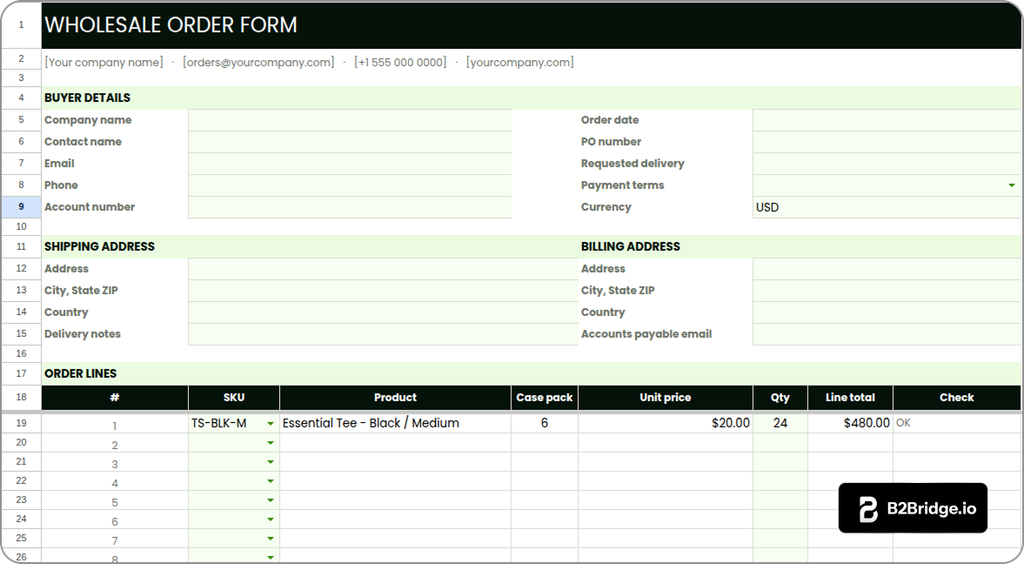
How to set up the template in ten minutes
Four steps, and the only one that takes real time is loading your catalogue.
Step 1. Load your catalogue into the price list tab
Open the Price List tab and replace the sample SKUs with your own. Case pack and wholesale price are the two columns the form actually reads. Everything else flows from this tab.
Step 2. Set your minimum, tax rate and discount tiers
Enter your minimum order value, your tax rate, and up to four volume tiers. Leave tax at zero if you invoice tax-exempt resellers, which is the usual case. The tiers sort low to high, and the first one starts at zero.
Step 3. Add your company details and logo
Replace the placeholder line at the top of the Order Form tab with your company name, email and phone. Drop your logo into the header row. The form now looks like yours rather than a generic download.
Step 4. Send the workbook or the printable PDF
Share the workbook with buyers who want it to calculate, and send the PDF to anyone who’d rather print and sign. Both carry the same fields, so orders arrive in one consistent shape.
How do you calculate the totals on a wholesale order?
Line total is quantity times unit price. Subtotal is the sum of the lines. Then a volume discount comes off, shipping goes on, and tax applies to what’s left, which for most wholesale orders is nothing at all.
Applying volume discount tiers
Threshold discounts apply one rate to the whole order once the subtotal crosses a level, so a $3,040 subtotal hitting a 10% tier takes $304 off. Tiered pricing instead charges separate rates per quantity band. Pick one and label it clearly.
Enforcing case packs and minimum order quantities
A case pack is the fixed number of units a product ships in. If socks ship in packs of 24, an order for 10 cannot be picked as written. Wrong multiples are the most common correction on inbound wholesale orders, so set your MOQ and case pack rules before the form goes out.
Why tax usually stays at zero
Most wholesale buyers are resellers holding a valid resale certificate, so their orders are invoiced tax-exempt. Net terms invoices also skip card processing. On a $1,000 order at 2.9% plus $0.30, that’s $29.30 you keep.
Wholesale order form vs purchase order vs invoice vs line sheet
Four documents, four different jobs. The line sheet sells, the order form captures, the purchase order commits, and the invoice collects.
| Document | Who creates it | When it’s used | What it commits |
|---|---|---|---|
| Line sheet | Seller | Before the order, with the catalogue | Nothing, it presents products and prices |
| Wholesale order form | Seller supplies, buyer completes | At the point of ordering | The buyer’s intent to purchase, once signed |
| Purchase order | Buyer | Instead of your form, on their paperwork | The buyer’s commitment, with their PO number |
| Invoice | Seller | After the order is accepted | Payment due under the agreed terms |
Larger accounts will often send their own purchase order rather than complete your form. Accept it. Match their PO number to your order ID and file both together.
Common mistakes on wholesale order forms
Most order problems trace back to the form itself. Six recur constantly:
- Stale prices keep circulating, because you raised prices and emailed a new version while two accounts carried on ordering off last season’s copy.
- Leaving out the case pack column lets buyers order quantities your warehouse can’t pick.
- Without a minimum order value, small orders arrive that cost more to fulfil than they earn.
- Skipping the resale certificate field means you zero-rate tax with no documentation to support it.
- Omitting a PO number field stops the buyer’s accounts payable team matching your invoice, and payment sits.
- No stock check means the form happily accepts 200 units of something you hold 40 of.
Fixing the first three removes most order corrections on its own.
When should you stop using an order form?
A spreadsheet form works well up to roughly a dozen accounts on a single price list. The template above pushes that ceiling as far as it goes. The ceiling is still real, and the failure modes are predictable.
Version drift comes first. Every price change means a new file, and old files keep circulating.
Then comes per-customer pricing. The moment a key account negotiates its own rates, you’re maintaining a separate file for them by hand, and a third for the next one.
Rekeying is the expensive one. Every completed form gets typed into Shopify by someone on your team, at five to ten minutes an order. That’s also where wrong quantities enter your system.
None of this argues against using a form today. It argues for knowing what you’re trading. When rekeying starts eating a real part of someone’s week, move the pricing into the store itself.
Take wholesale orders without a form using B2Bridge
What does that actually look like in practice? Buyers log in to your Shopify store and see their own price list. They order at their contracted prices, with MOQs and case packs enforced at checkout, and pay on net 15, 30, 60 or 90 terms. The order lands in Shopify already priced and already correct, so nobody retypes anything.
B2Bridge gives you unlimited price lists, customer groups and orders on a flat plan, so adding accounts never pushes you into a higher tier. Everything sits in one app rather than three stitched together: wholesale pricing, registration and approval, quotes, net terms and credit limits. A sales rep portal lets your team order on behalf of accounts and track commission, and the API keeps price lists in step with your ERP.

Book a Demo and we’ll walk through your current ordering workflow.
Frequently asked questions about wholesale order forms
Is this wholesale order form template free to use commercially?
Yes. Both files are free to use, edit and rebrand for commercial purposes, with no attribution required. Add your own logo, SKUs, prices and terms, then send them to your accounts.
Will the Excel template work in Google Sheets?
Yes. Google Sheets imports the file, and the price lookups and tier discounts carry over intact. Data validation dropdowns usually need re-applying after the import, which takes about a minute to redo.
What is a case pack and why does it matter on an order form?
A case pack is the fixed number of units a product ships in, such as six tees or twenty-four pairs of socks. Wholesale sells in whole cases, so quantities that aren’t multiples can’t be picked.
How do I set a minimum order value for wholesale?
Set it in one cell on the Price List tab and the form checks every order against it. Most brands set the minimum at two to three times their average retail basket.
Should a wholesale order form include sales tax?
Usually not. Most wholesale buyers are resellers with a valid resale certificate, so you invoice them tax-exempt. Keep a copy of the certificate on file before you zero-rate an account.
Do I need a wholesale contract as well as an order form?
For ongoing accounts, yes. The order form covers a single order and nothing beyond it. A contract covers the relationship, including exclusivity, territory, payment terms, and what happens when either side wants out.

As a Product Marketing Executive at B2Bridge, I focus on the Enterprise B2B Ecommerce domain. I leverage my understanding of product and user psychology to deliver customer-centric content that addresses business challenges and fuels growth.


