Wholesale buyers expect a lower price when they order more. That expectation is so baked into B2B purchasing that if you don’t offer volume discounts, you’re probably losing orders to suppliers who do.
Shopify gives you a few ways to set up quantity-based pricing, but the right approach depends on your plan, your product catalog, and how much flexibility you actually need. This guide walks through the setup options, the mechanics of each discount type, and how to structure tiers that grow revenue without eroding your margins.
What is a volume discount in B2B
A volume discount is a price reduction based on the quantity purchased in a single order. When a buyer orders 50 units instead of 10, they pay less per unit. B2B buyers expect this pricing structure because larger orders reduce fulfillment costs per item, and passing some of that savings along keeps you competitive with other suppliers.
You’ll hear this called quantity pricing, bulk pricing, or tiered pricing, though each term describes a slightly different mechanic. The core idea stays the same: order more, pay less per unit.
Why offer volume discounts to wholesale buyers
Wholesale buyers compare suppliers before placing orders. If a competitor offers a price break at 100 units and you don’t, you lose the order. Volume discounts give buyers a reason to consolidate purchases with you rather than splitting orders across multiple vendors.
Beyond competitive positioning, volume discounts change buyer behavior in ways that benefit your operation:
- Larger order sizes: Buyers add more units to reach the next price break, increasing average order value
- Lower fulfillment costs: Shipping one order of 200 units costs less than shipping four orders of 50
- Repeat purchasing: Predictable discount tiers encourage ongoing relationships because buyers know what to expect
- Inventory planning: Larger, less frequent orders make demand easier to forecast
Types of volume discounts for Shopify B2B
Before setting up volume pricing, you’ll want to understand the three main structures. Each works differently, and Shopify’s native B2B supports some but not all of them.
Quantity breaks
Quantity breaks apply a single discounted price once the buyer reaches a threshold. If you set a break at 50 units for $8 each, a buyer ordering 75 units pays $8 for every unit in the order. This is the structure Shopify’s native B2B uses.

Tiered pricing
Tiered pricing applies different prices to different portions of the order. Units 1–49 might cost $10 each, units 50–99 cost $9 each, and units 100+ cost $8 each. A buyer ordering 120 units pays three different rates across those tiers. Shopify’s native B2B does not support true tiered pricing, so you’ll need a B2B app if this structure fits your business.

Customer-specific volume pricing
Some merchants assign different volume schedules to different buyers. A distributor with a long-term contract might get steeper breaks than a new wholesale account. This requires either Shopify B2B catalogs (on Plus) or a B2B app that supports customer tags and multiple price lists.
| Discount type | How it works | Best for |
|---|---|---|
| Quantity breaks | Same price per unit once threshold is met | Standard wholesale pricing |
| Tiered pricing | Different prices for different quantity ranges | Complex pricing models |
| Customer-specific | Unique volume schedules per buyer or group | Negotiated contracts, VIP accounts |
Can you offer volume discounts on Shopify without Shopify Plus
Shopify’s native B2B features, including volume pricing in catalogs, require Shopify Plus. If you’re on Standard, Basic, or Advanced plans, you won’t see the B2B section in your admin.
That doesn’t mean you’re stuck. Merchants on any Shopify plan can offer volume discounts using a B2B wholesale app from the Shopify App Store. Some merchants also use manual discount codes, though this approach has limited flexibility and requires buyers to remember codes.
Three ways to set up volume discounts on Shopify
You have three paths depending on your Shopify plan and how much flexibility you need.
Native Shopify B2B volume pricing
Built into Shopify Plus, configured through catalogs in the admin. This is the simplest option if you’re already on Plus.
Shopify B2B wholesale apps
Third-party apps add volume pricing to any Shopify plan. Most also include customer groups, price lists, and buyer portal features that go beyond what native B2B offers.
Shopify discount codes
A manual workaround using Shopify’s built-in discount feature. You create codes like “BUY50GET10OFF” and share them with buyers. This works for simple cases but doesn’t scale well.
| Method | Shopify plan required | Setup complexity | Flexibility |
|---|---|---|---|
| Native Shopify B2B | Shopify Plus only | Low | Volume pricing per catalog |
| B2B wholesale app | Any plan | Medium | High (customer groups, per-variant pricing) |
| Discount codes | Any plan | Low | Limited (manual, no automation) |
How to set up native volume pricing in Shopify B2B
If you’re on Shopify Plus, here’s how to configure volume pricing through catalogs.
Step 1. Open the catalogs section in Shopify admin
Go to Markets > Catalogs in your Shopify admin. Catalogs control which products, prices, and rules apply to specific B2B customers or company locations.
Step 2. Select the catalog and products to price
Choose the catalog you want to edit, then select the products or variants that will have volume pricing. Volume pricing is set at the variant level, so if you have multiple sizes or colors, you’ll configure each one separately.

Step 3. Add volume pricing breaks by quantity
In the Products and pricing section, hover over the product or click into a specific variant, then in the Volume pricing column click + Add.
Click + Add quantity price breaks and enter your quantity thresholds with corresponding prices. For example: 1–24 units at $10, 25–49 units at $9, 50+ units at $8. You can add up to 10 price breaks per product. Note: once volume pricing is applied, the catalog’s overall adjustment discount no longer applies — the price becomes fixed.

Step 4. Assign the catalog to a company or customer group
On Shopify Plus: assign catalogs directly to specific company locations (up to 25 catalogs per location). Only logged-in buyers assigned to that catalog will see the volume pricing.
On Basic / Grow / Advanced: catalogs can only be assigned to B2B markets (not directly to individual companies), and you’re limited to 3 active catalogs total.

Step 5. Test the pricing with a B2B buyer account
Log in as a test B2B customer and add products to cart at different quantities. Confirm the correct price breaks display in the cart and at checkout before going live. Also ensure your theme is on version 11.0.0 or later to display volume pricing natively.
How to set up quantity rules and minimum order quantities
Quantity rules work alongside volume pricing to control how buyers order. You configure quantity rules in the same Catalogs section.
Minimum order quantities
A minimum order quantity (MOQ) is the lowest number of units a buyer can purchase. If you sell products in cases of 12, you might set an MOQ of 12 so buyers can’t order partial cases. In the catalog product settings, enter the minimum quantity for each variant.
Maximum order quantities
A maximum quantity caps how many units a buyer can order. This is useful for limited inventory or when you want to allocate stock across multiple buyers.
Order increments
Increment rules require orders in specific multiples. If you set an increment of 6, buyers can order 6, 12, 18, but not 7 or 15. This is common for case-packed goods where breaking cases creates operational problems.

How to offer volume discounts with a Shopify B2B app
If you’re not on Shopify Plus, or if you want features beyond what native B2B offers, a B2B wholesale app is the path forward.
Step 1. Install a B2B wholesale pricing app
Search the Shopify App Store for B2B apps that support volume pricing and tiered discounts. Look for apps that also offer customer groups, price lists, and buyer portal features.

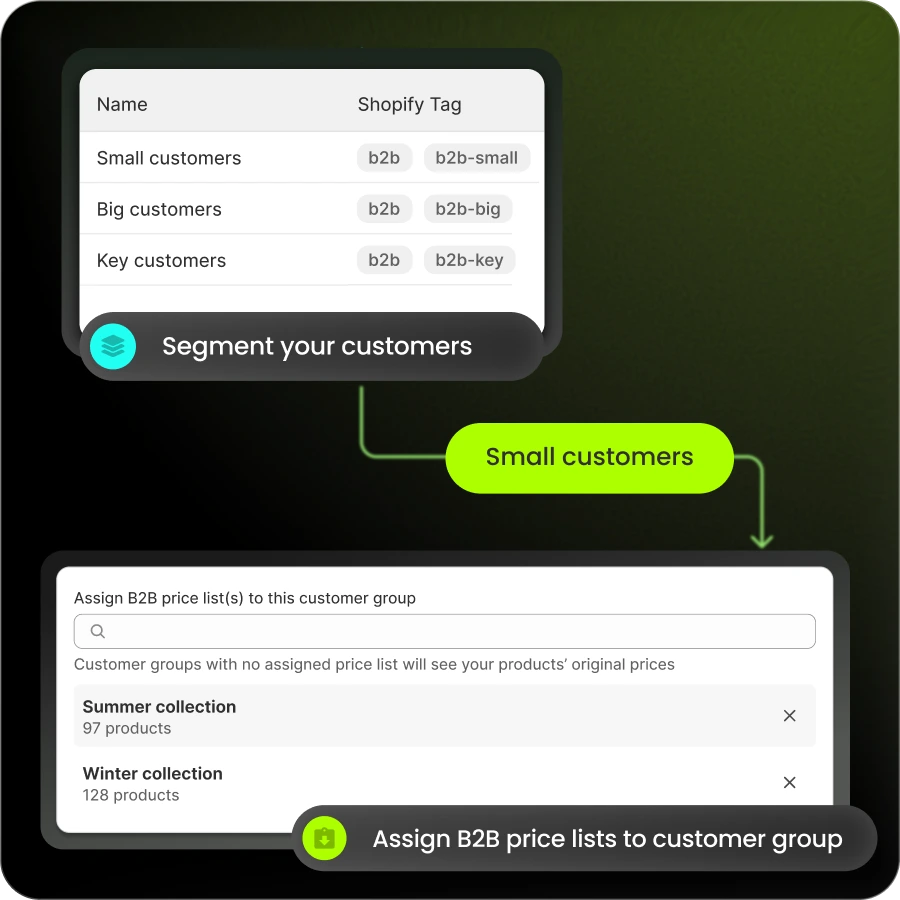
Step 2. Create wholesale customer groups by tag
Set up customer tags like “wholesale,” “distributor,” or “VIP” that identify B2B buyers. The app uses tags to determine which pricing rules apply to each customer.
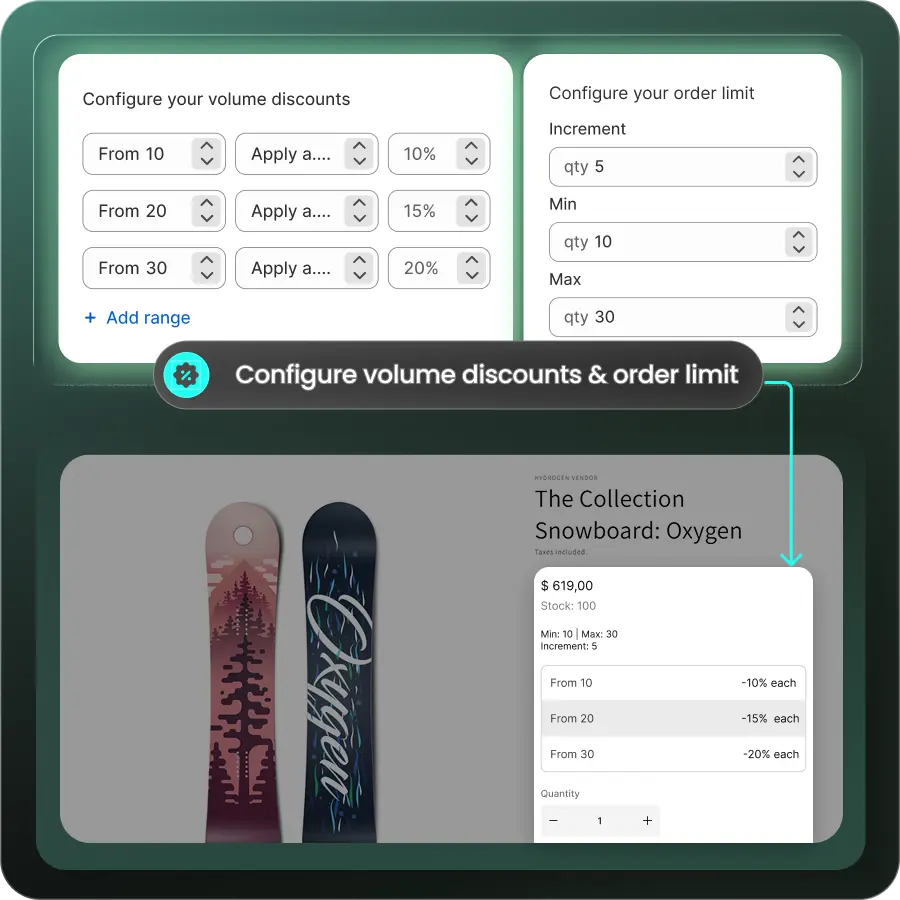
Step 3. Build volume pricing rules by product or variant
Configure quantity-based price breaks for specific products or across your entire catalog. Most apps let you set rules like “Buy 10+, get 15% off” at the product or variant level.
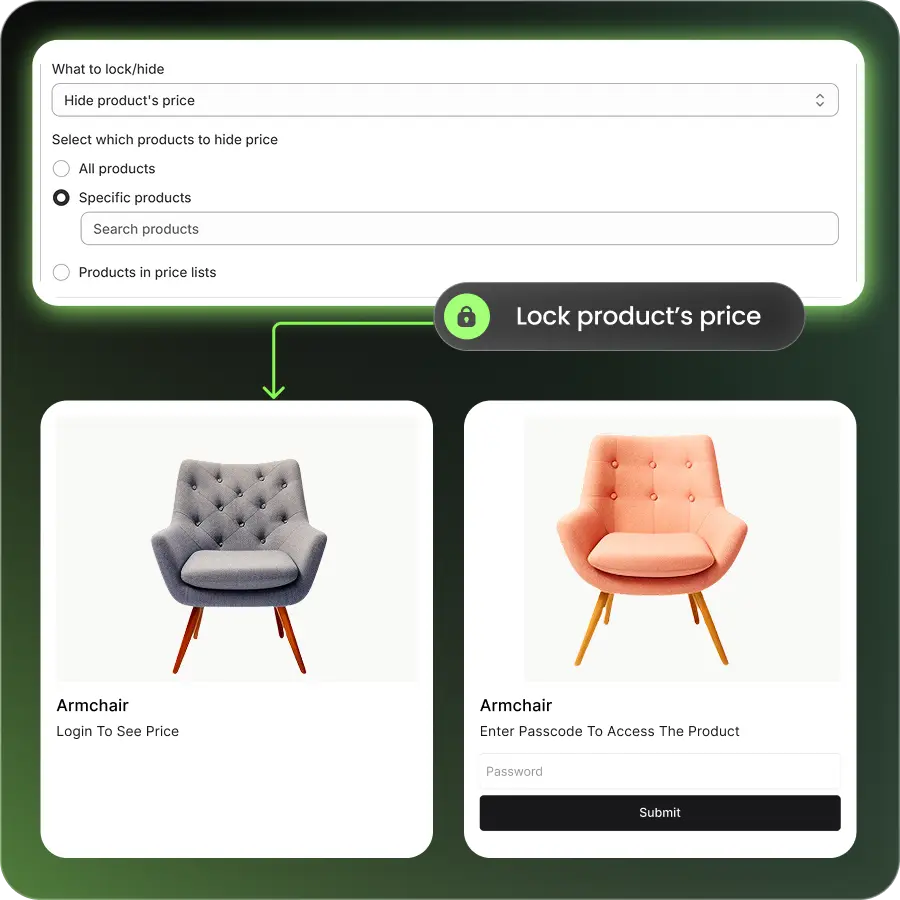
Step 4. Gate wholesale prices behind a buyer login
Ensure volume pricing only displays to logged-in, tagged wholesale customers. Retail visitors see standard prices. Configure the app to hide or lock wholesale pricing from public view.
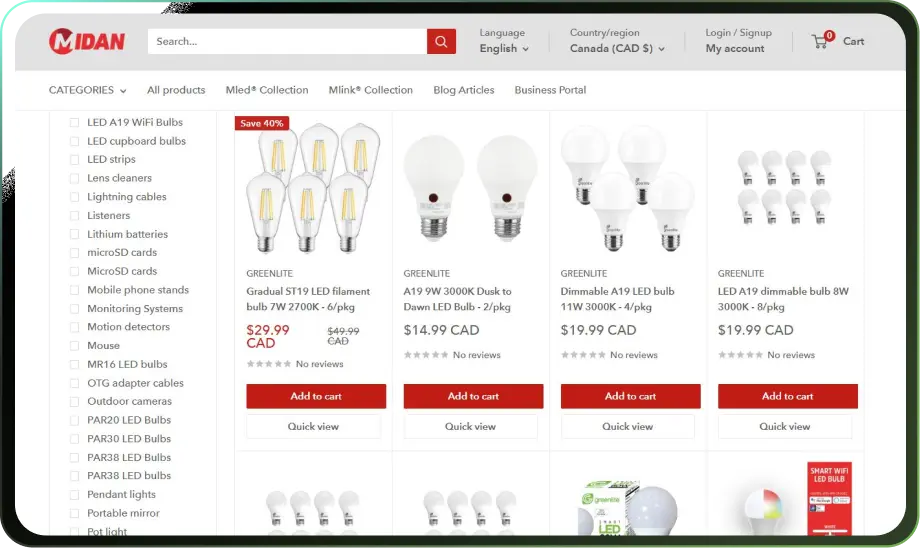
Step 5. Test the B2B buyer experience end to end
Log in as a test wholesale customer, add products at various quantities, and verify the correct prices appear in cart and checkout. Then log out and confirm retail customers don’t see wholesale pricing.
How to structure volume discount tiers that protect margin
Setting discount levels is a balancing act. You want to incentivize larger orders without giving away profit.
Start with your cost basis. Know your per-unit cost at different order sizes, including fulfillment, packaging, and shipping. Your discount tiers can then reflect the actual savings you realize when buyers order more.
- Anchor to your costs: If fulfilling 100 units costs you 8% less per unit than fulfilling 25, your discount at 100 units can reflect that savings
- Create meaningful gaps: The jump between tiers has to feel worth reaching. A 2% discount at 50 units and a 3% discount at 100 units won’t motivate buyers to double their order
- Limit complexity: Two to four tiers is usually enough. Too many tiers confuse buyers and complicate your operations
- Review regularly: Adjust tiers as your costs or competitive landscape change
Common mistakes to avoid with B2B volume discounts
A few pitfalls can undermine your volume discount program:
- Exposing wholesale prices to retail customers: Always gate B2B pricing behind a login. If retail shoppers see your wholesale prices, you’ve created a pricing problem
- Setting thresholds too low: If most orders already qualify for your first discount tier, you’re giving away margin without changing buyer behavior
- Ignoring product-level differences: Not every SKU has the same margin or fulfillment cost. A blanket discount structure across all products may not make sense
- Forgetting to test: Always verify pricing displays correctly before going live. A misconfigured price break can cost you money on every order
- Overcomplicating the structure: Buyers want to understand your tiers at a glance. If they need a spreadsheet to figure out their price, you’ve added friction
Run wholesale volume pricing and retail on one Shopify store
Many merchants want to serve both retail customers and wholesale buyers from a single Shopify store. The challenge is showing different prices to different audiences without maintaining two separate storefronts.
B2Bridge makes this possible on any Shopify plan. Retail customers see your standard pricing, while verified wholesale buyers see volume discounts, customer-specific price lists, and MOQs after logging in. You manage everything from one Shopify admin.
Beyond volume pricing, B2Bridge supports net payment terms (Net 30, Net 60), quick order forms for repeat buyers, quote-to-order workflows, and ERP integration for merchants who manage price lists in external systems.

Book a Demo to see how B2Bridge handles volume discounts for your wholesale operation.
Frequently asked questions about Shopify B2B volume discounts
Do volume discounts show up in the cart or on the product page?
In Shopify’s native B2B, volume pricing displays on the product page and updates in the cart as quantity changes. Most B2B apps also show pricing tiers on the product page so buyers know the breaks before adding to cart.
Can I combine volume discounts with net payment terms on Shopify?
Yes. Volume pricing and net terms are separate features that work together. Native Shopify B2B supports both, and most B2B wholesale apps allow you to offer payment terms alongside volume discounts.
Do Shopify volume discounts work across multiple currencies and markets?
Shopify B2B catalogs support Shopify Markets and multi-currency pricing. You can set different volume pricing for different markets or let Shopify convert prices automatically. B2B apps vary in their multi-currency support, so check before installing.
Can sales reps apply volume discounts on behalf of a B2B customer?
With Shopify B2B or a B2B app that supports sales agent portals, reps can log in on behalf of a customer and place orders with the customer’s assigned volume pricing.
How do volume discounts sync with an ERP or external price list?
Native Shopify B2B allows CSV import of volume pricing. Some B2B apps offer API integrations to sync price lists from ERP systems, so volume discounts update automatically when your source system changes.

As a Product Marketing Executive at B2Bridge, I focus on the Enterprise B2B Ecommerce domain. I leverage my understanding of product and user psychology to deliver customer-centric content that addresses business challenges and fuels growth.


