Tiered pricing is a strategy that charges different rates based on quantity or usage brackets—each tier has its own price, and buyers pay cumulatively across the tiers they reach. It’s one of the most effective ways to incentivize larger orders while protecting margin on smaller ones.
This guide covers how tiered pricing works, how it differs from volume pricing, the main models you’ll encounter, and how to calculate and implement tiers in B2B ecommerce.
What Is Tiered Pricing
Tiered pricing is a strategy that separates products or services into distinct brackets—called tiers—with different price points based on quantity, features, or usage levels. Each tier has its own rate, and buyers pay according to which bracket their purchase falls into. You’ll find this model across SaaS, wholesale distribution, manufacturing, and utilities.
The price per unit changes depending on how much someone buys. A buyer purchasing 50 units pays a different per-unit rate than someone purchasing 10, and the structure rewards larger orders without giving away margin on smaller ones.
- Distinct levels: Packages organized around quantity thresholds, feature sets, or usage caps
- Variable costing: Different rates apply to specific ranges rather than a single flat price
- Built-in incentives: Lower per-unit costs at higher volumes encourage buyers to order more

How a Tiered Pricing Model Works
Here’s where tiered pricing gets interesting. When a customer places an order, only the units within each tier are charged at that tier’s rate. Pricing is cumulative across brackets—not a single flat rate applied to everything.
Say your tiers look like this: units 1–10 cost $5 each, and units 11–20 cost $3 each. If a buyer orders 15 units, the first 10 are charged at $5 ($50 total), and the remaining 5 are charged at $3 ($15 total). The order total comes to $65.
This cumulative approach protects your margins on smaller orders while still rewarding buyers who purchase more. For B2B sellers, it creates a natural incentive for wholesale accounts to increase order sizes over time.

Tiered Pricing vs Volume Pricing
This distinction trips up a lot of people. Tiered pricing and volume pricing both offer discounts for larger orders, but they calculate those discounts very differently.
| Factor | Tiered Pricing | Volume Pricing |
|---|---|---|
| How rate applies | Each tier’s units charged at that tier’s rate | All units charged at the rate of the highest tier reached |
| Example (15 units) | 10 at $5 + 5 at $3 = $65 | All 15 at $3 = $45 |
| Best for | Incremental discounting | Rewarding large-volume buyers aggressively |
When does each model make sense? Tiered pricing works well when you want gradual incentives without giving away margin on smaller orders. Volume pricing fits better when you’re willing to discount everything once a buyer hits a threshold—common for commodity products or competitive markets.
Tier 1 vs Tier 2 Pricing
You’ll often hear references to “Tier 1” and “Tier 2” pricing, and the meaning depends on context. In quantity-based models, Tier 1 is typically the base level with the highest per-unit cost. Tier 2 kicks in once a buyer crosses a threshold, offering a reduced rate.
Some businesses use these terms differently—to denote customer segments rather than quantity brackets. A “Tier 1” customer might be a preferred wholesale account with negotiated pricing, while “Tier 2” refers to standard accounts paying list rates. However you define your tiers, document them clearly so your sales team, buyers, and systems all speak the same language.
Types of Tiered Pricing Models
Not all tiered pricing looks the same. The model you choose depends on what you’re selling and how your buyers purchase.
Volume-based tiered pricing
Discounts based on quantity purchased. This is the classic wholesale model—unit price drops after ordering 50+ units, drops again at 100+, and so on. Manufacturers and distributors use this approach to incentivize bulk orders.
Feature-based tiered pricing
Packages differentiated by what’s included. SaaS companies typically offer Basic, Pro, and Enterprise plans where higher tiers unlock additional features like API access or advanced reporting.
Usage-based tiered pricing
Pricing scales with consumption. Utilities, telecom providers, and cloud services often structure rates this way—your per-unit cost changes as you cross usage thresholds.
Subscription-based tiered pricing
Recurring plans at different price points with varying limits. A monthly subscription might offer different user seat caps, storage limits, or transaction volumes at each tier.
Tiered Pricing Examples in B2B and SaaS
Seeing real applications helps clarify how tiered pricing works in practice.
Wholesale volume tiers
A distributor offers $12 per case for orders of 1–9 cases, $10 per case for 10–24 cases, and $8 per case for 25+ cases. A B2B buyer ordering 15 cases pays $10 × 9 + $10 × 6 = $168. The tier breaks are visible at checkout, showing exactly how much they’d save by ordering more.
Good-better-best SaaS plans
A software company offers Starter at $29/month, Growth at $79/month, and Enterprise at $199/month. Each tier adds features—more users, integrations, or support levels. Buyers self-select based on their needs.
Customer group price lists
Different customer groups see different pricing structures entirely. A VIP wholesale account might see lower thresholds and steeper discounts than a standard account. This approach is common in B2B ecommerce where relationship depth varies.
How to Calculate Tiered Pricing
Setting up tiers involves more than picking arbitrary numbers. Here’s a practical process.
Step 1. Run a cost and margin analysis
Calculate your cost of goods and target profit margin for each product. Know your floor before setting tier rates—every tier still needs to be profitable.
Step 2. Conduct market and competitor research
Review competitor tier structures and industry benchmarks. What thresholds do buyers expect? What discounts are standard in your category?
Step 3. Define tier thresholds and rates
Set quantity or usage breakpoints and assign per-unit rates to each. Keep thresholds meaningful—if tiers are only a few units apart, buyers see little incentive to order more.
Step 4. Model revenue and margin impact
Project revenue and margin under different buyer scenarios. What happens if most buyers land in Tier 2? What if a large account negotiates Tier 3 rates on smaller orders?
Step 5. Roll out and communicate tiers
Publish tiers clearly to buyers. Update price lists, your storefront, and your ERP. Train your sales team on the new structure so everyone communicates consistently.
Benefits of a Tiered Pricing Strategy
- Revenue capture: Tiered pricing captures value from both low- and high-volume buyers without leaving money on the table
- Segment flexibility: One structure serves small retailers, mid-sized distributors, and enterprise accounts
- Order size incentives: Built-in motivation for buyers to reach the next tier
- Upsell path: Natural progression from entry tier to premium as buyer needs grow
Common Mistakes With Tiered Pricing
Setting tier thresholds too close together
If tiers are only a few units apart, the discount feels insignificant. Space thresholds to drive meaningful behavior—buyers want to feel rewarded for stretching to the next level.
Eroding margin with aggressive discounts
Deep discounts on upper tiers can hurt profitability, especially if most buyers land there. Always model margin impact before publishing new rates.
Ignoring customer group segmentation
One-size-fits-all tiers miss the opportunity to reward loyal or high-value accounts. Segment tiers by customer group when relationships warrant it.
Disconnected pricing across ERP and store
If tier pricing in your ERP doesn’t sync to your ecommerce store, buyers see wrong prices and orders fail. Keep systems aligned to avoid operational headaches and customer frustration.
Best Practices for a Tiered Pricing Strategy
Anchor tiers around buyer behavior
Use historical order data to set thresholds where buyers naturally cluster. If most orders land at 8 units, set your first break at 10 to nudge them upward.
Align tiers with customer groups and price lists
Map tiers to customer segments—VIP, standard, new. Use price lists to automate tier assignment so the right buyers see the right rates without manual intervention.
Use MOQs and case packs to protect margin
Minimum order quantities (MOQs) and case pack rules ensure orders hit profitable tier thresholds. Quantity increments—say, orders in multiples of 12—keep fulfillment efficient.
Sync tier pricing with your ERP and CRM
Automate price list updates through ERP and storefront integration. Manual updates invite errors and pricing mismatches that frustrate buyers and create operational drag.
Test and iterate with real sales data
Review tier performance regularly. Adjust thresholds and rates based on actual order patterns, not assumptions from six months ago.
How to Implement Tiered Pricing in B2B Ecommerce
For Shopify merchants running wholesale operations, implementation follows a clear path.
Step 1. Map customer groups and price lists
Segment customers—wholesale, retail, VIP. Assign each group to a price list with its own tier rules.
Step 2. Configure volume and quantity rules
Set tier thresholds, MOQs, and case packs in your pricing engine or app. Define what happens when buyers order quantities that don’t fit neatly into increments.
Step 3. Connect tier pricing to your ERP
Sync price lists and customer groups between Shopify and your ERP—NetSuiteSync price lists and customer groups between Shopify and your ERP—NetSuite, Odoo, Zoho, or custom systems. This keeps pricing aligned without manual intervention.
Step 4. Gate B2B prices from B2C shoppers
Hide wholesale tier pricing from retail visitors. Show B2B pricing only to logged-in, approved accounts to avoid channel conflict.
Step 5. Launch, monitor, and optimize
Go live, track order data, and refine tiers based on buyer behavior and margin performance. Tiered pricing evolves with your business—it’s not a set-and-forget configuration.
Run Tiered Pricing on Shopify With B2Bridge
If you’re running B2B on Shopify and want tiered pricing that actually works, B2Bridge handles the complexity without requiring Shopify Plus.
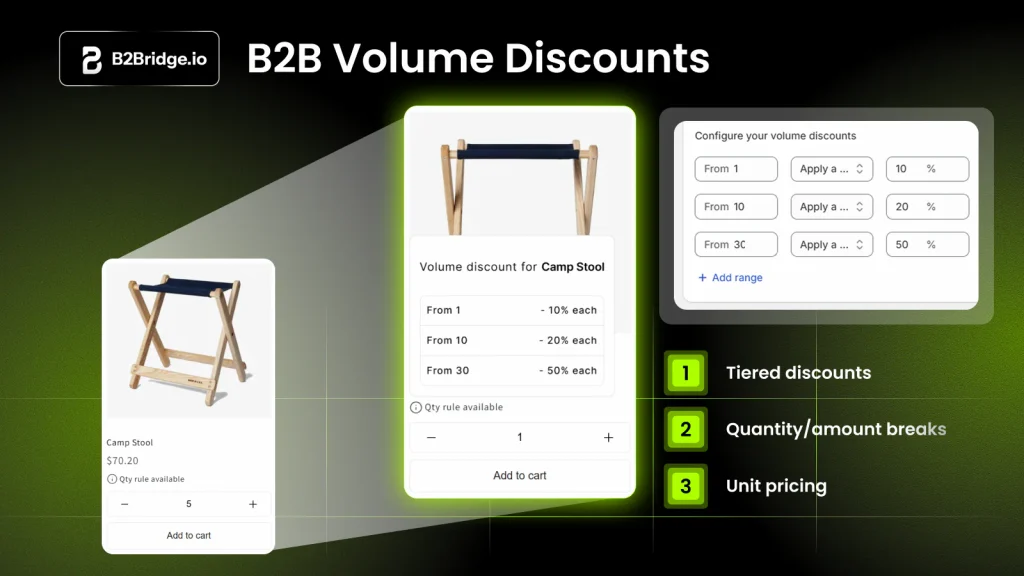
- Volume-based tier pricing: Set quantity thresholds and per-unit rates that calculate automatically at checkout
- Customer group price lists: Assign different tier structures to different buyer segments
- MOQs and case packs: Enforce minimum quantities and increments to protect margins
- ERP sync: Connect to NetSuite, Zoho, Odoo, or custom systems via API
- Hidden B2B pricing: Keep wholesale rates invisible to retail shoppers
Contact us to get expert guidance for your wholesale store.
Frequently Asked Questions About Tiered Pricing
Can I run tiered pricing on Shopify without Shopify Plus?
Yes. Apps like B2Bridge let you run tiered and customer-group pricing on any Shopify plan without requiring Shopify Plus or a separate B2B store.
How is tiered pricing different from bulk discounts?
Tiered pricing applies different rates to units within each tier cumulatively. A bulk discount typically applies one flat rate once a volume threshold is met—all units get the same price.
Can different customer groups see different tier prices?
Yes. B2B platforms allow you to assign unique price lists and tier structures to each customer group, so VIP accounts can see different rates than standard wholesale buyers.
Does tiered pricing work for small or mid-sized wholesalers?
Tiered pricing is effective for wholesalers of any size. It incentivizes larger orders and can be tailored to your product catalog and buyer segments without requiring enterprise-level complexity.
How often should tier thresholds be reviewed?
Review tier thresholds at least quarterly or whenever you see significant shifts in order patterns, costs, or competitive pricing.

As a Product Marketing Executive at B2Bridge, I focus on the Enterprise B2B Ecommerce domain. I leverage my understanding of product and user psychology to deliver customer-centric content that addresses business challenges and fuels growth.