Your wholesale buyers don’t want to email for a quote, wait for a callback, or wonder if they’re seeing the right price. They want to log in, see their negotiated rates, place an order, and move on—without involving your sales team.
That’s exactly what a well-built B2B portal delivers. This guide breaks down what B2B portals actually are, walks through seven real examples worth studying, and covers how to build self-service capabilities into your own Shopify store.
What Is a B2B Portal
A B2B portal is a secure, login-gated digital platform that facilitates transactions, collaboration, and services between businesses. Unlike a public ecommerce site where anyone can browse and buy, a B2B portal restricts access to verified business buyers who see pricing, products, and account tools tailored to their specific relationship with you.
The core features typically include contract-specific pricing, bulk ordering capabilities, and multi-tier approval workflows. Once a buyer logs in, they access their negotiated rates, order history, invoices, and self-service tools rather than generic retail information.
- Gated access: Only approved buyers log in and view pricing
- Customer-specific catalogs: Products and prices match each account’s agreement
- Self-service tools: Order history, reorders, invoices, and account management
Why B2B Portals Matter for Wholesale Self-Service
Your wholesale buyers don’t want to call a sales rep every time they reorder. They want to log in at 10 PM, check inventory, place an order against their negotiated pricing, and move on.
When customers can self-serve, your team spends less time on routine order entry. That time goes toward closing new accounts or handling complex issues instead.
- Reduced CSR workload: Buyers place and track orders themselves
- Fewer pricing errors: Contract prices pull directly from your ERP
- Faster order cycles: No waiting for email confirmations or callbacks
Types of B2B Portals You Should Know
Not every B2B portal serves the same purpose. The type you build or evaluate depends on your business model and who you’re serving.
B2B Customer and Commerce Portals
Customer portals are the most common type for wholesale and B2B ecommerce. Verified buyers browse your catalog, view their negotiated pricing, and place orders directly. You might also hear the term “B2B ecommerce portal” used interchangeably.
Distributor and Wholesale Portals
Distributor portals are designed for resellers buying in bulk. Volume-based pricing, minimum order quantities, and case pack requirements are standard. The buying experience centers on efficiency for repeat, high-volume purchases.
Supplier and Procurement Portals
Here, the relationship flips. Instead of selling to buyers, you’re managing vendors. Businesses use supplier portals to submit purchase orders, track supplier performance, and manage vendor relationships.
Partner and Dealer Portals
Channel partners, franchisees, and dealers often require more than ordering capabilities. Partner portals provide access to marketing materials, training resources, co-branded ordering, and territory-specific pricing.
7 B2B Portal Examples That Deliver Exceptional Self-Service
The best way to understand what makes a B2B portal effective is to see how leading companies have built theirs.
1. Grainger for Industrial Self-Service Ordering
Grainger’s portal sets the standard for industrial B2B self-service. Buyers search across millions of SKUs using detailed technical filters, view account-based pricing, and check real-time inventory at nearby branches.
The reorder functionality stands out. Procurement teams save lists, set up recurring orders, and quickly repurchase from order history. For industrial buyers ordering the same safety equipment monthly, this approach saves hours of repetitive work.

2. Amazon Business for Multi-Buyer Procurement
Amazon Business extends the familiar Amazon experience into B2B with features built for organizations. Multiple users within a company share an account, each with different purchasing permissions and approval limits.
The portal integrates with procurement systems and provides detailed purchase analytics. For businesses managing spend across departments, visibility and control features matter as much as product selection.

3. Alibaba for Global Wholesale Sourcing
Alibaba connects buyers with manufacturers worldwide for bulk orders. The portal includes RFQ (request for quote) capabilities, letting buyers submit specifications and receive custom pricing from multiple suppliers.
Trade assurance and secure messaging address trust challenges in cross-border B2B transactions. While the model differs from a single-brand portal, Alibaba demonstrates how self-service works even for complex, negotiated purchases.

4. Ferguson for Trade Account Management
Ferguson built its portal around how contractors and trade professionals actually work. Buyers organize purchases by job or project, save product lists for specific types of work, and arrange branch pickup.
Job tracking is particularly useful for contractors managing multiple sites. Instead of sorting through one long order history, they see exactly what was ordered for each project.

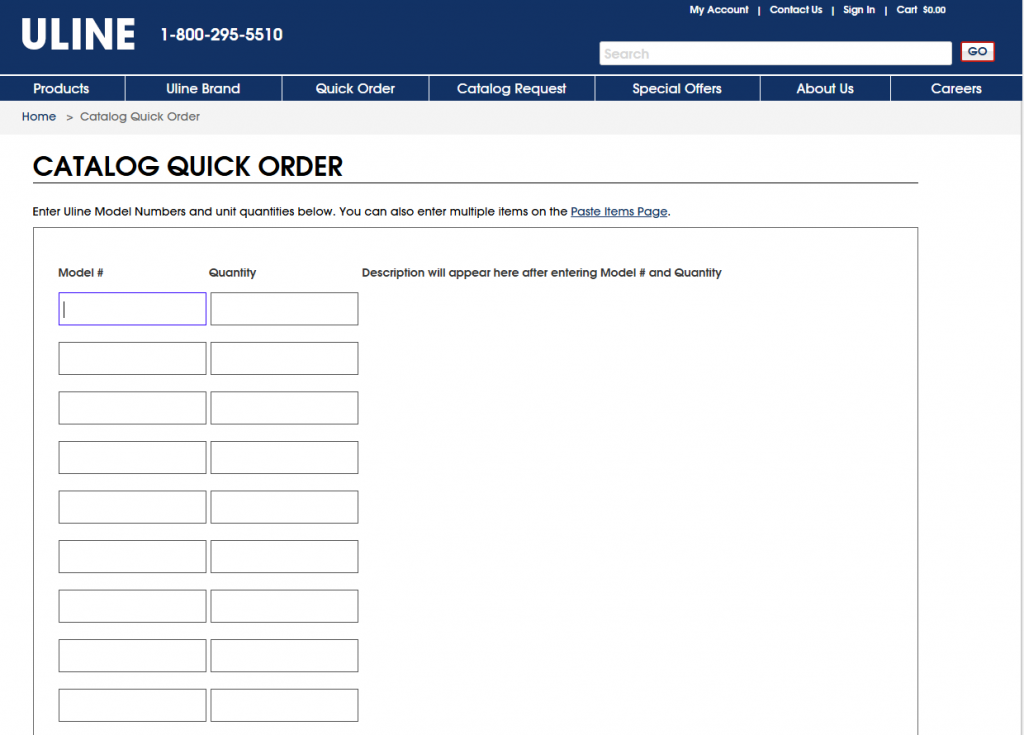
5. Uline for Quick Reorder Workflows
Uline’s portal prioritizes speed for buyers who already know what they want. The interface is straightforward, reorder tools are prominent, and same-day shipping messaging reinforces urgency.
For repeat B2B buyers like office managers ordering shipping supplies monthly, Uline removes friction from the reorder process. Less browsing, more buying.
6. Fastenal for Vendor-Managed Inventory
Fastenal takes B2B self-service beyond the portal itself. Their system supports vendor-managed inventory programs and integrates with on-site vending machines that dispense industrial supplies.
The portal becomes a management layer for inventory programs, letting customers track consumption, set reorder points, and manage inventory across locations.

7. Berlin Packaging for Quote-to-Order Buying
Berlin Packaging serves buyers who require custom packaging solutions rather than off-the-shelf products. Their portal supports a consultative RFQ process where buyers submit requirements and receive tailored quotes.
The quote-to-order workflow handles custom manufacturing complexity while still giving buyers self-service access to quotes, order status, and account history.

Common Features Behind Every Great B2B Portal
Looking across the examples above, certain capabilities appear consistently. If you’re evaluating or building a B2B portal, the following features separate functional from exceptional.
Customer-Specific Pricing and Contract Price Lists
Every example displays pricing based on the logged-in buyer’s account. Pricing might mean tiered volume discounts, negotiated contract rates, or customer group pricing. Generic retail prices don’t appear.
For your operation, the portal connects to wherever you manage pricing, whether that’s your ERP, a dedicated pricing engine, or the portal platform itself.
ERP and CRM Integration
Portals that work smoothly behind the scenes connect to backend systems. When a buyer places an order, it flows directly into your ERP. When inventory changes, the portal reflects it immediately.
Without integration, you’re stuck with manual data entry and reconciliation, exactly the operational burden a portal is supposed to eliminate.
Quick Order and Reorder Tools
B2B buyers often know exactly what they want. Quick order features let them enter SKUs directly, upload a CSV of items, or reorder from previous purchases with a single click.
Quote-to-Order and RFQ Workflows
Not every B2B transaction has a fixed price. RFQ functionality lets buyers submit requests for custom pricing, which you review, adjust, and convert into an order. RFQ stands for “request for quote.”
Net Payment Terms and Credit Limits
B2C checkout expects immediate payment. B2B buyers expect terms like Net 30 or Net 60. A proper B2B portal displays available credit, supports invoicing, and tracks payment status.
Company Accounts With Roles and Approvals
Larger buyers often have multiple people involved in purchasing. Company accounts let you set up different roles: buyers who add to cart, approvers who authorize purchases, and admins who manage the account.
B2B Portal vs B2B Ecommerce Site vs Wholesale Store
The terms get used interchangeably, but they describe different things.
| Feature | B2B Portal | B2B Ecommerce Site | Wholesale Store |
|---|---|---|---|
| Access | Login-gated, approved buyers only | May be public or gated | Typically gated |
| Pricing | Customer-specific, contract-based | May be fixed or tiered | Tiered by customer group |
| Account tools | Full self-service (invoices, reorders, quotes) | Varies | Basic account features |
| ERP integration | Deep sync typically required | Optional | Optional |
A B2B portal emphasizes the self-service account experience. A B2B ecommerce site might simply be a website that sells to businesses. A wholesale store often refers to a separate storefront for bulk buyers.
How to Build a B2B Self-Service Portal on Shopify
You don’t require Shopify Plus or a separate platform to run a capable B2B portal. With the right approach, you can add enterprise-grade B2B functionality to a standard Shopify store.
Step 1. Map Your Pricing Rules and Customer Groups
Start by documenting how you actually price for different buyers. Do you have tiered volume discounts? Contract rates for specific accounts? Customer groups with different base pricing?
This mapping becomes the foundation for your B2B pricing engine.
Step 2. Connect Your ERP and CRM
Identify which systems hold your customer records, price lists, and inventory data. Common integrations include NetSuite, Zoho, Odoo, and custom ERPs.
The goal is bidirectional sync: orders flow from the portal to your ERP, and pricing or inventory updates flow back.
Step 3. Configure Quote, Reorder, and Net Terms Workflows
Decide which B2B workflows your buyers require. Quick order pages speed up repeat purchases. RFQ functionality handles custom pricing requests. Net payment terms let approved buyers pay on invoice.
Step 4. Launch a Unified B2B and B2C Storefront
Running B2B and B2C on a single Shopify store means buyers see the appropriate experience based on login status. Public visitors see retail pricing or no pricing at all. Verified wholesale buyers see their negotiated rates and B2B tools.
This approach avoids the operational overhead of maintaining two separate stores.
Choosing the Right B2B Portal Platform for Your Wholesale Business
The platform you choose shapes what’s possible. When evaluating options, focus on the following criteria:
- Pricing flexibility: Can it handle your specific pricing rules like contract, tiered, volume, and multi-currency?
- Integration depth: Does it connect to your ERP and CRM without extensive custom development?
- B2B UX: Does it offer quick order, quotes, net terms, and company accounts?
- Implementation support: Will the vendor help you launch and scale, or simply hand off software?
Outcome: The right platform reduces operational friction and lets your wholesale buyers self-serve confidently.

Book A Demo to see how B2Bridge embeds enterprise B2B operations directly into Shopify.
Frequently Asked Questions About B2B Portal Examples
What is the best B2B portal for wholesale businesses?
The best portal depends on your pricing complexity, ERP requirements, and buyer expectations. Platforms like Grainger and Amazon Business serve specific markets well. For Shopify merchants, solutions like B2Bridge add enterprise B2B functionality without requiring a platform change.
How much does it cost to build a B2B portal?
Costs range from affordable Shopify app subscriptions to custom enterprise builds depending on integration depth, pricing complexity, and required features.
Can you run a B2B portal on Shopify without Shopify Plus?
Yes. Apps like B2Bridge add customer-specific pricing, net terms, quick order, and ERP sync to standard Shopify plans without requiring Plus.
How long does it take to launch a B2B self-service portal?
With the right platform and implementation support, a functional B2B portal can launch in days to weeks rather than months. Complex ERP integrations or custom workflows may extend the timeline.
What is the difference between a B2B portal and a B2B marketplace?
A B2B portal serves your own buyers with your own products and pricing. A B2B marketplace like Alibaba connects multiple sellers with multiple buyers on a shared platform. You control everything in a portal; you’re one of many vendors in a marketplace.

As a Product Marketing Executive at B2Bridge, I focus on the Enterprise B2B Ecommerce domain. I leverage my understanding of product and user psychology to deliver customer-centric content that addresses business challenges and fuels growth.