What Are Customer-Specific Price Lists in Shopify?
A customer-specific price list is a set of prices tied to a specific customer or customer group, so logged-in buyers see their own prices instead of your retail prices. When a verified wholesale buyer logs into your Shopify store, they see the negotiated rates you agreed on, while retail shoppers see standard pricing.
This solves a core problem for wholesale sellers: without customer-specific pricing, you end up emailing quotes and manually adjusting orders after checkout. A price list automates that process.
In Shopify’s vocabulary, a “price list” holds the actual prices (fixed amounts or percentage discounts), while a “catalog” controls which products a buyer can see. Together, they let you offer different custom pricing models to different buyer segments from a single storefront.
Why Customer-Specific Pricing Matters for B2B Sellers
B2B buyers expect to log in and see the prices you negotiated, not a generic retail price followed by a phone call. According to Sana Commerce’s own commissioned 2025 B2B Buyer Report, 64% of buyers say accurate, agreed-upon pricing online is crucial when ordering.
The shift toward self-serve buying is accelerating. Gartner found that 61% of B2B buyers prefer an overall rep-free buying experience. If your wholesale customers can’t see their prices and place orders without calling a rep, you lose orders to competitors who offer that convenience.
The market opportunity is substantial. The global B2B ecommerce market is valued at USD $36 trillion by 2026 and will grow at a 14.5% compound annual growth rate through 2026. Merchants who set up accurate, gated pricing now position themselves to capture that growth while protecting margins from price leakage.
The Two Ways to Set Up Customer-Specific Pricing
Shopify merchants have two paths to customer-specific pricing: native Shopify B2B features or a third-party B2B app. The right choice depends on your Shopify plan, the complexity of your pricing, and how you manage customers.
Native Shopify B2B uses catalogs and price lists tied to company accounts. A B2B app, on the other hand, can add tag-based price lists, per-variant pricing, and price gating to any Shopify plan.
Option 1: Native Shopify B2B (Catalogs and Price Lists)
Shopify’s native B2B features let you create catalogs (which control product visibility) and price lists (which control pricing) assigned to company accounts. This is the built-in route for merchants on Shopify Plus or using Shopify’s B2B on Shopify features.
With native Shopify B2B price lists, you create a company record for each wholesale buyer, attach a catalog, and set the price list within that catalog. The buyer logs in, sees only the products and prices you assigned, and checks out at those rates.
This approach works well if your pricing is straightforward (percentage discounts or fixed prices per product) and you’re already on a plan that includes B2B features. It becomes harder to manage when you need per-variant pricing, customer-tag segmentation, or price lists for hundreds of buyers without company accounts.
Option 2: A B2B App (Including Without Shopify Plus)
B2B apps like B2Bridge add customer-specific pricing to any Shopify plan, including stores not on Shopify Plus. Instead of requiring company accounts, apps often use customer tags to assign price lists, which gives you more flexibility in how you segment buyers.
Apps can also offer features beyond native B2B: per-variant pricing (different prices for size or color variants), price hiding for logged-out visitors, volume and tiered discounts, and CSV bulk management for large catalogs.
If you want B2B without Shopify Plus, or you need tag-based segmentation and per-variant control, a B2B app is the practical path. Many manufacturers and distributors choose an app because it fits their existing workflows and doesn’t require migrating to company accounts.
Step-by-Step: Set Up a Customer-Specific Price List
The workflow below applies whether you use native Shopify B2B or a B2B app. The interface differs, but the logic is the same: segment customers, build a price list, set rules, assign it, gate it, and test it.
Step 1: Segment Your Customers
Before you create a price list, decide how you’ll group buyers. Common approaches include:
- Customer tags: Assign tags like “wholesale” or “distributor” in Shopify’s customer admin. Apps use these tags to show the right price list.
- Company accounts: Native Shopify B2B uses company records. Each company can have multiple buyer logins and locations, each with its own catalog assignment.
Segmentation comes first because every other step depends on it. If you skip this and create a price list without a clear group, you’ll end up reassigning customers later.

Step 2: Choose Your Pricing Model
Customer-specific pricing can take several forms. Pick the model that matches how you actually negotiate with buyers:
- Percentage discount: A flat percentage off retail (e.g., 30% off for all distributors). Simple to set up and easy for buyers to understand.
- Fixed price: A specific dollar amount per product or variant. Use this when you’ve negotiated exact prices with a buyer.
- Per-variant pricing: Different prices for different variants (sizes, colors, pack counts). Useful for apparel, food, and products with meaningful variant cost differences.
- Tiered pricing: Price breaks based on quantity. For example, $10 each for 1–49 units, $8 each for 50–99 units, $6 each for 100+.
Many merchants combine models. You might offer a baseline percentage discount to all wholesale buyers, then layer in tiered pricing for high-volume SKUs.

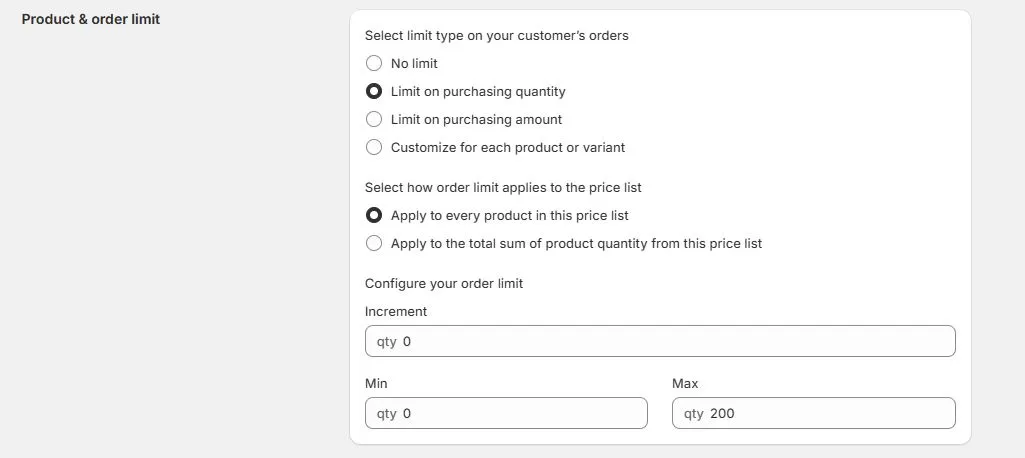
Step 3: Set Quantity Rules
B2B orders often have constraints retail orders don’t. Set these rules alongside your prices:
- Minimum order quantities (MOQs): Require buyers to order at least a set number of units per product or per order. This protects margins on low-volume items.
- Quantity increments (case packs): Force orders in multiples, like 6 or 12, to match how you ship.
- Maximum limits: Cap how much a buyer can order, useful for limited inventory or promotional items.
- Order minimums: Set a minimum cart total or unit count before a buyer can check out.
These rules appear at the product page and cart, so buyers know the requirements before checkout.
Step 4: Assign, Gate, and Bulk-Manage
Once your price list is built, connect it to the right customers.
- Assign to customers or companies: In native B2B, assign the catalog to a company location. In an app, assign the price list to a customer tag.
- Gate prices behind login: Hide wholesale prices from logged-out visitors. This protects your margins and prevents retail customers from seeing discounts they don’t qualify for.
- Bulk-manage with CSV: If you have hundreds or thousands of SKUs, manual entry doesn’t scale. Use import and export price lists via CSV or connect your ERP to push prices automatically.
- Test as a buyer: Log in with a test account from the assigned group and walk through the full purchase flow.
Confirm they see the correct prices, quantity rules, and product visibility before going live.

Native Shopify vs. a B2B App: Which Should You Choose?
The table below compares native Shopify B2B and a B2B app across the factors that matter most for customer-specific pricing.
| Factor | Native Shopify B2B | B2B App (e.g., B2Bridge) |
|---|---|---|
| Plan requirement | Shopify Plus or B2B on Shopify | Any Shopify plan |
| Customer segmentation | Company accounts and locations | Customer tags, companies, or tiers |
| Pricing models | Percentage discount, fixed price | Percentage, fixed, per-variant, tiered/volume |
| Per-variant pricing | Limited | Full support |
| Price gating (hide from retail) | Via catalog visibility | Explicit price hiding and locking |
| Quantity rules | MOQs at catalog level | MOQs, increments, maximums per product |
| Bulk management | Limited CSV support | Full CSV import/export |
| ERP/API integration | Via Shopify APIs | Direct ERP connectors and API-managed price lists |
Choose native Shopify B2B if: You’re on Shopify Plus, your pricing is straightforward (percentage discounts or fixed prices), and you prefer working with company accounts.
Choose a B2B app if: You’re not on Shopify Plus, you need per-variant or tiered pricing, you use customer tags instead of company accounts, or you need CSV and ERP-driven price list management.
Common Mistakes to Avoid
Setting up price lists is straightforward, but a few mistakes trip up merchants repeatedly.
- Showing wholesale prices to retail shoppers: If you don’t gate your price lists behind login, anyone can see your wholesale rates. This undercuts your retail channel and confuses buyers.
- Skipping the buyer login test: Always log in as a customer from each segment and walk through the full shopping flow. Confirm prices, quantity rules, and checkout all work as expected.
- Forgetting quantity rules: If you ship in case packs or require minimums, set those rules in the price list. Otherwise, you’ll process orders you can’t fulfill profitably.
- Managing prices in disconnected spreadsheets: If your “source of truth” is a spreadsheet that doesn’t sync to Shopify, prices will drift. Use CSV import/export or ERP integration to keep your store and records aligned.
Frequently Asked Questions
B2B ecommerce is growing fast: according to McKinsey, 71% of B2B respondents offer some form of e-commerce, and online sales now account for 34 percent of revenue. Forrester predicts more than half of large B2B transactions (US$1 million or greater) will be processed through digital self-serve channels, including the vendor’s website or marketplace. These questions address common concerns about setting up pricing for that shift.
What is customer-specific pricing in Shopify?
Customer-specific pricing lets you show different prices to different buyers based on their customer group, company account, or tag. A logged-in wholesale buyer sees their negotiated rates while retail shoppers see standard prices.
How do I set customer-specific pricing in Shopify?
Segment your customers into groups, create a price list with your pricing model (percentage, fixed, or tiered), set quantity rules, assign the price list to the right customers, and gate prices behind login.
Do I need Shopify Plus for customer-specific price lists?
No. Native Shopify B2B features work best on Shopify Plus, but B2B apps like B2Bridge add customer-specific price lists to any Shopify plan.
What are the different types of price lists?
The main types are percentage-based (a flat discount off retail), fixed-price (a specific dollar amount per product), per-variant (different prices for sizes or colors), and tiered/volume (price breaks at quantity thresholds).
How do I stop retail customers from seeing wholesale prices?
Gate your price lists behind login so only signed-in buyers see wholesale rates. With native B2B, catalogs are visible only to assigned company buyers, and with a B2B app you can enable price hiding so logged-out visitors see retail prices or no price at all.
Ready to set up customer-specific pricing? B2Bridge adds wholesale price lists, customer tagging, volume discounts, MOQs, price gating, and CSV bulk management to any Shopify store, without Shopify Plus. Start your free trial and give your B2B buyers the pricing experience they expect.


As a Product Marketing Executive at B2Bridge, I focus on the Enterprise B2B Ecommerce domain. I leverage my understanding of product and user psychology to deliver customer-centric content that addresses business challenges and fuels growth.


