Yes, you can run Shopify B2B without Plus. Since April 2026, native B2B is included on Basic, Grow and Advanced at no extra cost. You get company accounts, B2B catalogs, quantity rules, net payment terms and a buyer portal. The main limit is three active catalogs across all your B2B markets.
That makes the real question narrower than it used to be. This guide shows what native B2B covers on your plan, how to set it up in six steps, and the point where an app or Plus starts to make sense. If you want the full feature picture first, start with how Shopify B2B works.
Can You Use Shopify B2B Without Plus?
Yes. Shopify extended its native B2B features to Basic, Grow and Advanced on 2 April 2026, according to Shopify’s announcement. Before that date, company accounts and B2B catalogs were Plus-only, which is why older guides tell you to rebuild wholesale with customer tags and apps.
That tag-based workaround is now optional. Most wholesale basics run natively on every paid plan, and checkout already knows which buyer it’s dealing with.
Plus still adds things that matter at scale:
- unlimited B2B catalogs
- catalogs assigned directly to a company or location
- deposits, partial payments and payment requests per fulfillment
- deeper checkout customization
A merchant with a few trade accounts on similar terms can launch without Plus. A merchant pricing dozens of accounts individually will hit the ceiling fast.
What Native B2B Includes Below Plus
Native B2B on Basic, Grow and Advanced covers the account, catalog and checkout side of wholesale. The table below comes from Shopify’s B2B features by plan page, read on 1 October 2026.
| Feature | Basic / Grow | Advanced | Plus |
|---|---|---|---|
| Companies, locations, buyer permissions | Yes | Yes | Yes |
| B2B catalogs | 3 active | 3 active | Unlimited |
| Direct catalog assignment to a company | No | No | Yes |
| Quantity rules and price breaks | Yes | Yes | Yes |
| Net terms and payment reminders | Yes | Yes | Yes |
| ACH (US only) and vaulted cards | Yes | Yes | Yes |
| PO numbers, draft order to invoice | Yes | Yes | Yes |
| Quick order list, easy reorders | Yes | Yes | Yes |
| Contextual checkout and storefront | No | Yes | Yes |
| Deposits and partial payments | No | No | Yes |
The gap between Basic and Advanced is small. Advanced adds contextual checkout and storefront through Shopify Markets, which lets B2B buyers see a different checkout or theme experience. Everything else in the first eight rows works the same on all three plans.
How the Three-Catalog Limit Works
Below Plus, you can have three active B2B catalogs across all your B2B markets combined. The cap isn’t per market. Assigning three catalogs to one market uses the whole allowance, so a second market can’t get its own pricing until you remove or draft one.
Here’s how that plays out for a typical hybrid brand:
| Buyer group | Catalog | Uses |
|---|---|---|
| Distributors | 40% off retail | 1 of 3 |
| Independent retailers | 30% off retail | 2 of 3 |
| Key accounts | Fixed contract prices | 3 of 3 |
| EU retailers | No room left | Blocked |
Three groups is enough for many wholesale programs. It’s also where most growing brands stall. A fourth pricing tier, a regional price list or a single contract customer all need a catalog you don’t have. Catalogs also attach to markets, so every buyer in a market shares that market’s catalogs.
How to Set Up Shopify B2B Without Plus
Setting up native B2B takes six steps in the Shopify admin, in this order. The Shopify B2B launch checklist covers the full pre-launch review.
1. Switch to New Customer Accounts and New Markets
Native B2B only works with new customer accounts, and catalogs below Plus need the new Shopify Markets. Turn both on first. Legacy customer accounts won’t show B2B pricing to company buyers.
2. Create a B2B Market and Your Companies
Create a B2B market, then add each wholesale customer as a company with its locations and buyers. Payment terms, tax exemptions and catalog access attach per location, so set those up now.

3. Build Up to Three Catalogs
Create one catalog per pricing level. Set prices as a percentage off retail or a fixed price per variant, then add minimums, increments and quantity price breaks. Our guide to Shopify B2B price lists walks through each setting.

4. Set Payment Terms and Checkout Options
Assign net terms per location, from Net 7 to Net 90. Add ACH or vaulted cards where buyers pay upfront. You can also have checkout create a draft order, so you approve large orders before they ship.

5. Turn On Buyer Self-Service
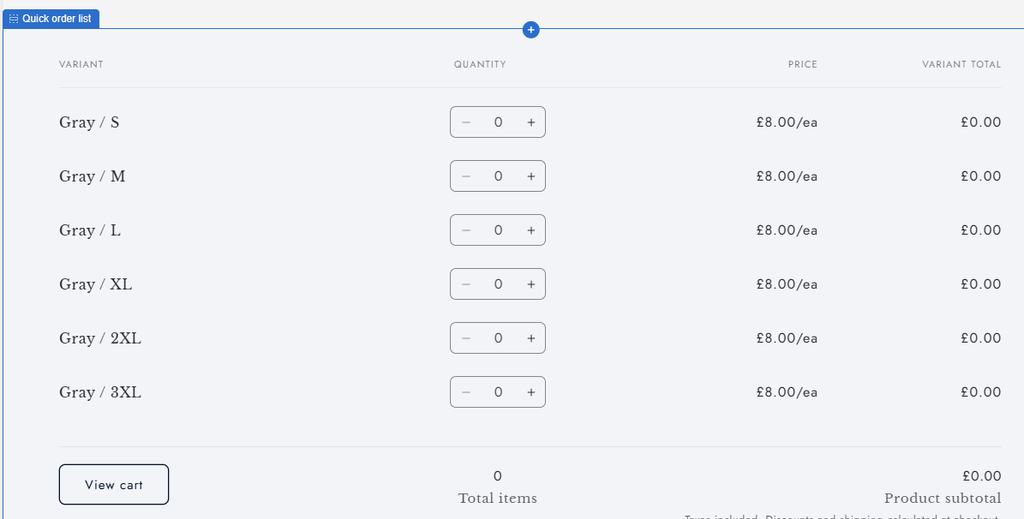
Add the quick order list block to product pages, and make sure the customer account page shows past orders for reordering. The free Trade theme ships with B2B layouts if you’re building a dedicated wholesale storefront.
6. Test as a Buyer Before Launch
Log in as a test buyer for each catalog. Confirm prices, quantity rules, payment terms and order emails. Then check that a logged-out visitor still sees retail pricing only.
Where Native B2B Stops Below Plus
Native B2B handles accounts and checkout well. The gaps appear on the storefront and in sales workflows, and none of them close by upgrading from Basic to Advanced.
| Gap | What it means day to day |
|---|---|
| More than three price levels | A fourth tier or a contract customer has no catalog |
| Per-account pricing | Catalogs attach to markets, so buyers in one market share prices |
| Application and approval | No built-in wholesale signup form or approval queue |
| Hiding prices from guests | Logged-out visitors can’t be shown “log in to see prices” natively |
| Quotes | No request-for-quote flow, only draft orders your team builds |
| Credit limits | Net terms work, but nothing caps how much a buyer can owe |
| Rep ordering | Sales staff can create draft orders, with no rep view or commission tracking |
Which of these hurts first depends on how you sell. Brands that recruit new stockists usually feel the approval gap first, and our guide to the Shopify registration form covers workarounds. Brands with negotiated pricing feel the catalog cap first.
When to Add an App Instead of Upgrading to Plus
What happens when you need a fourth price level? You have two paths: upgrade to Plus for unlimited catalogs, or keep your plan and add a B2B app that manages pricing outside Shopify’s catalog limit.
| Setup | Monthly cost | Price levels | Best for |
|---|---|---|---|
| Native B2B on Basic | $39 plan, B2B included | 3 catalogs | A few trade accounts on similar terms |
| Native B2B on Advanced | $399 plan, B2B included | 3 catalogs | Stores needing a separate B2B checkout look |
| Shopify Plus | About $2,300 | Unlimited | Large operations using Plus-only checkout and payments |
| Your plan + B2B app | Plan + app fee | Unlimited with B2Bridge | Many price levels without a platform change |
Shopify plan prices are monthly-billing US rates from Shopify’s pricing pages. Check them for your country before deciding. The Shopify B2B pricing breakdown covers annual billing too.
Plus makes sense when you need deposits, partial payments or deep checkout control alongside unlimited catalogs. If unlimited pricing is the only reason, an app costs far less. The Shopify B2B vs Shopify Plus comparison goes deeper on that decision.
Run Unlimited B2B Pricing on Any Plan with B2Bridge
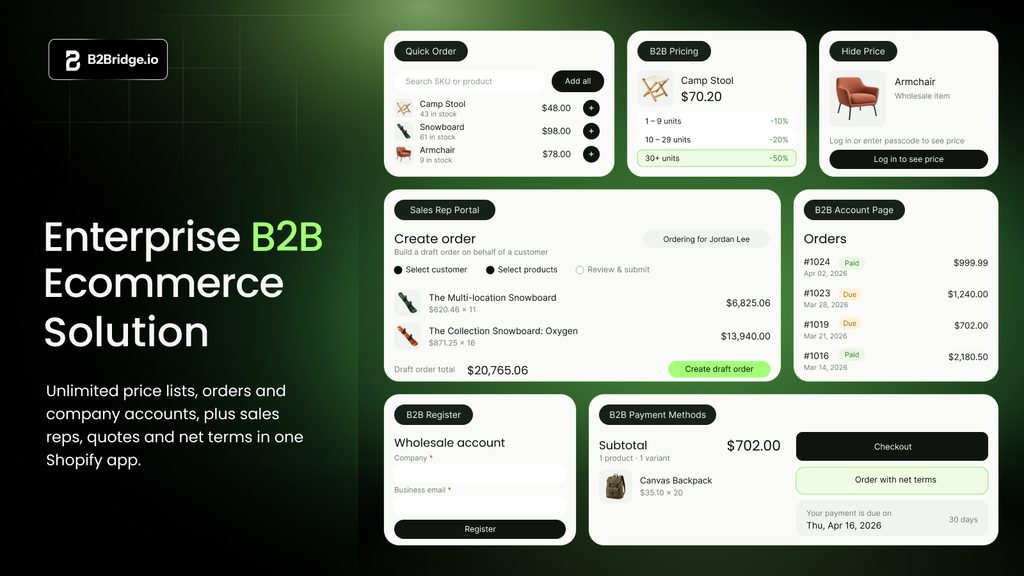
B2Bridge removes the catalog ceiling first. You get unlimited price lists, customer groups and B2B orders on a flat monthly plan, so adding a fifth tier or a single contract buyer doesn’t force an upgrade.
It also runs the rest of your wholesale program from one app. That includes a wholesale registration form with approval, login-to-see-price locks, volume pricing, quick order and net terms. Growth adds credit limits, quotes and a Sales Rep Portal for ordering on behalf of buyers. Advanced adds the Public API for ERP sync with NetSuite, Zoho or Odoo.
Plans start at Professional $99 a month, with Growth at $199 and Advanced at $299, after a 14-day free trial. Retail and wholesale stay in one Shopify admin on the plan you already pay for.
Book a Demo to see B2Bridge running on your store.
FAQs About Shopify B2B Without Plus
Do you need Shopify Plus for B2B?
No. Native B2B has been included on Basic, Grow and Advanced since April 2026. You need Plus only for unlimited catalogs, direct company catalogs, deposits, partial payments or deeper checkout customization.
Is Shopify B2B available on the Basic plan?
Yes. Basic includes companies, up to three active B2B catalogs, quantity rules, net terms, ACH in the US and the quick order list. Advanced adds contextual checkout and storefront through Shopify Markets.
How many B2B catalogs can you have without Plus?
Three active catalogs across all B2B markets combined. The limit isn’t per market, so three catalogs on one market use the whole allowance until you remove or draft one.
Can you offer net terms without Shopify Plus?
Yes. Net terms from Net 7 to Net 90, plus due on fulfillment, work on every paid plan. Native terms don’t enforce credit limits, so buyers can keep ordering while invoices stay unpaid.
Can you hide wholesale prices without Plus?
Not natively. B2B prices show only to logged-in company buyers, but guests still see retail prices. To show “log in to see prices” or lock products, you’ll need an app such as B2Bridge.

Hi, I’m Ha My Phan – an ever-curious digital marketer crafting growth strategies for Shopify apps since 2018. I blend language, logic, and user insight to make things convert. Strategy is my second nature. Learning is my habit. And building things that actually work for people? That’s my favorite kind of win.


