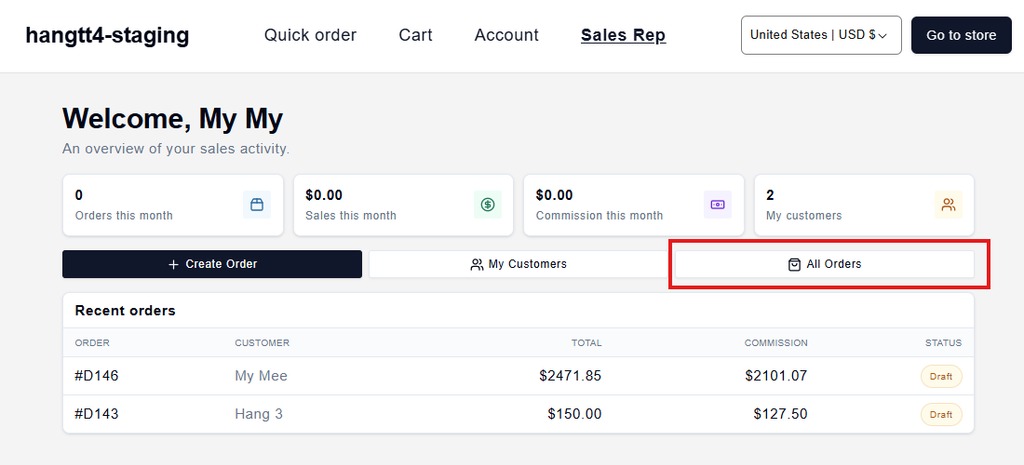
A Shopify sales rep portal is a dedicated workspace where your sales team logs in to place orders on behalf of assigned wholesale customers, using each account’s own pricing and payment terms. Reps build carts or quotes, push them into Shopify as orders, and track commissions, all without the buyer touching the storefront.
Most Shopify orders start with a shopper clicking “add to cart.” Wholesale rarely works that way. A rep knows the account, knows the reorder, and enters it for them. This guide covers what a rep portal is, how it works on Shopify, native options versus dedicated apps, setup, and cost.
What Is a Shopify Sales Rep Portal
A Shopify sales rep portal is a secure area where reps order on behalf of their assigned wholesale accounts, at each account’s negotiated prices, instead of the buyer self-serving at checkout. It’s where phone and email orders finally live in one place, and every order links to the rep who made it.
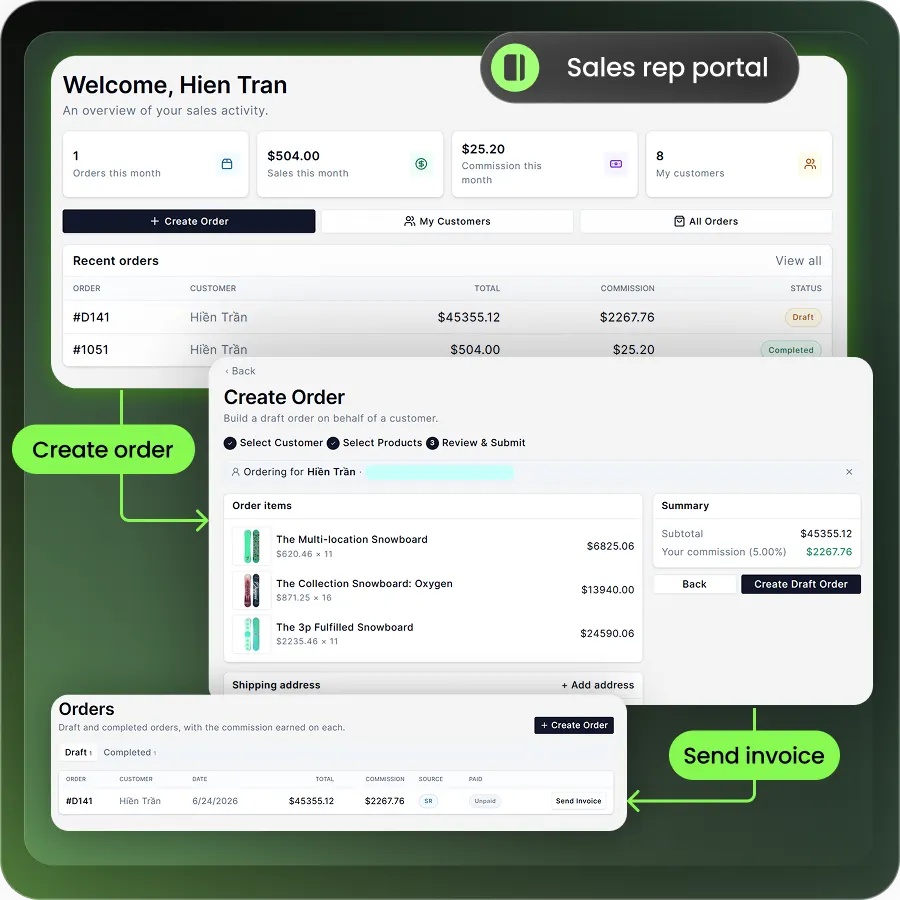
Think of it as a cockpit for your sales team. The rep sees only their accounts, the right wholesale prices, and real-time stock. They build the order, send a quote, or convert it straight to a Shopify order. The buyer doesn’t have to log in or learn your storefront.
How a Sales Rep Portal Works on Shopify
A rep portal works by turning a rep-built cart into a real Shopify order tied to a company account. The rep does the entry, and Shopify handles pricing, terms, and fulfillment. Here’s the typical flow.
- Log in and pick an account. The rep signs in and selects one of their assigned companies. Only their accounts appear.
- Build the cart at account pricing. They add products, and the buyer’s price list and payment terms apply automatically.
- Create a quote or a draft order. For negotiation, the rep sends a quote. For a confirmed order, they build a draft order.
- Convert and fulfill. The buyer pays an invoice link, or the rep marks it paid. The order moves into standard Shopify fulfillment.
- Record the commission. The order is attributed to the rep so commission can be calculated.
Outcome: orders reach Shopify accurately the first time, with no re-keying between a phone call and the admin.
Want the wider picture? See how a full Shopify B2B portal fits around rep ordering.
Core Features of a Shopify Sales Rep Portal
A good rep portal covers five things: ordering, pricing, quoting, commissions, and access control. Miss one and your team fills the gap with spreadsheets. Here’s what to look for.
- Order on behalf of customers. Reps build and submit orders for assigned accounts from any device.
- Account-specific catalogs and pricing. Each rep sees the buyer’s price list, volume tiers, and hidden retail prices.
- Quote creation. Reps send a request for quote or a draft, then convert it to an order once approved.
- Commission tracking. The portal attributes each order to a rep and calculates commission automatically.
- Rep assignment and permissions. Admins assign reps to specific accounts so each rep sees only their book of business.
Together these features replace the manual back-and-forth that slows most wholesale teams down.
Native Shopify Sales Staff vs a Dedicated Rep Portal App
Shopify supports sales-assisted ordering natively, but it stops short of a full rep portal. Since April 2026, native B2B features like company accounts, price lists, and sales staff permissions are available on standard Shopify plans, not just Plus. Reps get roles, assigned companies, and draft orders in the admin.
So what’s missing? Shopify gives no rep-facing branded portal, no built-in commission tracking, and no native sync to your ERP. Reps work inside the admin, and you’re left tracking commissions in a separate spreadsheet.
| Capability | Native Shopify sales staff | Dedicated rep portal app |
| Order on behalf of a customer | Yes, via draft orders in admin | Yes, in a rep-facing portal |
| Account-specific pricing and terms | Applied automatically on B2B drafts | Applied automatically |
| Assigned accounts and permissions | Yes, up to 10 staff per location | Yes |
| Commission tracking | No | Yes |
| Branded self-service rep portal | No, reps use the admin | Yes |
| ERP sync for live pricing and credit | No built-in sync | Available in apps like B2Bridge |
For teams that need commissions and live ERP pricing, an app closes the gap. B2Bridge, for example, adds a rep portal on top of deep ERP and CRM integration with NetSuite, Zoho, and Odoo.
Benefits of a Sales Rep Portal for Wholesale Teams
A rep portal pays off in fewer errors, faster orders, and clearer commissions. Each benefit ties to a number your team already watches.
- Fewer order errors. Reps order from live catalogs and account pricing, so wrong SKUs and stale prices disappear.
- Faster order entry. No re-keying a phone order into the admin. The rep enters it once.
- Protected wholesale pricing. Retail shoppers never see wholesale rates, because access is gated by login.
- Commission clarity. Every order maps to a rep, so payouts stop being a monthly argument.
- Self-service history. Reps check past orders and status themselves, which cuts internal requests. See how a B2B self-service portal extends the same idea to buyers.
Outcome: your team spends time selling, not fixing orders or reconciling commission sheets.
Challenges to Plan For
A rep portal solves real problems, but it introduces a few of its own. Plan for them and adoption goes smoothly.
Pricing accuracy. If your prices live in an ERP and sync nightly, reps can quote on stale data. The fix is a real-time integration so every cart reflects current pricing and stock.
Access control. Give a rep too much visibility and you expose accounts they shouldn’t see. Scope each rep to their own companies from day one.
Commission disputes. Unclear rules cause friction. Define base and account-specific rates up front, and let the portal calculate them.
Adoption. Reps stick to phone and email out of habit. Short training and a portal that’s faster than the old way solve most of it.
How to Set Up a Sales Rep Portal on Shopify
You set up a rep portal in five steps: define reps, set pricing, choose your tooling, configure commissions, and train the team. The order matters, so work top to bottom.
- Define reps and territories. List your reps and which accounts each one owns. This drives every permission later.
- Set customer groups and price lists. Create wholesale groups and assign each account its price list and payment terms, including any net payment terms.
- Choose native or an app. Use native sales staff for simple ordering, or add an app when you need commissions, a branded portal, or ERP sync.
- Configure commissions. Set base and account-specific rates so the portal calculates payouts automatically.
- Train and roll out. Walk reps through logging in, building an order, and sending a quote, then go live with one team first.
Running retail and wholesale together? Our hybrid B2B and B2C guide covers the setup choices.
How Much a Shopify Sales Rep Portal Costs
Costs range from free to a few hundred dollars a month, depending on whether you use native tools or a dedicated app. Native sales staff and draft orders are included with your paid Shopify plan. Standalone apps and all-in-one B2B apps sit on top.
| Option | Best for | Pricing (verify current) |
| Native Shopify sales staff and draft orders | Small teams already on Shopify B2B | Included with paid Shopify plans |
| Mify FieldB2B | A standalone rep portal with commissions | Free to about $149/mo |
| Commission-only app | Adding commissions to an existing flow | Verify current |
| B2Bridge (Growth plan) | A rep portal inside an all-in-one B2B app | $199/mo |
B2Bridge includes the Sales Rep Portal on its Growth plan, alongside quotes, credit limits, and company accounts. Full details sit on the B2Bridge pricing page.
Equip Your Sales Team with B2Bridge
If your reps are outgrowing spreadsheets and phone orders, B2Bridge gives them a real portal without stitching apps together. It bundles the Sales Rep Portal into an all-in-one B2B app, so ordering, pricing, quotes, and commissions live in one place.
Here’s what you get with B2Bridge:
- Unlimited price lists, orders, and customer groups at a flat price, so growth never triggers a penalty
- A Sales Rep Portal for order on behalf, quotes, and automatic commission tracking, on the Growth plan
- Deep ERP and CRM sync with NetSuite, Zoho, Odoo, or custom systems via the Public API
- One app for pricing, net terms, RFQ, and registration, instead of four separate tools
Outcome: your sales team orders faster, your wholesale pricing stays protected, and your data stays connected.
Ready to see it on your store? Book a Demo.
FAQs About Shopify Sales Rep Portals
Can sales reps place orders on behalf of customers on Shopify?
Yes. Shopify lets staff create draft orders for assigned company accounts, and B2B pricing and terms apply automatically. A dedicated app adds a branded rep portal and commission tracking on top.
Does Shopify track sales rep commissions natively?
No. Shopify doesn’t calculate commissions for you. You’ll need a dedicated rep portal or commission app, such as B2Bridge’s Sales Rep Portal, to attribute orders and calculate payouts automatically.
Do I need Shopify Plus to give reps a portal?
No. Since April 2026, native B2B features and sales staff permissions run on standard Shopify plans. Apps like B2Bridge also work without Plus, so most merchants don’t need to upgrade.
How are wholesale prices kept hidden from retail shoppers?
Access is gated by login. Reps and approved buyers see wholesale price lists, while retail visitors see standard pricing, so your negotiated rates never leak to the public storefront.
How long does it take to set up a rep portal?
A basic setup takes a day or two once your customer groups and price lists exist. Adding commissions, ERP sync, and rep training extends the timeline, but most Shopify teams launch within a week.

As a Product Marketing Executive at B2Bridge, I focus on the Enterprise B2B Ecommerce domain. I leverage my understanding of product and user psychology to deliver customer-centric content that addresses business challenges and fuels growth.


