B2B shipping on Shopify is set up in Settings, Shipping and delivery. You create a wholesale shipping profile, assign shipping zones to every B2B market, and pick a rate model that suits bulk orders. Shopify prices shipping by product, weight, order value and zone. Customer-specific wholesale rates need an app or a delivery customization.
Wholesale orders are heavier, slower to pack and often move by pallet. Retail rates applied to them either eat your margin or lose you the order at checkout. This guide covers the setup steps, the limits of native B2B checkout, and how merchants who sell retail and wholesale from one store keep the two rule sets apart.
Key takeaways
- B2B shipping lives in your normal shipping settings, not in a separate B2B panel.
- A B2B market with no shipping zone configured shows your buyers no shipping options at all.
- Shopify prices shipping by product, weight, order value, zone and carrier, never by customer.
- Customer-specific rates need an app. B2Bridge sets them by customer group, market and product.
- B2B checkout doesn’t support local delivery or Shop Promise, and pickup in store is off by default.
- Order minimums protect shipping margin better than a free-shipping threshold on its own.
What B2B Shipping On Shopify Means
B2B shipping on Shopify is the set of rates, zones, delivery methods and fulfillment rules that apply to orders from company accounts rather than retail shoppers. There’s no separate B2B shipping panel. You configure it in the same settings you use for retail, then control who sees what.
Four objects do the work.
- Shipping profiles, the rules that apply to a chosen group of products
- Shipping rates, what you charge inside each zone
- Shipping zones, the countries or regions a rate covers
- Locations, where the order ships from
Shopify’s Help Center lists these four as the prerequisites for processing any B2B order from your online store. The gap between a working B2B setup and a broken one usually isn’t the rate itself. It’s which profile and which zone that rate sits in.
Why Wholesale Shipping Needs Its Own Rules
Retail rates fail on wholesale orders because those orders are bigger, heavier and slower to prepare. A DTC order might weigh half a kilo and ship for a flat $8. A stockist ordering twelve case packs of the same product weighs 45 kg and costs several times that to move.
Four things break when both channels share one rule set.
Margin goes first. Every heavy order sold at a retail flat rate quietly subsidises the buyer.
Processing time goes next. Picking, palletising, invoicing and staging a wholesale order takes days, and promising retail speed on it generates support tickets you can’t answer.
Buyer trust suffers third. A wholesale buyer who sees a $9 rate on a 45 kg order assumes something is wrong, because they ship freight for a living.
Reporting suffers last. One profile serving two channels makes it impossible to see what wholesale fulfillment actually costs you.
Separating the rules gives you shipping revenue that tracks shipping cost per channel, without editing orders by hand after they land.
Shipping Rate Types For Wholesale Orders
Shopify gives you five practical ways to price a wholesale order, and most merchants end up using two of them together.
| Rate type | Best for | What it charges on | Watch out for |
|---|---|---|---|
| Flat rate | Predictable case-pack orders | One fixed price per order or zone | Heavy orders quietly erode margin |
| Weight based | Dense or bulky goods | Total cart weight tiers | Every product weight has to be accurate |
| Order value based | Free-shipping thresholds | Cart subtotal tiers | Wholesale discounts pull the subtotal down |
| Carrier calculated | Orders that vary by size and destination | A live carrier quote | Plan gated, and it fails without dimensions |
| Quoted or draft order | Pallets and freight | A rate you enter by hand | Manual, so it stops scaling at some point |
Carrier-calculated rates carry a plan condition. Per Shopify’s Help Center, third-party carrier-calculated shipping runs on Advanced and Plus. Shopify Grow stores can add it for an extra monthly fee, and it isn’t available on Basic or Starter. Confirm your plan before you build a rate model around live quotes.
Most wholesale setups pair two models. A flat or weight-based rate covers standard case-pack orders, since those repeat and the weights barely move. Anything at pallet scale gets quoted by hand instead, because a live carrier quote on freight is only as good as the dimensions behind it. Pick the pair before you build zones, not after.
How To Set Up B2B Shipping On Shopify
Five steps take you from a single retail rate to a wholesale setup your buyers can actually check out through.
1. Configure Shipping Zones For Every B2B Market
Start with zones, because this is where B2B setups fail silently. Per Shopify’s Help Center, a B2B market with no shipping zone configured in a shipping profile displays no shipping options at checkout. If you sell wholesale into other countries, every one of those markets needs a zone.
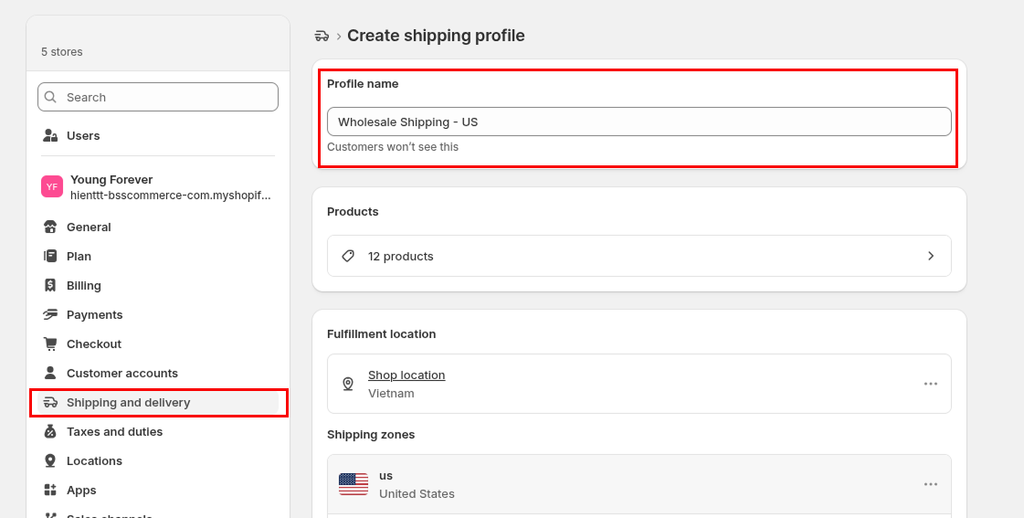
2. Create A Wholesale Shipping Profile
Go to Settings, Shipping and delivery, then Shipping profiles, and create a profile for your wholesale or freight-only products. A shipping profile is a rule set scoped to specific products and fulfillment locations. Moving heavy SKUs into their own profile stops retail rates from reaching them.
3. Pick A Rate Model For Bulk Orders
Choose from the table above. Flat rates for predictable case packs, weight tiers for dense goods, order value for thresholds, carrier-calculated where size and destination swing widely. Handling fees add a fixed markup on top of a calculated rate — they stack up, not down, so use a separate discounted rate if you need to pass savings to specific buyers.

4. Set Order Minimums Before You Set Free Shipping
Configure your minimum order quantity and quantity increments before you touch a free-shipping threshold. A threshold on its own invites small heavy orders that clear the value bar and lose money. MOQ raises the floor, and increments force buyers into case multiples.

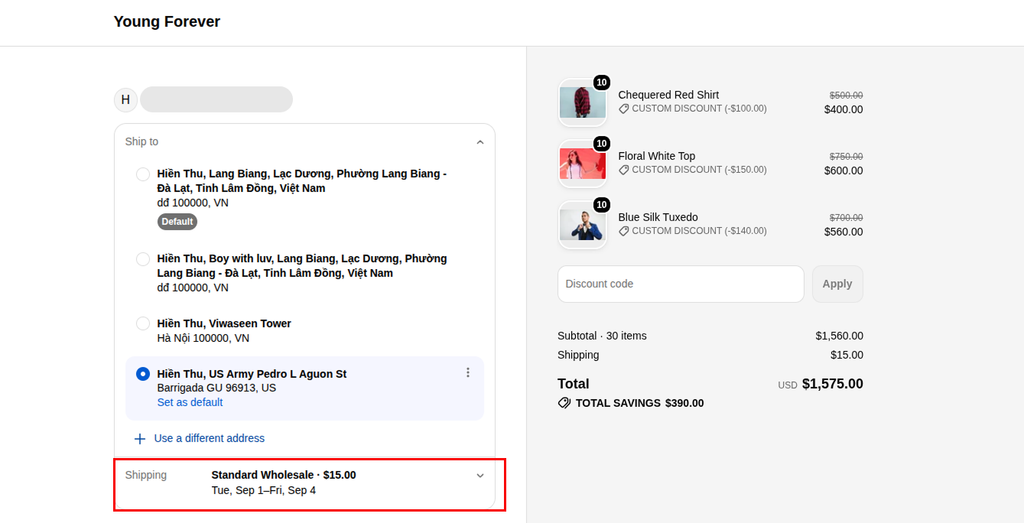
5. Test Checkout With A Real Company Location
Log in as a buyer assigned to a real company location and run a full checkout. A company location is the specific business address you’re selling to — it carries its own catalog, pricing, payment terms, and shipping address. Rates only appear once a delivery address is entered. Testing without a properly assigned company location will look broken even when everything is configured correctly.
What Native Shopify B2B Shipping Cannot Do
Native B2B checkout has four limits worth knowing before you promise a buyer anything. Shopify documents each one, and each has a fix.
Local Delivery Is Not Available At B2B Checkout
B2B buyers can’t select local delivery at checkout, and Shop Promise isn’t available to them either. You can still apply local delivery to a draft order in your admin, or build a shipping profile that carries the same option and restrict it to B2B buyers.
Pickup In Store Is Off By Default
Pickup in store is turned off for Shopify B2B until you ask for it. Per Shopify’s Help Center, the store or organization owner has to contact Shopify Support. On a blended store, switching it on exposes the option to retail buyers as well.
Shipping Rates Cannot Be Priced Per Customer
Shopify’s native settings price shipping by product, weight, order value, zone and carrier. They don’t price it by customer. Shopify names three routes, the Checkout Blocks app, an App Store app, or a Delivery Customization Function. A B2B app with its own rate engine is the fourth, covered next.
Carrier Calculated Rates Depend On Your Plan
Live carrier quotes need Advanced or Plus, or a paid add-on on Grow. Several older guides still say Plus only, which is out of date. Without carrier rates, weight tiers are the closest approximation you can build natively.
How To Set B2B Shipping Rates By Customer Group
Which route closes the per-customer gap without a developer? B2Bridge runs its own shipping rate engine alongside Shopify’s. You build an option, choose who triggers it, then set how it’s priced. Free shipping above 500 lb for one group, a percentage rate for another, and nothing for retail, is one afternoon of configuration.
1. Name The Option And Set A Shipping Time
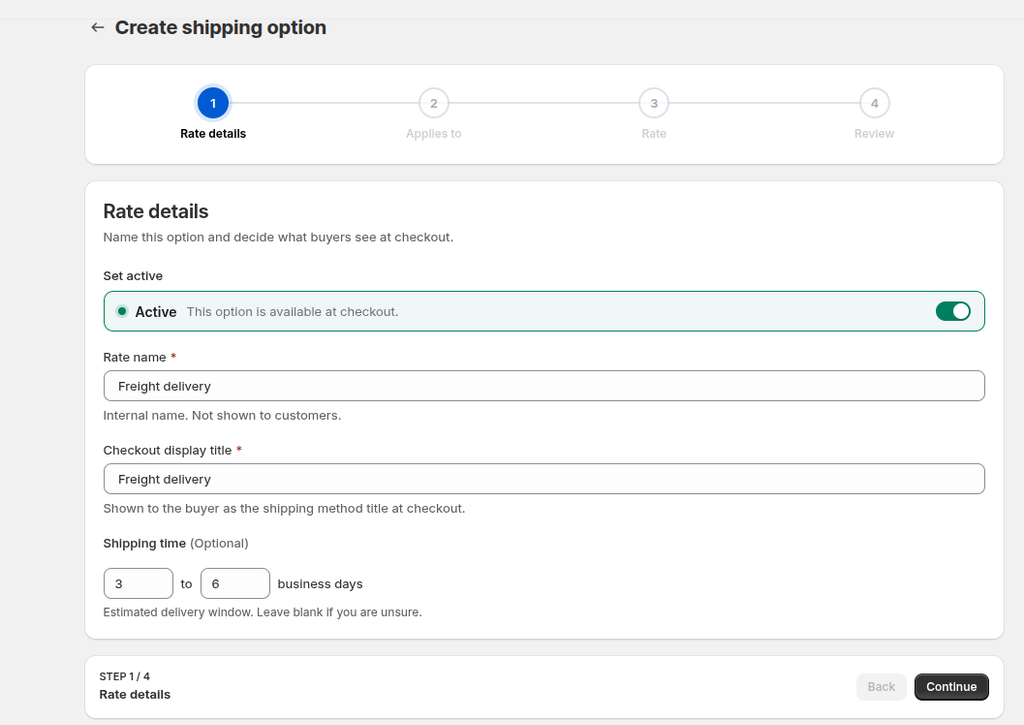
Every option carries two names. The option name stays internal, used to find it in your list. The checkout display title is what the buyer reads, something like Freight delivery. An optional from-to window in business days shows the buyer a delivery estimate.
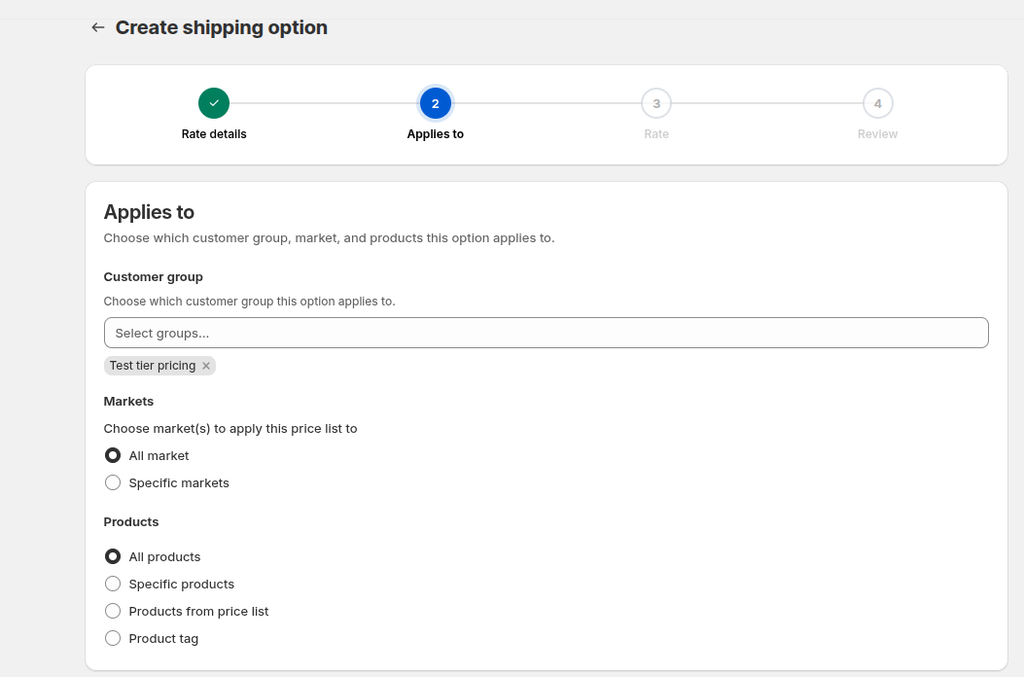
2. Choose Who And What Triggers The Rate
This is the step native settings can’t do. Pick one or more customer groups, then all markets or specific ones, which stay in sync with your Shopify Markets. Scope products by price list, collection, tag, or an explicit list. Only matching cart items trigger the rate.
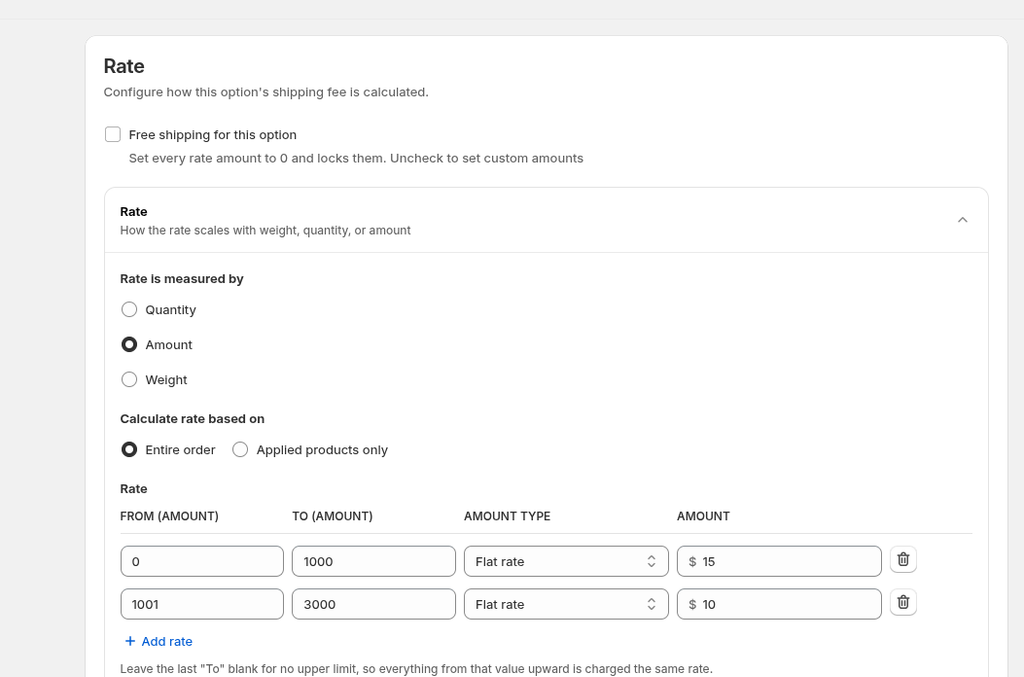
3. Build The Rate Table
Choose one basis for the lookup, either total quantity, order value or total weight. Each row covers a from-to range and charges either a flat amount or a percentage of order value. Leave the last row’s upper bound blank to mean everything above it. Ranges can’t overlap.
4. Set Limits, Schedules And Precedence
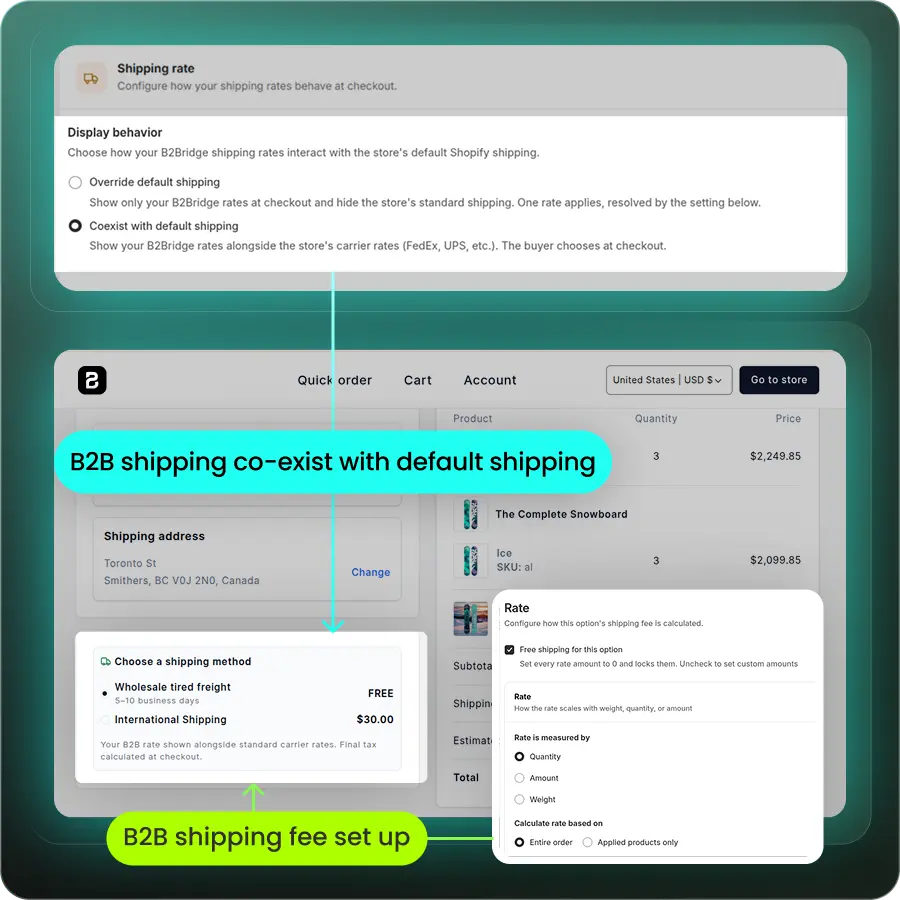
Cap an option by total uses or per customer, so a launch freight offer retires itself. Start and end dates control when it appears, and leaving both blank keeps it always on. Two settings then decide how your rates sit beside Shopify’s.
| Setting | What you choose |
|---|---|
| Display behaviour | Override hides Shopify’s own rates, or Co-exist shows both together |
| When several rates match | Charge the lowest or charge the highest |
Handling Freight And Pallet Orders
Freight doesn’t belong at self-serve checkout, so quote it instead. A draft order lets you build the order in your admin and enter a shipping rate by hand, which overrides your public rates for that order alone. That’s the cleanest route for anything moving on a pallet.
Buyers who want a delivered price before committing need a quote rather than a cart. A request a quote workflow captures the order, the destination, the quantity and the delivery window, then you return a price with freight included. Quoted freight is also where shipping meets net payment terms, because a buyer accepting a freight-inclusive quote usually expects to pay on terms.
Set processing time honestly on these orders. A palletised order that ships after freight confirmation should never carry a retail parcel estimate. Buyers forgive a five-day lead time. They don’t forgive a missed one.
Wholesale Shipping Rules That Protect Your Margin
What actually protects margin once wholesale volume picks up?
- Weigh and dimension every wholesale SKU before you price a rate. Weight tiers and carrier quotes both fail on bad data. A missing dimension is the most common reason a live rate never appears at checkout.
- Tier free shipping rather than granting it. Set the threshold above your average wholesale order value, and remember that wholesale discounts pull the subtotal back down toward the bar.
- Split heavy or fragile goods into their own profile. Keeping a 20 kg SKU alongside a 200 g one guarantees you overcharge one buyer and undercharge the other.
- Negotiate carrier rates once volume steadies. Wholesale volume is your strongest lever with a carrier, and a negotiated account feeds straight into calculated rates.
None of this needs a developer. It needs accurate product data and a threshold you’ve done the arithmetic on.
Running B2B Shipping On A Blended Store With B2Bridge
B2B shipping breaks in two places. The rate itself is one, and the shape of the order arriving at checkout is the other. B2Bridge covers both, which is why the shipping rate engine sits in the same app as the order rules feeding it.
Price lists, customer groups and orders are unlimited at a flat monthly price. Wholesale segmentation stays open, where native Shopify B2B caps non-Plus stores at three active catalogs. The rest sits in one app instead of four.
- Price shipping by customer group, market and product, using quantity, order value or weight tiers
- Run free shipping, percentage rates, usage caps and scheduled offers per group
- Override Shopify’s rates or run alongside them, and set which rate wins when several match
- Set MOQ, order limits and quantity increments so orders arrive in shippable multiples
- Gate wholesale pricing behind a login and keep retail buyers out of it
- Run RFQ and quote-to-order workflows for freight-heavy orders
- Offer net terms and credit limits on quoted freight
- Give reps a Sales Rep Portal to place orders on behalf of buyers
- Sync customers and price lists from your ERP through the Public API
Plans start free, with Professional at $99, Growth at $199 and Advanced at $299 a month. B2B shipping rates unlock at Growth, alongside Sales Rep Portal, RFQ, credit limits and company accounts. The Public API unlocks at Advanced.
Rates that match the buyer, on orders that arrive in shippable multiples, is what stops freight from eating a margin you already discounted once.

FAQs About B2B Shipping On Shopify
Can I charge different shipping rates for retail and wholesale customers on Shopify?
Yes, but not through native settings alone. Shopify prices shipping by product, weight, order value and zone, never by customer. B2Bridge prices it by customer group, market and product instead.
Can I offer free shipping to one wholesale group only?
Yes. Create a shipping option scoped to that customer group, tick free shipping, and it applies only to carts from those buyers. Other groups keep whatever rate their own option specifies.
Do I need Shopify Plus to set up B2B shipping?
No. Shopify B2B runs on all paid plans, and Shopify Functions work on every plan. Third-party carrier-calculated rates are the exception, requiring Advanced or Plus, or a paid add-on on Grow.
Can wholesale buyers pick up their order in store?
Yes, once you request it. Pickup in store is off by default for Shopify B2B, and the store or organization owner has to contact Shopify Support to turn it on for your store.
How do I ship a pallet order through Shopify checkout?
Quote it instead. Build a draft order in your admin and enter the freight rate by hand, which overrides your public rates for that order. Self-serve checkout can’t rate a pallet reliably.
Why aren’t my B2B customers seeing any shipping options at checkout?
Check your zones first. A B2B market with no shipping zone configured in a shipping profile shows no shipping options at all. Buyers also see nothing until a delivery address is entered.
Do I need a developer to hide shipping methods from retail customers?
No. Checkout Blocks, several App Store apps and B2Bridge all do it without code. A developer is only needed if you build a custom app on Shopify’s Delivery Customization Function API.

Hi, I’m Ha My Phan – an ever-curious digital marketer crafting growth strategies for Shopify apps since 2018. I blend language, logic, and user insight to make things convert. Strategy is my second nature. Learning is my habit. And building things that actually work for people? That’s my favorite kind of win.


