Shopify doesn’t have a “customer groups” feature, at least not by that name. What it does have are customer tags and segments, which become the foundation for showing different prices to different buyers once you connect them to the right tools.
This guide walks through how to create and manage customer groups in Shopify, assign custom pricing to each group, and run wholesale and retail from a single store without maintaining separate systems.
What Customer Group Pricing in Shopify Actually Means
Customer group pricing means showing different prices to different buyer types when they log into your store. A wholesale buyer sees wholesale rates. A distributor sees distributor rates. A retail shopper sees standard prices.
Shopify does not apply group pricing automatically on standard plans. You set it up using one of three methods: customer tags with discount codes, native B2B companies and catalogs, or a dedicated pricing app. The method you choose depends on how many customer groups you need, whether you want to gate pricing behind a login, and how complex your pricing gets.
Most Shopify merchants who sell to multiple buyer types (wholesale accounts, distributors, VIP members, or trade customers) run into this question early. That reflects clear B2B personalized pricing expectations: according to the Sana Commerce B2B Buyer Report 2024 (via Digital Commerce 360), 55% of B2B buyers want to see their personalized agreed prices when shopping online. If they don’t, they lose trust in the accuracy of your store.

Why Different Pricing for Different Customers Matters
The B2B ecommerce channel is large and growing fast. Recent US B2B ecommerce growth proves the point: according to eMarketer (March 2025), B2B ecommerce site sales increased 10.5% year over year in 2024, reaching $2.297 trillion. Wholesale buyers, distributors, and trade accounts expect to see prices that match their contracts, not guesswork.
When pricing is wrong or unclear, buyers leave. The Sana Commerce B2B Buyer Report 2024 (via Digital Commerce 360) measured the B2B order error rate: B2B buyers experience order errors on 33% of their total online orders, and 68% of B2B buyers are discouraged from ordering online because of those errors. Inaccurate pricing, cited by 29% of buyers as a top barrier, is a key contributor.
Setting up customer group pricing correctly does two things. It builds trust with your buyers by showing them exactly what they agreed to pay. And it protects your margins by keeping wholesale rates out of sight for retail shoppers.
The Building Blocks: Customer Tags, Groups, and Price Lists
Before you set up group pricing, you need to understand three pieces: customer tags, customer groups, and price lists.
Key point: A customer tag is a label you attach to a customer record. Tags let you organize and segment buyers. You might tag someone “wholesale,” “distributor,” or “vip.”
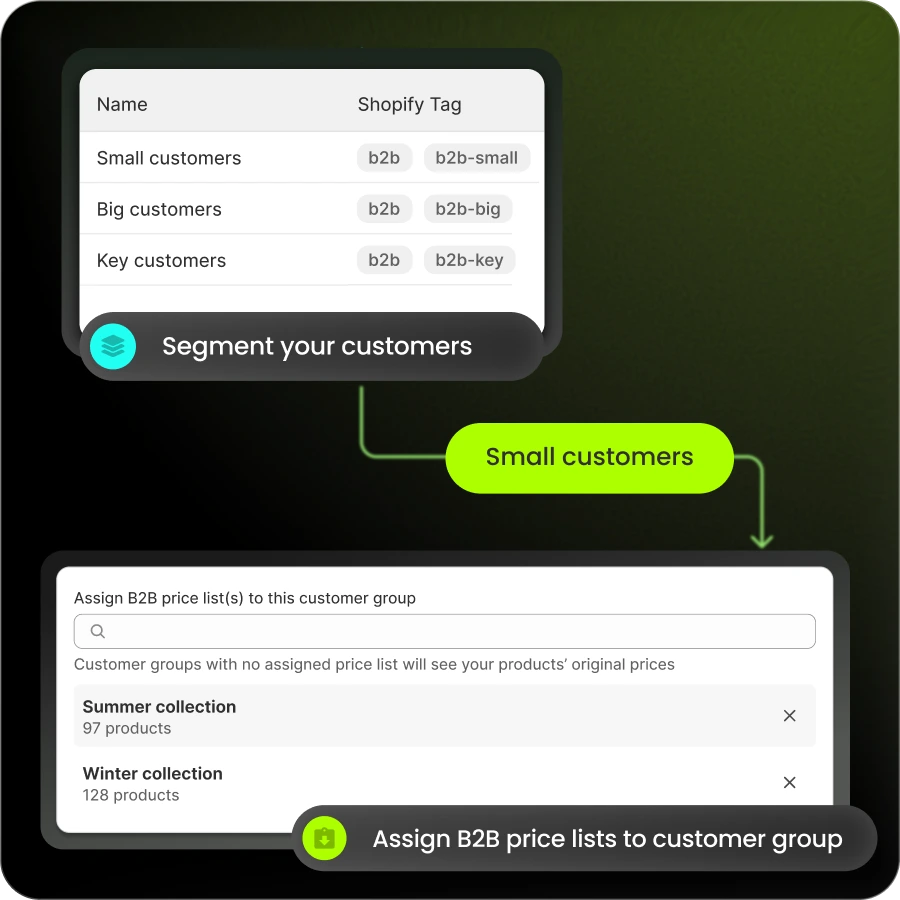
Key point: A customer group (or segment) is a collection of customers who share the same tag. In Shopify, you create a segment with a filter like “Customer tags CONTAINS wholesale.”
Key point: A price list is a set of custom prices tied to a specific group. When a buyer in that group logs in, they see the prices from their assigned price list instead of your standard retail prices.
The relationship works like this: Price List → Customer Group → Customer. You create a price list, assign it to a group, and tag customers to add them to that group. Buyers only see their B2B prices after logging in.
Method 1: Customer Tags and Discount Codes (Simplest, Most Limited)
The simplest way to give different customers different pricing is with tags and discount codes. Here’s how it works:
- Tag your customers: Open a customer record in Shopify admin and add a tag like “wholesale.”
- Create a customer segment: Go to Customers → Segments and create a new segment filtered by your tag.
- Create a discount code restricted to that segment: Set the discount (for example, 20% off) and limit it to customers who match your segment.
When a tagged customer uses that code at checkout, they get the discount.
Key point: This method has real limits. Automatic discounts in Shopify cannot target customer groups. Prices on product pages stay the same for everyone (the discount only applies at checkout). And you have to trust customers to enter the code correctly.
This works for a handful of wholesale accounts with a single discount tier. It breaks down quickly when you need multiple price levels, per-product pricing, or prices that display before checkout.

Method 2: Shopify’s Native B2B (Companies and Catalogs)
Shopify expanded its native B2B features in 2026, making core B2B tools available on the Basic, Grow, and Advanced plans at no extra cost (announced in Shopify Editions Spring 2026).
Here’s what native B2B gives you:
- Company profiles: Create a company record for each B2B customer, with support for multiple locations under one company.
- B2B catalogs: Create up to 3 catalogs and assign them to B2B markets. Each catalog can include custom pricing and volume price breaks per product. (Note: Catalogs are assigned at the market level, not per individual company that requires Shopify Plus.)
- Quantity rules: Set minimum order quantities, maximum quantities, and quantity increments per product.
- Net terms: Offer payment terms like Net 15 or Net 30 to approved companies.
To set it up: Create a company in Shopify admin, build a catalog with your custom prices, assign that catalog to a B2B market, then add the company to that market. When a buyer from that company logs in, they see the catalog prices.

Where Native B2B Hits Limits
Native B2B works well for merchants with a small number of customer tiers. But it has a ceiling.
On non-Plus plans, you can create up to three active catalogs total. Those three catalogs are shared across all your Shopify Markets. If you sell in multiple regions or need more than three customer groups, you run out of room fast. For more detail, see this guide to Shopify wholesale limitations.
Native B2B also lacks a few features B2B merchants often need:
- No built-in request-for-quote (RFQ) workflow for negotiated pricing
- No native registration form with approval and auto-tagging
- No per-variant pricing within a catalog
To unlock unlimited catalogs and more advanced features, Shopify requires an upgrade to Shopify Plus, which starts around $2,300 per month. For many merchants, that jump doesn’t make sense just to add more pricing tiers.
Method 3: A Dedicated B2B Pricing App
When tags and native B2B aren’t enough, a dedicated pricing app fills the gap. Apps like B2Bridge, Bold Custom Pricing, SparkLayer, and others extend Shopify’s pricing capabilities on any paid plan. For a comparison, see this roundup of the best custom pricing apps.
Here’s what a dedicated app typically adds:
- Unlimited price lists and customer groups: No three-catalog cap.
- Per-variant and per-collection pricing: Set exact prices for specific products, variants, or collections.
- Price override (not discount overlay): The app changes the actual variant price rather than stacking a discount. This keeps your Shopify revenue reports accurate.
- Gated pricing: Hide wholesale prices from retail shoppers. Only logged-in, verified buyers see their group prices.
- Registration and approval: Let new buyers apply for wholesale access. Auto-tag approved customers and assign them to the right price list.
The setup follows the same model: Price List → Customer Group → Customer. You build a price list with your custom prices, assign it to a group (defined by a customer tag), and tag buyers to enroll them. When those buyers log in, they see their prices. Retail visitors see your standard storefront.
If you want to run wholesale on Shopify without upgrading to Plus or managing a second store, an app is the most flexible path.
Tiered and Volume Pricing for Your Groups
Once you have customer groups, you can layer in quantity-based pricing. Two models are common: tiered pricing and volume pricing.
According to Shopify (June 2025), tiered pricing is “a strategy that sets different price rates based on service levels or quantity purchased.”
Key point: Tiered pricing charges a different per-unit rate for each quantity tier. For example, units 1–10 cost $20 each, units 11–50 cost $18 each, and units 51+ cost $15 each. Each tier has its own rate.
Key point: Volume pricing applies one price to the entire order once a threshold is met. For example, buy 50+ units and every unit costs $15. The discount applies to the whole order, not just the units above the threshold.
Here’s a worked example showing how tiered pricing might look across customer groups:
| Quantity | Retail (per unit) | Wholesale (per unit) | Distributor (per unit) |
|---|---|---|---|
| 1–10 | $25 | $20 | $16 |
| 11–50 | $25 | $18 | $14 |
| 51+ | $25 | $15 | $12 |
This table shows retail customers paying a flat $25 regardless of quantity, while wholesale and distributor groups get deeper discounts as they order more. For more on setting this up, see this guide on tiered pricing explained.
Key point: MOQ (minimum order quantity) sets the lowest number of units a buyer can order. Increments control the step size (for example, buyers must order in packs of 6). Both help you enforce ordering rules per group.
Gating Wholesale Pricing and Adding Net Terms
If you run both retail and wholesale from the same Shopify store, you need to keep wholesale prices hidden from retail shoppers. This is called gating.
Gating works through login. Retail visitors browse your store and see standard prices. Wholesale buyers log in and see their assigned price list. Without logging in, they can’t access B2B rates.
Dedicated apps handle gating with features like price hiding, price locking, or “B2B Lock” modes. Some let you hide entire products or collections from retail visitors. Others simply replace the price display with “Login for pricing” until the buyer authenticates.
Beyond pricing, B2B buyers often expect payment terms. A 2024 Hokodo survey of 500 B2B buyers across Europe and the UK measured B2B payment terms abandonment: 83% would abandon an ecommerce purchase if no payment terms were offered. Net 30, Net 60, and Net 90 terms let buyers pay after delivery, just like a traditional invoice.
For customers who need negotiated pricing, a request-for-quote workflow lets buyers submit a quote request instead of checking out at a fixed price. You review, adjust, and send a quote. They accept and pay. This supports contract pricing, large orders, and special deals without publishing prices publicly.
How to Choose the Right Method
Choosing between tags, native B2B, and an app depends on your situation. Use this decision table:
| Situation | Best Method |
|---|---|
| Fewer than 10 wholesale accounts, single discount tier | Customer tags + discount codes |
| Up to 3 customer groups, volume pricing needed | Native Shopify B2B (companies + catalogs) |
| More than 3 groups or pricing tiers | Dedicated B2B pricing app |
| Need to hide prices from retail shoppers | Dedicated app with gating |
| Need RFQ, registration, or ERP/CRM sync | Dedicated app with those features |
| Budget for Shopify Plus (~$2,300/month) | Native B2B with unlimited catalogs |
Start with the simplest method that meets your needs. If you outgrow it, upgrading to an app is straightforward. Most apps import your existing customers and let you build price lists from your current catalog.
Frequently Asked Questions
Does Shopify support customer group pricing natively, or do I need an app?
Native Shopify B2B (companies and catalogs) supports customer group pricing on paid plans, but you’re limited to three catalogs on non-Plus stores. If you need more than three groups, gating, RFQ, or ERP sync, you need an app.
How do I use customer tags to assign different prices?
Tag your customers with labels like “wholesale” or “distributor,” create a segment filtered by that tag, then either restrict a discount code to that segment or use an app to assign a price list. Prices display after the customer logs in.
Can I show wholesale prices only to logged-in wholesale customers?
Yes. With login-gating through a dedicated app, retail shoppers see your standard prices while verified wholesale buyers see their group prices after logging in.
What’s the difference between tiered pricing and volume pricing?
Tiered pricing charges a different per-unit rate for each quantity tier (units 1–10 at one rate, units 11–50 at another). Volume pricing applies one rate to the entire order once a threshold is met (buy 50+ and every unit costs the lower price).

As a Product Marketing Executive at B2Bridge, I focus on the Enterprise B2B Ecommerce domain. I leverage my understanding of product and user psychology to deliver customer-centric content that addresses business challenges and fuels growth.


