Shopify B2B payment methods are the ways a wholesale buyer can pay on your store: credit and debit cards, ACH bank debit, PayPal, Apple Pay, manual options like bank transfer, wire, and purchase order, plus net payment terms that let approved buyers pay after delivery. You set these up in Settings > Payments and control who sees which method.
The right mix depends on order size, your margin, and how much your buyers expect to pay on terms rather than upfront. This guide covers every method, how to set them up, how to show different options to wholesale and retail buyers, and where Shopify’s native tools stop being enough for a growing wholesale operation.
What Are B2B Payment Methods on Shopify
B2B payment methods on Shopify are the payment options available to business buyers, and they work differently from retail checkout. A retail shopper pays by card the moment they check out. A wholesale buyer often places a large order and pays later on agreed terms.
That gap matters most for hybrid brands that sell retail and wholesale from one Shopify admin. Your consumers want a fast card checkout. Your wholesale accounts want invoices, bank transfer, and net terms. Shopify can support both on the same store once you configure who sees what. You can run both channels together without a second storefront, as covered in our guide to Shopify B2B and B2C hybrid operations.
Payment Methods Available for Shopify B2B
Shopify B2B supports cards, ACH bank debit, PayPal, Apple Pay, manual methods like wire and purchase order, net payment terms, and store credit. Each one suits a different buyer and order size.
Credit and Debit Cards Through Shopify Payments
Cards are the default. Shopify Payments accepts major credit and debit cards the moment your store opens, with no third-party setup. B2B buyers can save a card, and you can charge a vaulted card from your admin for future orders.
ACH Bank Debit and Bank Transfer
ACH is direct bank debit through Shopify Payments, available to eligible US merchants. It settles in one to three business days and costs less than cards, so it suits recurring and higher-value orders where card fees would eat your margin.
PayPal and Apple Pay
PayPal and Apple Pay both work for B2B orders and reconcile in your admin. They give buyers a familiar wallet option without entering card details. Accelerated checkout versions of each are not available for B2B, so they appear only on standard orders.
Manual Methods: Wire, Bank Deposit, and Purchase Order
Manual payment methods cover wire, bank deposit, and purchase order. You add clear instructions, the buyer pays outside checkout, and you record the payment once it arrives. These handle very large or international orders and buyers who need a PO number before paying.
Net Payment Terms
Net payment terms let an approved buyer submit an order with payment pending, then pay by a due date. Shopify supports terms such as Net 15, Net 30, Net 60, and Net 90 on company locations. Terms are the standard way wholesale buyers expect to pay.
Store Credit and Gift Cards
Store credit can appear as a B2B checkout option and works well for refunds or prepaid accounts. Gift cards at checkout are turned off by default for B2B and are limited to Shopify Plus, so most merchants rely on the methods above instead.
Shopify B2B Payment Methods Comparison
Which method fits which buyer? Use the table below to match a method to order size, cost, and how the buyer wants to pay.
| Method | Speed | Typical cost | Best for | Native or app |
|---|---|---|---|---|
| Card via Shopify Payments | Instant auth, 1–3 day payout | ~2.5–3% + fee | Smaller and first B2B orders | Native |
| ACH bank debit | 1–3 business days | ~1–2% | Recurring, larger orders | Native |
| PayPal / Apple Pay | Instant | Provider fee | Buyers who prefer wallets | Native |
| Wire / bank transfer | Manual, buyer-initiated | Bank fee | Very large or international orders | Native (manual) |
| Purchase order + invoice | On terms | None to accept | Buyers needing PO approval | Native (draft order) |
| Net payment terms | Pay after delivery | Cash-flow cost to you | Trusted, repeat buyers | Native terms, app for limits |
| Store credit | Instant | None | Refunds, prepaid accounts | Native |
Read it by margin and trust. Steer large orders toward ACH or terms to protect margin, and hold cards for smaller or first-time buyers.
How to Set Up B2B Payment Methods on Shopify
Setup runs in five steps inside Settings > Payments and your B2B company locations. Work through them in order, then test both a retail and a wholesale account before you go live.
Step 1. Enable Shopify Payments or a Third-Party Provider
Turn on Shopify Payments to accept cards and ACH right away, or pick from Shopify’s third-party providers if you need one for your region. This gives every buyer a working card option as your baseline.
Step 2. Add Manual Payment Methods for Wire, ACH, and PO
In Settings > Payments > Manual payment methods, create options such as Bank Transfer, Wire, or Purchase Order. Write the account number, remittance email, and PO steps into the instructions so buyers know exactly how to pay.
Step 3. Set Net Payment Terms on Company Locations
Assign payment terms to each B2B company location. When a buyer with Net 30 checks out, the order submits with payment pending and a due date attached. Link buyers to the terms that match their history, as explained in our net payment terms guide.
Step 4. Use Draft Orders and Invoices for Approval Flows
For orders that need review or a custom quote, create a draft order, apply terms or a PO number, and send an invoice. The buyer gets a secure pay link. This keeps large or negotiated orders under your control before they become final.
Step 5. Test the Retail and Wholesale Checkout
Log in as a retail customer and confirm normal card checkout still works. Then log in as a B2B buyer and confirm the right terms and methods appear. Place a test order on terms and check the payment status, due date, and account view.
How to Show Different Payment Methods to Wholesale and Retail Buyers
Shopify does not restrict payment methods by customer group at standard checkout on its own. You control who sees what using payment customizations, customer tags, or draft orders.
Payment Customizations and Checkout Blocks
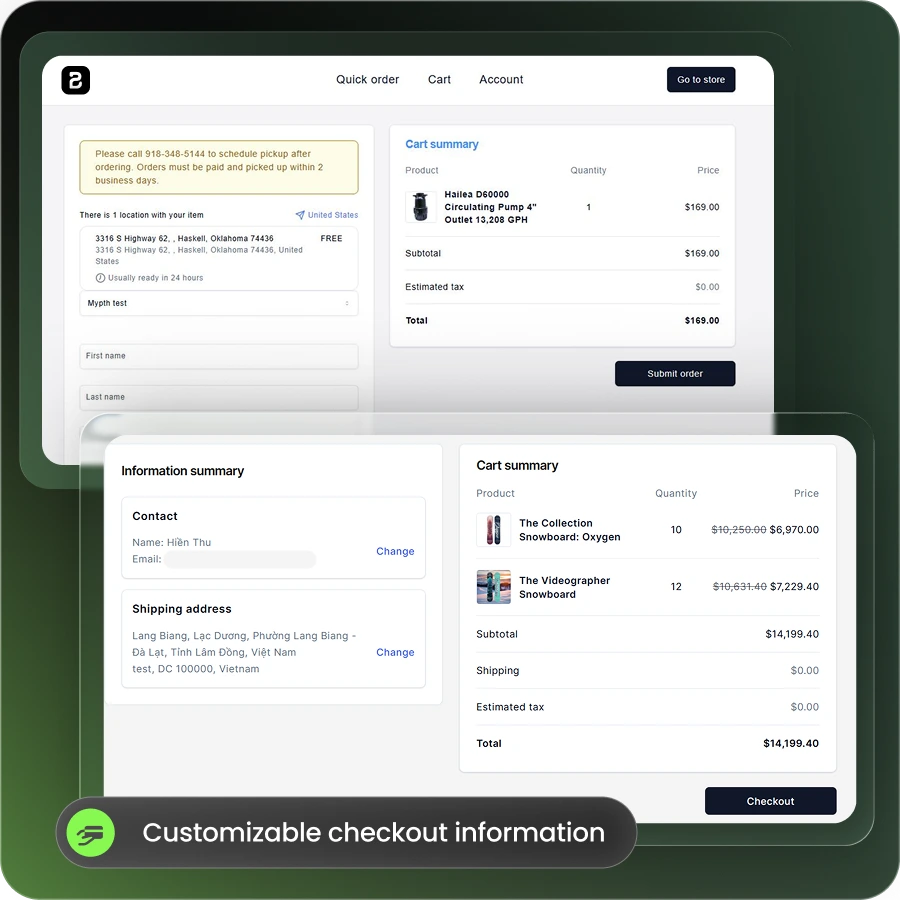
Payment customizations, set through Checkout Blocks or a payment function, hide, rename, or reorder methods at checkout. You can move invoice and bank transfer options up for B2B buyers while retail customers keep cards and wallets. Test both account types before going live.
Customer Tags and Gated B2B Access
Tag approved wholesale accounts and gate B2B pricing and pages from the public. Tags drive the pricing and access rules that decide which buyers reach terms-based checkout. Our guide to gating wholesale pricing behind a login walks through the setup.
Draft Orders and Invoice Links
Draft orders keep manual methods away from retail buyers entirely. You build the order, apply the right method, and send an invoice link only to the approved account. This suits PO-based and negotiated orders that never belong in public checkout.
Where Native Shopify B2B Payments Fall Short for Scaling Wholesale
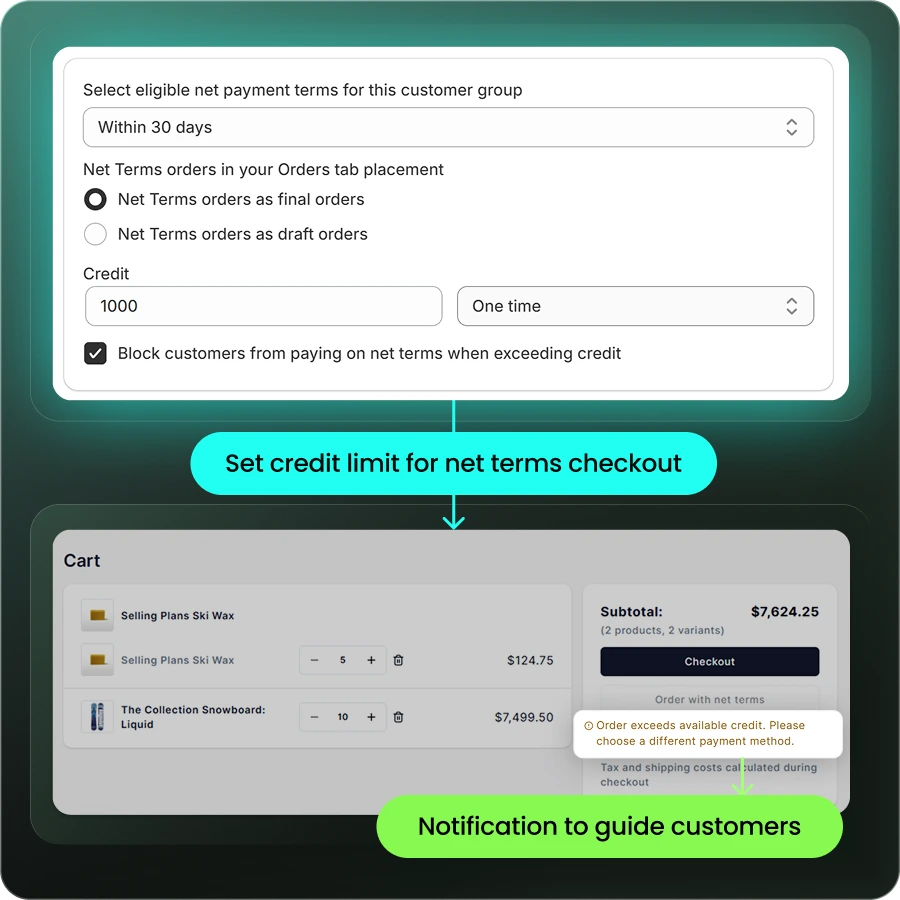
What happens when your wholesale channel grows past a handful of accounts? Native B2B payments start to show gaps. Shopify handles terms well, yet per-customer credit control, deposits, quoting, and back-office sync need more.
| Capability | Shopify B2B native (non-Plus) | With a B2B app like B2Bridge |
|---|---|---|
| Net terms (Net 15/30/60) | Yes, on company locations | Yes, with automated invoices and reminders |
| Per-customer credit limits | No | Yes (Growth tier) |
| Deposits and partial payments | Plus only | Yes |
| Request a quote before payment | No | Yes (Growth tier) |
| Active catalogs and price lists | Capped at 3 | Unlimited |
| ERP reconciliation (NetSuite, Zoho, Odoo) | No built-in sync | Yes |
The pattern is clear once volume climbs. Native B2B is free on every plan now, and it starts fine. Credit limits, deposits, and quoting are where scaling merchants outgrow it.
Reducing Payment Processing Costs on Large B2B Orders
Card fees cost you the most on your biggest orders. Moving large wholesale payments to ACH or net terms protects margin, since ACH runs about 1–2% against roughly 2.5–3% for cards.
ACH already carries the majority of US B2B payment value, an estimated 47.9% in 2024 per eMarketer. Two habits help beyond method choice. Route high-value orders to ACH or wire to avoid gateway holds that freeze funds for review. Ask new accounts for a deposit while they build a payment history with you.
Best Practices for Managing B2B Payments on Shopify
Good B2B payment management comes down to matching methods to buyers and automating the follow-up. These four practices keep cash flowing and retail checkout clean.
1. Match the Method to the Buyer and Order Size
Give small and first orders a card option, and steer large or repeat orders toward ACH and terms. The method should fit the order value and the trust you have with that account.
2. Set Credit Limits Before Extending Terms
Decide a credit ceiling per account before you offer Net 30 or Net 60. A limit caps your exposure if a buyer pays late or stops paying. Some buyers never pay on time.
3. Automate Invoices, Reminders, and Reconciliation
Manual invoicing and payment matching create errors as volume grows. Automate invoice sends, due-date reminders, and reconciliation so your finance team stops copying order details between screens, as covered in our B2B ecommerce integration guide.
4. Keep Retail Checkout Untouched While Adding B2B Options
Add wholesale methods without changing what consumers see. Use tags and payment customizations so retail buyers keep a fast card checkout while approved accounts reach terms and bank transfer.
Running B2B Payment Methods at Scale with B2Bridge
If your wholesale channel is outgrowing native B2B, B2Bridge adds the payment controls Shopify leaves out. It brings enterprise B2B payments to a standard Shopify store, with unlimited price lists, orders, and customer groups at a flat price while native caps active catalogs at three.
- Net payment terms such as Net 30 and Net 60 with automated invoices and reminders
- Per-customer credit limits and company accounts to cap your exposure
- Request for quote so buyers agree a price before payment
- ERP and CRM sync with NetSuite, Zoho, Odoo, or a custom system via Public API
You run both retail and wholesale on one store, keep consumer checkout fast, and give approved buyers the terms they expect. See current plan details on the B2Bridge pricing page. To see it on your own store, Book a Demo.
FAQs about Shopify B2B Payment Methods
Can I offer Net 30 to wholesale customers without Shopify Plus?
Yes. Shopify B2B supports net payment terms like Net 30 on company locations across all plans. An app adds credit limits, automated invoices, and reminders on top of the native terms.
Can I hide credit card payment for B2B buyers and only allow bank transfer?
Yes, with setup. Use payment customizations to hide cards for tagged B2B buyers, or send them a draft-order invoice with only bank transfer instructions so retail checkout stays unchanged.
Do I need a payment app if Shopify B2B is now free on all plans?
Native B2B covers terms and manual methods well. You need an app once you want per-customer credit limits, deposits without Plus, request for quote, or ERP reconciliation at scale.
How do I set a credit limit for a wholesale customer on Shopify?
Native Shopify has no per-customer credit limit. You set and enforce credit limits with a B2B app such as B2Bridge, which caps how much each account can owe on open terms.
What payment methods are incompatible with Shopify B2B?
Shop Pay, Shop Cash, and Shop Pay Installments do not work with Shopify B2B orders. Standard cards, ACH, PayPal, Apple Pay, manual methods, and net terms remain available.

Hi, I’m Ha My Phan – an ever-curious digital marketer crafting growth strategies for Shopify apps since 2018. I blend language, logic, and user insight to make things convert. Strategy is my second nature. Learning is my habit. And building things that actually work for people? That’s my favorite kind of win.


