Migrating a B2B store to Shopify means moving your products, customers, and orders onto Shopify, then rebuilding your wholesale setup as company accounts, price-list catalogs, and net terms. You export and clean your data, map wholesale customer groups to Shopify companies, and import in the right order so nothing breaks at cutover.
The product data is the easy part. The wholesale data, your price lists, net terms, and tax-exempt accounts, is where most migrations go wrong. This guide walks the full move, platform by platform, and shows how to keep your pricing and your search rankings intact.
Key Takeaways
- A wholesale migration to Shopify is mostly a data and configuration project, and a standard catalog moves in weeks, not months.
- The wholesale data breaks first: customer groups, price lists, net terms, and tax-exempt status all need a target home in Shopify.
- Import products first, customers second, historical orders last, so order line items reconcile against the catalog.
- Build a 301 redirect map before cutover to protect the organic traffic you already earn.
- Native Shopify B2B caps active catalogs at three below Plus, so count your price lists before you choose native or an app.
What Migrating a B2B Store to Shopify Involves
Migrating a B2B store to Shopify is a data and configuration project, not a rebuild from scratch. You move products, customers, and order history onto Shopify, then set up the wholesale layer: company accounts for each buyer, price-list catalogs for negotiated rates, net terms, and tax-exempt status. For a standard catalog, that takes a few weeks.
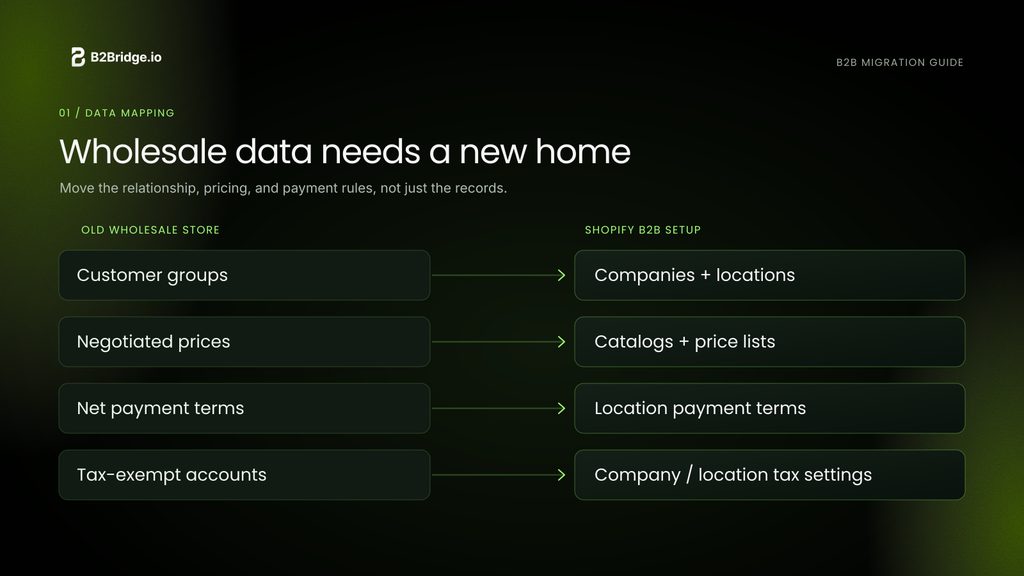
A B2C migration guide stops at products and customers. A wholesale move has extra pieces that each need a home in Shopify’s model. Company accounts replace your old customer groups, price lists carry your negotiated rates, and net terms and tax exemptions sit at the company level. Miss one and buyers see a wrong price or get charged tax they shouldn’t pay.
If you run retail and wholesale together, the move also has to keep both channels on one catalog and one inventory. That unified setup is what a Shopify B2B portal gives you once the data lands.
Why Wholesale Brands Move to Shopify
Why leave a platform that still runs? Wholesale brands move to Shopify to escape unpredictable cost and constant maintenance on legacy platforms. On Magento, BigCommerce, or a custom build, the bill runs well past the license fee. Hosting, security patches, developer retainers, and version upgrades turn a small feature request into a multi-thousand-dollar sprint.
The second reason is fit. Older platforms were built with a B2C model in mind, so wholesale pricing, payment terms, and self-serve portals get bolted on instead of built in. Buyers now expect to log in, see their own pricing, and reorder without a phone call, and a platform that fights that expectation quietly costs you orders.
Shopify now ships native B2B on every paid plan, with predictable SaaS pricing that includes hosting, security, and updates. Brands get out of infrastructure work and back to selling. That shift is the whole reason the move keeps accelerating quarter over quarter.
What Transfers From Your Current Platform
Most of your data transfers, though not all of it, and what moves cleanly depends on the source platform. Products, customers, collections, and basic order history always come across. Customer passwords and saved payment methods never do, because passwords are hashed irreversibly and cards stay behind for PCI compliance.
| Source platform | Moves cleanly | Needs rework | Note |
|---|---|---|---|
| Zoey | Products, customers, orders | Customer groups to companies, price tiers | Close to Shopify’s data model |
| Volusion | Products, customers | Order history, category structure | Often a multi-store consolidation |
| WooCommerce | Products, customers, orders | Plugin-based pricing rules | Matrixify has a WordPress connector |
| BigCommerce | Products, customers, orders | Custom pricing logic, URL structure | Schema diverges, plan redirects early |
Tell your buyers about the password reset before launch. They reactivate their account by email and re-enter card details at first checkout, which is the single biggest point of friction at cutover.
How to Migrate Your Wholesale Data Step by Step
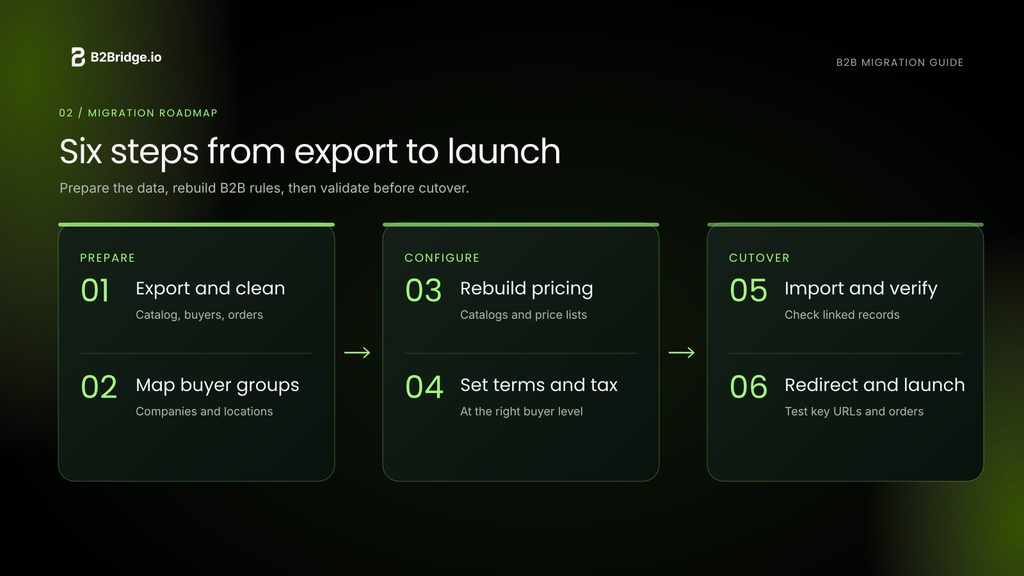
Where does a wholesale migration actually start? It runs in a fixed order, because each step depends on the one before it. Work through these six.
- Export and clean your catalog and accounts. Pull products, customers, and orders from your old platform, then dedupe SKUs and drop products that haven’t sold in 18 months. A leaner catalog imports faster and indexes better from day one.
- Map customer groups to Shopify companies. Your old wholesale and distributor groups become company accounts, each with an assigned price list. List every group and its pricing rule before you build anything.
- Rebuild price lists and catalogs. Recreate each tier as a price list using a percentage discount, fixed prices, or quantity breaks. Assign each list to the right companies so buyers see their own rates on login.
- Recreate net terms and tax exemptions. Set net payment terms such as Net 30 or Net 60 per company, and mark tax-exempt accounts at the company level so their orders skip sales tax automatically.
- Import in the right order. Products first, customers second, historical orders last. Shopify links order line items to products and customers at import, so that sequence keeps orders from orphaning.
- Build your 301 redirect map. Export every URL that ranks or holds a backlink, map each to its closest Shopify page, and redirect once. This is what protects the organic traffic you already earn.
Migrating From Each Platform
Each source platform surrenders its data differently, so the move looks a little different depending on where you start. The wholesale rework is similar across all four.
Zoey to Shopify
Zoey sits close to Shopify’s data model, so products and customers export cleanly by CSV or app. The real work is mapping Zoey customer groups to Shopify companies and rebuilding price tiers. Brands usually move for lower, more predictable cost, as our Zoey and Shopify comparison covers.
Volusion to Shopify
Volusion migrations are often a consolidation, pulling one or more storefronts into a single Shopify store. Products and customers move by CSV, while order history and category structure need rework. The Park Store customer story shows this kind of retail-and-wholesale consolidation in practice.
WooCommerce to Shopify
WooCommerce moves are smoother than most, because Matrixify has a dedicated WordPress connector for products, customers, and orders. Plugin-based pricing rules are the piece to rebuild as native price lists, which our WooCommerce and Shopify B2B comparison explains.
BigCommerce to Shopify
BigCommerce schemas diverge from Shopify’s, so a migration app or a partner handles the transfer. Watch the custom pricing logic and the URL structure, since the latter drives your redirect map. See our BigCommerce and Shopify B2B comparison for the detail.
Native Shopify B2B or a B2B App After You Migrate
Once you’re on Shopify, is native B2B enough? Native Shopify B2B covers the core wholesale portal on every paid plan, though it caps active catalogs at three below Plus. A brand running more than three price lists hits that wall right after migrating, which is the moment to weigh a B2B app.
B2Bridge runs unlimited price lists, orders, and customer groups at a flat monthly price, so a growing wholesale program never forces a Plus upgrade or a per-order penalty. It puts the whole workflow in one app and adds a Sales Rep Portal and ERP sync that native Shopify doesn’t include.
Native B2B is a solid starting point. The catalog cap is what decides when you outgrow it, a trade-off our Shopify B2B and Shopify Plus comparison and Shopify B2B features guide both break down.
Keeping Your ERP and Orders in Sync After Migration
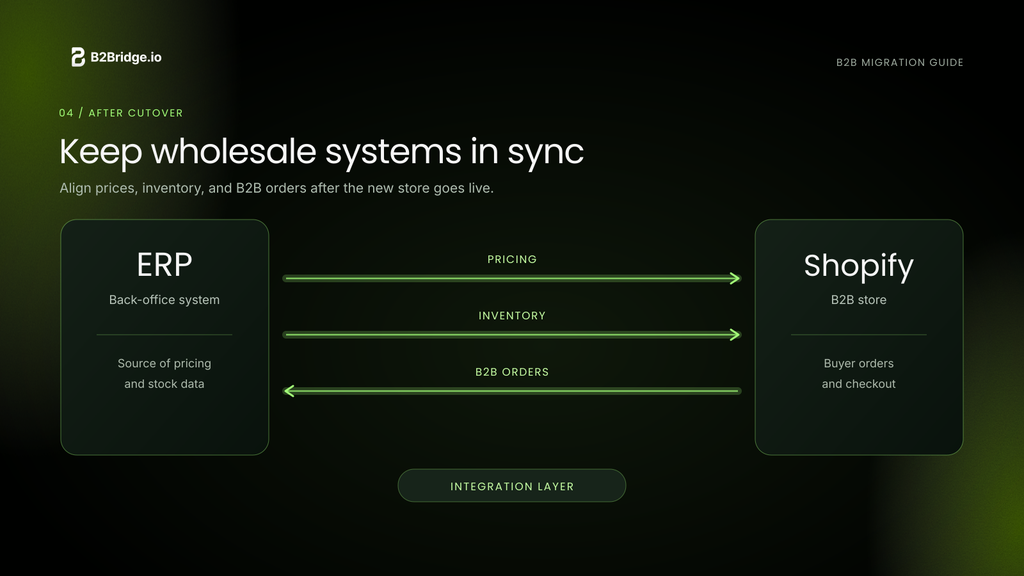
After cutover, your Shopify store and your back-office systems have to stay in sync, or a wrong price or an oversell reaches a buyer. Price-list changes, inventory, and net-terms orders should flow both ways without manual re-entry.
Connect your ERP so a price change reaches the right Shopify catalog, stock reflects real availability, and net-terms orders land in your accounts-receivable module on their own. B2Bridge syncs with NetSuite, Zoho, Odoo, and custom systems through its Public API. That sync is what keeps a migrated store from turning into a second set of books your team reconciles by hand.
Migrate Your Wholesale Store to Shopify With B2Bridge
Moving to Shopify protects your margins from legacy platform cost and frees your team from maintenance work. Scaling the wholesale side once you land is the next question, and it’s where the platform choice pays off.
B2Bridge brings enterprise B2B to any Shopify plan, so you keep your pricing model, your net terms, and your ERP data without a Plus contract:
- Unlimited price lists, orders, and customer groups at a flat price
- Company accounts, quick order, and gated wholesale pricing
- Request for quote, net terms, and credit limits for real B2B checkout
- ERP sync with NetSuite, Zoho, and Odoo

Merchants like Ayersfish and Park Store run their wholesale on B2Bridge today, and the team helps plan and execute the move rather than leaving you with an app to figure out alone. Book a Demo to map your migration.
FAQs About Migrating B2B to Shopify
How long does a B2B migration to Shopify take?
For a standard catalog, a few weeks. Shopify reports most migrations finish in under three months, while full Plus replatforms with custom integrations run 8 to 16 weeks.
Will I lose my SEO rankings when I move to Shopify?
Not if you build a 301 redirect map before cutover. Map every ranking URL to its Shopify page and redirect once, and rankings usually hold or recover within a few weeks.
Do customer passwords and saved cards transfer to Shopify?
No. Passwords are hashed and can’t move, and saved cards stay behind for PCI compliance. Buyers reactivate by email and re-enter payment details at first checkout.
Do I need Shopify Plus to run wholesale after migrating?
No. Native B2B works on every paid plan, with a three-catalog cap below Plus. A B2B app adds unlimited price lists and full wholesale workflows on a standard plan.
Can I keep my custom wholesale pricing and net terms?
Yes. Wholesale customer groups become company accounts, price tiers become price lists, and net terms are set per company. Plan that mapping before you import.
Should I use a migration app or a Shopify Partner?
Use an app like Matrixify for catalogs up to a few thousand SKUs. Choose a Shopify Partner for Plus, headless builds, complex B2B logic, or catalogs past 10,000 SKUs.

As a Product Marketing Executive at B2Bridge, I focus on the Enterprise B2B Ecommerce domain. I leverage my understanding of product and user psychology to deliver customer-centric content that addresses business challenges and fuels growth.


