Request for quote (RFQ) on Shopify is a workflow where a buyer asks for a custom price instead of checking out. You reply with a quote that converts into an order. Shopify has no native buyer-initiated quote request, so merchants add an app. The strongest options are B2Bridge, Quote Snap, SA Request a Quote, BSS B2B Order, and SparkLayer.
Choosing badly is expensive. Your buyers get trained on whatever button you install, and switching later means retraining them. So which one should you install? Here’s what Shopify does natively, six apps with verified ratings, the plan caps nobody advertises, and how to set it up.
What Is a Request for Quote on Shopify
A request for quote is a buyer asking you to price something before they buy it. On the storefront, Add to Cart is replaced by a Request a Quote button. The buyer submits products, quantities and requirements. You review, set a price, and send it back.
That’s the whole loop. So why not just publish a wholesale price and skip it? Because fixed pricing doesn’t survive contact with wholesale. A retailer ordering 400 units expects a different number than someone buying one, and the request for quote process is how that number gets agreed.
RFQ is standard in three situations: bulk and volume orders, made-to-order or configured products, and negotiated contract pricing for named accounts.
Outcome: buyers who can’t transact at your list price get a path to a real number instead of leaving.
What Shopify Native B2B Does and Does Not Do for Quotes
Shopify can send quotes, but only ones you create yourself. Shopify’s B2B GMV grew 96% in FY2025 and another 80% year over year in Q1 2026, per its FY2025 earnings release and Q1 2026 earnings call. On April 2, 2026, Shopify also moved core B2B features to every plan. Company profiles, catalogs, volume pricing and net payment terms are now free on Basic, Grow and Advanced.
So what’s actually missing? The buyer’s half. You can build a draft order, apply custom prices, and email a checkout link. Your buyer can’t start any of it, can’t negotiate in-thread, and can’t be shown a quote button instead of a price.
| Capability | Shopify native B2B | RFQ app |
|---|---|---|
| Buyer-initiated quote request | No | Yes |
| Hide price and Add to Cart | No | Yes |
| Merchant-created quote via draft order | Yes | Yes |
| Multi-round price negotiation | No | Most apps |
| Quote PDF and expiry dates | No | Most apps |
| Active B2B catalogs on non-Plus plans | 3 | Unlimited with most apps |
What to Look For in a Shopify Quote Request App
The features that matter are the ones that remove manual work. Every app here adds a quote button. The differences show up after the request lands. So what earns its keep?
- Buyer entry points. Buyers should start a quote from a product page, a collection page, and the cart — not just one of the three.
- Price hiding rules. Hide price should apply by product, collection, tag, or customer group, so retail shoppers never see wholesale numbers.
- Quote-to-order conversion. An accepted quote should become a Shopify draft order automatically. Retyping quotes is where the hours go.
- Custom form fields. B2B buyers need to send a PO number, tax ID, delivery window, and sometimes a spec sheet.
- File upload. Non-negotiable for made-to-order goods and anything with drawings.
- The cap on the plan you’d actually buy. Free and entry tiers usually limit monthly quotes.
Best Shopify Request for Quote Apps
Six apps cover the realistic range, from a $7.99 quote form to a full wholesale platform. All ratings and prices below were verified on the Shopify App Store in July 2026. Shopify’s own draft orders are included as a seventh, no-app baseline.
| App | Best for | Starting price | Rating |
|---|---|---|---|
| B2Bridge | Quoting inside a full wholesale setup | $199/mo (RFQ on Growth) | 5.0 (24) |
| Quote Snap | Proven, full-featured negotiation | Free plan, paid from $16.99/mo | 4.8 (666) |
| SA Request a Quote | Per line item negotiation | Free plan, paid from $16.99/mo | 4.8 (601) |
| BSS B2B Order | Quoting plus bulk reordering | From $19/mo | 4.9 (170) |
| SB Request a Quote, Hide Price | AI-scored quoting with multi-channel requests | Free plan, paid from $7.99/mo | 4.8 (185+) |
| SparkLayer | Quoting inside a wider B2B platform | Quoting on the $299/mo tier | 4.9 (354) |
| Quotilio | Low-cost draft quote automation | From $7.99/mo, no free plan | 3.2 (13) |
| Shopify native draft orders | Merchant-created quotes only | Included in your plan | n/a |
B2Bridge for Quoting Inside a Full Wholesale Setup
B2Bridge runs RFQ as one part of a complete B2B layer. An accepted quote lands on the buyer’s own price list and checks out on their net terms.
Best for: hybrid B2C and B2B brands, manufacturers and distributors who need quoting alongside wholesale pricing.
Standout features:
- RFQ enabled or disabled per customer group
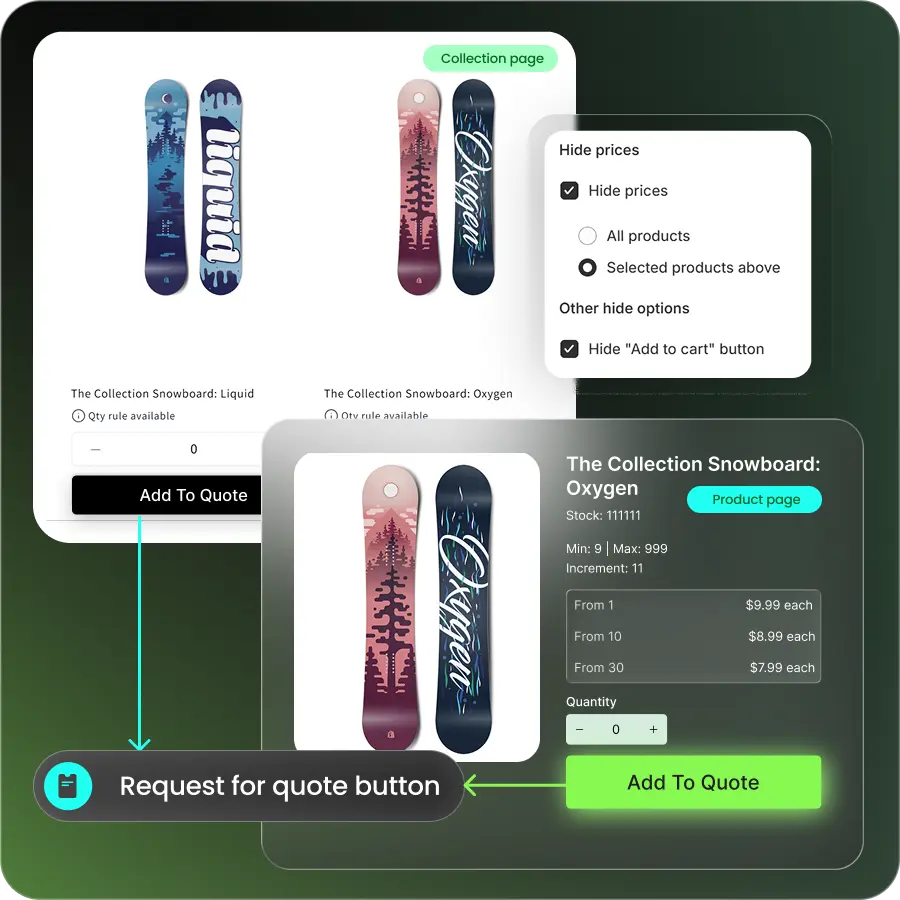
- Prices, Add to Cart and Buy It Now hidden for quote-only segments
- Quote dashboard in Shopify admin, with auto-conversion below a set threshold
- Unlimited wholesale price lists, customer groups and B2B orders at a flat price
- Sales rep portal plus ERP sync via Public API
Considerations: RFQ starts on the Growth plan, so it isn’t the cheapest way to add a quote button alone.
Pricing: Professional $99, Growth $199, Advanced $299/mo. 5.0 stars from 24 reviews, Built for Shopify.
Quote Snap for Proven Quote Negotiation at Volume
Quote Snap is the most heavily reviewed quote app on Shopify and covers the full request, negotiate and convert cycle.
Best for: stores that want a battle-tested standalone system with a drag-and-drop form builder.
Standout features:
- Request a Quote and Call for Price buttons on product and collection pages
- Buyer-proposed pricing with per-line-item discounts
- Granular hide-price rules
- File upload, plus one-click conversion to PDF or order
- CRM sync with Mailchimp and HubSpot
Considerations: the free and Starter tiers limit how many quote requests you can receive each month.
Pricing: free plan; paid from $16.99 to $96.99/mo. 4.8 stars from 666 reviews, Built for Shopify, 2024 Build Award winner.

SA Request a Quote for Per Line Item Negotiation
SA Request a Quote lets buyers build a quote from any page and propose their own price on each line.
Best for: B2B stores where buyers negotiate item by item and need to attach context to each line.
Standout features:
- Add to quote from collection page, product page, or cart
- Buyer-suggested pricing and remarks per item
- Hide price by tag, vendor or collection, plus login-to-see-price
- File upload in the RFQ form, and quote export
Considerations: development moves slower than newer apps, and quote volume is capped below the paid tiers.
Pricing: free plan; paid from $16.99 to $96.99/mo. 4.8 stars from 601 reviews, Built for Shopify, on the App Store since 2017.

BSS B2B Order for Quoting Plus Bulk Reordering
BSS bundles Request a Quote with a quick order form, so negotiating buyers and repeat buyers share one app.
Best for: wholesale stores with a mix of buyers who negotiate and buyers who reorder the same SKUs.
Standout features:
- Request a Quote and Call for Price buttons
- Multiple quote rules per company customer
- Admin-edited quote proposals, plus quote duplication
- Quick order form with CSV upload, and reorder from order history
Considerations: the Growth plan caps you at 100 quotes per month and 5 custom form fields.
Pricing: from $19 to $79/mo; the free tier is development stores only. 4.9 stars from 170 reviews, Built for Shopify.

SB Request a Quote, Hide Price for AI-Scored Quoting Across Multiple Channels
SB Request a Quote runs the full request-to-order flow with AI scoring quote leads and filtering spam before they reach the pipeline.
Best for: merchants who want quote requests from multiple channels (form, WhatsApp, call) funneled into one scored, trackable pipeline.
Standout features:
- Request a quote via multi-step form, WhatsApp, or call
- AI lead-quality scoring and spam protection
- In-quote negotiation with chat and branded PDF proposals
- Hide price and Add to Cart by product, collection, tag, or customer group
- BI dashboard for quote source tracking, plus sync to HubSpot, Klaviyo, and Zapier
Considerations: the free plan caps at 5 quotes, and higher-volume features like AI scoring and the BI dashboard only unlock on the Growth plan.
Pricing: Free plan; paid from $7.99 to $19.99/mo(7-day free trial). 4.8 stars from 185+ reviews, built for Shopify.

SparkLayer for Quoting Inside a Wider B2B Platform
SparkLayer includes a quoting engine as one module of a broader B2B platform covering pricing, sales agents and terms.
Best for: merchants who want quoting bundled with a full B2B front end and accounting integrations.
Standout features:
- Quoting engine with negotiate-and-convert
- Wholesale price lists and tiered pricing
- Sales agent portal, company users and teams
- Integrations with Xero, QuickBooks Online, Cin7 and Unleashed
Considerations: quoting only unlocks on the top listed plan, and every plan caps monthly B2B orders.
Pricing: free Basic plan; paid from $49/mo, quoting on the $299/mo Pro tier. Order caps run 5, 50, 100 and 150 per month by tier. 4.9 stars from 354 reviews.

Quotilio for Low Cost Draft Quote Automation
Quotilio turns each request into a draft quote automatically. A rep then adjusts price, tax and shipping before sending a checkout link.
Best for: small stores that want the cheapest structured path from quote request to payment.
Standout features:
- One-click Request Quote button with no theme edits
- Add to Quote on product and collection pages
- Hide price and hide Buy Now
- Rep-adjusted shipping, tax and item pricing
- PDF generation and auto-approve
Considerations: it carries the smallest review base and the lowest rating here, and there’s no free plan.
Pricing: from $7.99 to $13.99/mo with a 7-day trial. 3.2 stars from 13 reviews.

Where Quote and Order Caps Cost You as You Scale
Almost every quote app caps something, and it’s rarely the number you shopped for. What happens the month you get 140 quote requests instead of 40?
| Solution | What gets capped | Where the cap sits |
|---|---|---|
| Shopify native B2B (non-Plus) | Active B2B catalogs | 3 |
| Quote Snap | Quote requests on Free and Starter | Unlimited from Pro |
| SA Request a Quote | Quote requests below the paid tiers | Unlimited from Premium |
| SB Request a Quote, Hide Price | Quote requests on Free and Startup | Unlimited from Premium |
| BSS B2B Order | Quotes per month on Growth | 100 |
| SparkLayer | B2B orders per month, all tiers | 5 / 50 / 100 / 150 |
| B2Bridge | Nothing on paid plans | Unlimited price lists, groups and orders |
Read that table by column. Quote caps bite during a busy quarter. Order caps bite permanently, because a quote you can’t convert is worth nothing. So which cap will you hit first? Usually not the one you shopped for. On a flat monthly price, growth costs you nothing extra.
Outcome: you pick a plan that still works at three times your current quote volume.
How to Set Up Request a Quote on Your Shopify Store
Setting up RFQ takes five steps and, for a basic configuration, less than a day. Where do you start? With scope, not software.
- Decide what quotes and what sells. List the products and customer groups that should request a price rather than buy at list. Everything else keeps Add to Cart.
- Install the app and place the button. Add Request a Quote to product pages, collection pages and the cart. Test all three as a logged-out visitor and as a wholesale account.
- Hide prices for quote-only segments. Apply hide-price rules by product, collection, tag or customer group. Replace the price with a branded message, not a blank space.
- Build the form you need. Collect company name, PO number, tax ID, quantity and file uploads. Every extra field costs you submissions, so cut what you won’t act on.
- Set your response rules. Decide who reviews requests, what auto-approves below a threshold, and whether an accepted quote becomes a draft order or a final one.
Outcome: requests land in one dashboard with the information you need to price them, instead of scattered across inbox threads.
How to Choose the Right Shopify Quote App
Match the app to your workflow, not to the longest feature list. Two questions settle most decisions. Do your buyers negotiate, or do they just need a number? And do you already have wholesale pricing set up, or does the quote have to create it?
| If you need | Start with |
|---|---|
| The cheapest working quote button | Quotilio, or a free tier of Quote Snap |
| Proven standalone quoting | Quote Snap or SA Request a Quote |
| Quoting plus bulk reordering | BSS B2B Order |
| Quoting plus pricing, net terms and sales reps | B2Bridge or SparkLayer |
| Quoting with no monthly quote or order ceiling | B2Bridge |
| Occasional quotes handled by email today | Shopify native draft orders |
Then apply the scale test. If you’ll pass 100 quotes a month, outgrow 3 B2B catalogs, or need price lists next to quoting, weight an unlimited all-in-one higher than a cheap form. Either way, install on a trial and send yourself a test quote. The buyer experience tells you more than any feature list.
Run Quoting and Wholesale Pricing Together with B2Bridge
Adding a quote button is easy. Making the quote useful is harder. It has to land on the right price, check out on the right terms, and reach your admin without anyone retyping it. So what does that look like in one system?
B2Bridge runs quoting as part of one B2B layer rather than a form bolted onto your storefront. It also doesn’t charge you more as wholesale grows:
- Unlimited price lists, customer groups and B2B orders on every paid plan
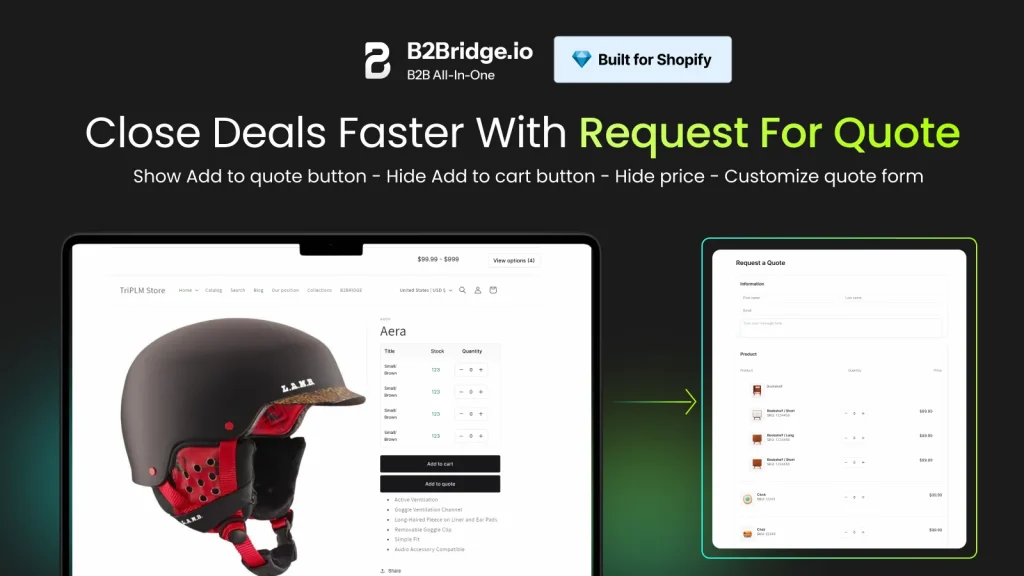
- RFQ per customer group, with prices and buy buttons hidden for quote-only segments
- Quote dashboard, PDF invoices, and auto-conversion below a threshold you set
- Net terms of 15, 30, 60 or 90 days with per-customer credit limits
- Sales rep portal with unlimited agents ordering on behalf of assigned accounts
- ERP and CRM sync with NetSuite, Zoho, Odoo and custom systems via Public API
Outcome: one app handles the quote, the price and the checkout, so your team stops reconciling three tools.
See the full all-in-one B2B feature set, or Book a Demo and we’ll map your quoting workflow together.
FAQs About Request for Quote on Shopify
Can you add a request for quote button to Shopify without an app?
Yes, with custom development. It’s rarely worth it. You’d rebuild form handling, price hiding and draft order conversion that apps already ship and maintain.
Do you need Shopify Plus to use request for quote?
No. Since April 2026, Shopify’s core B2B features are free on Basic, Grow and Advanced, and every RFQ app here works on standard plans.
How do accepted quotes turn into orders on Shopify?
An accepted quote becomes a Shopify draft order, which you finalize or send as a payment link. Some apps auto-convert quotes below a threshold you set.
Can you hide prices from the public and still show them to wholesale buyers?
Yes. Login-required price hiding tied to customer groups or tags shows wholesale pricing only to approved accounts. Retail visitors see a quote request instead.
How long does it take to set up RFQ on Shopify?
A basic quote button with hidden prices takes a few hours. A full B2B setup with price lists, registration approval and net terms takes a few days to configure and test.

As a Product Marketing Executive at B2Bridge, I focus on the Enterprise B2B Ecommerce domain. I leverage my understanding of product and user psychology to deliver customer-centric content that addresses business challenges and fuels growth.


