Yes. Shopify lets you sell to retail and wholesale buyers from one blended store. Both groups use the same Shopify admin, storefront, and inventory, while approved business buyers can access their own products, prices, and payment terms after signing in. Shopify B2B is available on Basic, Grow, Advanced, and Plus. Your setup depends on how many wholesale pricing segments you need and how different the buying experience should be.
If you already have a retail store, a blended setup can put wholesale orders in the same operation. You still need to configure buyer access, catalogs, shipping, and checkout deliberately. This guide builds on how Shopify B2B works and shows where the native tools are enough and when an app can fill a specific workflow gap.
Can you sell B2B and B2C on one Shopify store?
Yes. A blended Shopify store accepts consumer and business orders through one storefront. Retail buyers see the ordinary shopping experience. A business contact associated with a Shopify company location signs in to see the products, catalog pricing, and terms assigned to that B2B context. Both channels share the same admin and inventory.
The distinction matters when the same product sells at different prices. Suppose a bicycle has a retail price and a dealer price. The dealer must be recognized through the correct company location before Shopify shows the applicable B2B catalog. A customer tag or a wholesale-looking page alone does not establish native B2B pricing.
Sharing one store also means some settings apply across both channels until you configure them otherwise. Inventory cannot be reserved by customer type by default. Payment methods and shipping rates are shared at checkout by default. Those details should shape the store decision before you build the wholesale pages.

Blended vs dedicated Shopify B2B stores
A dedicated B2B store is a separate Shopify store for business buyers. It has its own admin, theme, settings, and inventory. Choose between the two store structures first. You can then decide which native features, apps, or integrations each store needs.
| Decision point | Blended store | Dedicated B2B store |
|---|---|---|
| Storefront and admin | One for both buyer types | Separate B2B storefront and admin |
| Theme and branding | Shared foundation, with eligible contextual changes | Independent B2B presentation |
| Inventory | Shared; no default allocation by buyer type | Separate by default |
| Access | Retail storefront stays open; B2B prices and account data require B2B login | Whole storefront can be restricted to B2B buyers |
| Payments and shipping | Shared by default; configure buyer-specific rules where needed | Settings apply to B2B buyers in that store |
| Integrations | Usually configured once for the store | Configure integrations for the separate store as well |
A blended store usually fits when the two groups buy much of the same range and the team wants one operating view. A dedicated store is useful when wholesale needs a fully gated storefront, distinct stock, separate staff, or substantially different branding. For a deeper decision framework, see our blended vs dedicated store guide.
What if you need a shared inventory but a private dealer page? That can still be a blended store. You may need a page-locking app for the private content, while the underlying store remains shared.
What Shopify B2B includes on each plan
Shopify expanded native B2B to Basic, Grow, and Advanced in April 2026. Companies, company locations, catalogs, quantity rules, net terms, purchase-order numbers, and self-service ordering are available on those plans and Plus. The differences below affect pricing design and storefront customization. Shopify’s current feature matrix is the source for this table.
| Capability | Basic | Grow | Advanced | Plus |
|---|---|---|---|---|
| Companies, locations, net terms, quantity rules, PO numbers | Yes | Yes | Yes | Yes |
| Active catalogs assigned across all B2B Markets | Up to 3 | Up to 3 | Up to 3 | Unlimited |
| Catalogs assigned directly to specific companies or locations | No | No | No | Yes |
| Contextual storefront and checkout through Markets | No | No | Yes | Yes |
| Deposit requirements and partial payments | No | No | No | Yes |
The three-catalog limit is across all B2B Markets, not three catalogs per market. Assigning all three to one market uses the whole allowance. On Basic, Grow, and Advanced, these native B2B catalog features also require the new Shopify Markets. Shopify Plus can assign catalogs directly to company locations for customer-level pricing.
There is another distinction for the storefront. Contextual storefront and checkout through Markets start on Advanced, while Shopify’s blended-store checklist says theme-editor customization specifically by B2B versus D2C customer type is Plus-only. A custom theme can use Liquid for buyer-specific content. Check your theme and plan before promising a fully different experience to each group.
How to set up a blended B2B and B2C store
Start with a small group of real wholesale accounts and test the whole order path. Shopify’s official checklist provides the native setup order; the steps below add the decisions a retail store needs to make.
1. Map products, buyer groups, and prices
List the SKUs each group may buy, their wholesale prices, quantity rules, tax treatment, and terms. Decide whether all dealers can share one catalog or whether regions need distinct catalogs. Count the catalogs you would assign across B2B Markets before choosing a plan or adding an app.
2. Create companies and company locations
Create a company for each business and one or more locations for its buying entities. Add the contacts who can purchase for each location. Locations can carry different addresses, tax settings, and payment terms. If existing wholesale contacts are ordinary customer records, plan their migration into company records and review how historic orders should be handled.
3. Build B2B Markets and catalogs
Set the products and prices in catalogs, then assign them through B2B Markets on eligible non-Plus plans. On Plus, direct assignment to a company or location is also available. Verify the final product price for a contact with access to multiple locations before you launch.
4. Activate customer accounts and buyer login
Shopify B2B requires customer accounts. Buyers sign in with the email associated with their company location and a one-time code sent to that address. If one contact belongs to several locations, test location selection and its effect on prices and terms. You can keep legacy accounts for retail buyers while offering the newer customer-account login to B2B buyers.
5. Configure terms, payment, and shipping
Set payment terms and applicable tax exemptions at the company-location level. Then review checkout methods for both buyer types. In a blended store, payment and shipping options start as shared settings. Shopify lists Checkout Blocks or a suitable app using payment and delivery Functions as ways to conditionally change method availability. Configure any special wholesale freight rule and test the result in checkout.
6. Adapt the storefront without changing prices in the theme
Make the dealer login easy to find and explain how a buyer requests access. Show suitable content once the buyer is recognized. Shopify’s customer.b2b? Liquid property can help a custom theme display B2B-specific content, and company-location properties support a location picker. Catalogs or the chosen app’s pricing rules should determine the actual wholesale price; visual changes in a theme do not replace those rules.
7. Run complete test orders
Place consumer and wholesale test orders, including a contact with multiple locations. Check product access, price at product page and checkout, terms, shipping, taxes, discounts, notifications, and inventory changes. If your team takes orders for customers, verify its staff permissions and order process too. Shopify recommends testing as an actual B2B customer before inviting buyers.
When do you need a wholesale app?
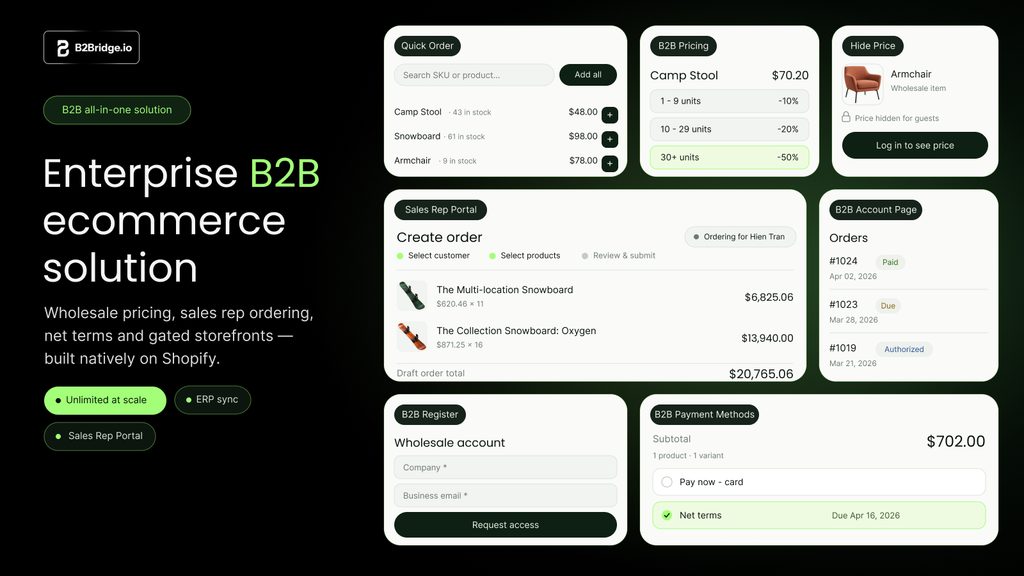
Start by listing the workflows that your plan and theme cannot cover. Shopify native already supports many essentials, including net terms, quantity rules, quick order lists, PO numbers, and admin-based sales staff permissions. An app should solve an identified requirement, such as more price lists than your native plan permits, private wholesale pages, a quote process, or a customer-facing sales rep portal.
| Requirement | First option to assess |
|---|---|
| A few shared wholesale catalogs and standard terms | Shopify native B2B on the eligible plan |
| More than three distinct native B2B Market catalog assignments on a non-Plus plan | Revisit segmentation, evaluate Plus, or evaluate an app’s own pricing system |
| A private dealer page within a public retail store | Appropriate page-locking workflow or app |
| No price displayed to unapproved visitors | Review product access, theme output, public product data, and an app’s price-hiding controls |
| Quotes, customer-group price lists, or a sales rep portal | Wholesale app with those features |
| ERP data exchange | Define the fields and direction first; evaluate a supported integration, API, or implementation project |
B2Bridge’s Professional plan lists unlimited app-managed B2B price lists, customer groups, and B2B orders. Its Growth plan adds request for quote, company accounts, credit limits, and a sales rep portal. Advanced adds a public API for third-party connections. These are B2Bridge features and plan allowances. They do not increase Shopify’s native three-catalog allowance or turn app price lists into Shopify native company catalogs. Test any mixed native-and-app pricing setup for precedence, checkout totals, theme display, and compatibility before migrating buyers.
An ERP connection also needs a defined implementation. Specify which system owns customer IDs, product prices, orders, fulfillment updates, and payment status. The app or API is one part of that data flow.
What if you want no public prices?
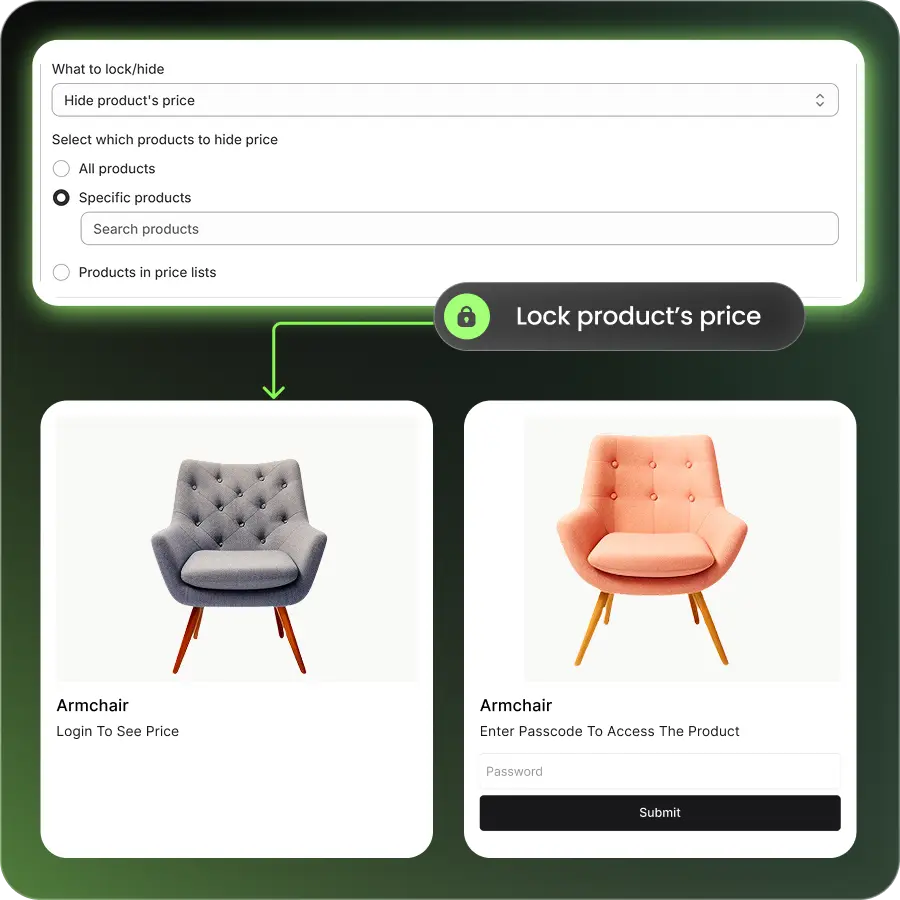
For a hybrid brand, showing retail prices publicly while keeping wholesale catalog prices behind B2B login is often exactly the goal. Shopify protects the B2B-specific buying experience this way. A manufacturer selling only to approved distributors may have a different requirement: no numeric price visible to an unapproved visitor, even in machine-readable product data.
Hiding a price in the theme addresses what a visitor sees on the page. For a publicly available product, also inspect the HTML, structured data, feeds, and Shopify’s Ajax product JSON endpoint, which can include a variant price field. Shopify documents the Ajax API as unauthenticated. A search engine or AI service may use publicly accessible data, but its behavior varies; no storefront setting can guarantee that a price will never appear in an AI answer.
B2Bridge offers price hiding and product or store locking on its Professional plan. Those controls can help shape the experience for visitors who have not been approved. If the underlying Shopify variant price itself is confidential, verify each public output and the final checkout amount with the implementation team before treating any app as a complete price-privacy solution. A hidden on-page label alone does not prove the source price is private.
A real hybrid store example
Brooklyn Bicycle Co. sells bicycles to retail shoppers and wholesale partners on Shopify. Its published B2Bridge story shows separate retail and wholesale product views. The wholesale setup uses variant-specific prices, login-only dealer pages, and order and fulfillment data flowing between Shopify and NetSuite.
The example makes the design problem concrete: an approved dealer should see the correct price for the selected variant and reach private trade content, while a retail shopper keeps the ordinary storefront. The story describes operational benefits but does not publish a measured lift in order frequency or launch speed. Treat those benefits as the customer’s reported experience, rather than a performance benchmark for another store.
Hybrid store launch checklist
Before inviting the full wholesale list, use a test account for each buyer state. Record the expected and actual result so the team can trace any pricing or checkout mismatch.
| Test buyer | Check before launch |
|---|---|
| Guest or retail customer | Retail price, public products, discounts, shipping, and standard payment methods |
| Approved B2B buyer at one location | Assigned products and price, quantity rules, terms, tax setting, freight options, and order email |
| B2B buyer at two locations | Location switch, distinct prices and terms, address, and order association |
| Unapproved wholesale applicant | No access to protected pricing or private pages; clear approval path |
| Logged-out visitor checking product data | Whether any price that must remain private appears in page source, product JSON, structured data, or feeds |
| Sales staff placing an order | Correct company location, permissions, price, and order record |
Three failures deserve special attention. A wholesale contact may sign in with an email that is not linked to the intended company location. Retail payment or shipping options may remain available to a B2B buyer because the shared defaults were never customized. A theme may show a wholesale-looking number while the checkout uses a different pricing rule. Testing a full order catches these errors earlier than a storefront preview.
FAQs about Shopify B2B and B2C
Can I add wholesale to my existing retail Shopify store?
Yes. A blended store lets you add companies, company locations, B2B catalogs, and buyer login to an existing retail store. Plan the migration of wholesale customer records and test the current retail checkout before launch.
Do I need Shopify Plus to sell B2B and B2C together?
No. Native B2B is available on Basic, Grow, and Advanced as well as Plus. Non-Plus plans have a shared limit of three active B2B Market catalogs and cannot directly assign native catalogs to company locations.
Can retail shoppers see wholesale prices?
Shopify displays B2B-specific catalog prices to recognized buyers after they sign in to an associated company location. Test guest, retail, and approved B2B sessions, especially if a theme or app adds other price displays.
Does hiding the price on a product page hide it from crawlers?
Not necessarily. Page display and product data are separate surfaces. Check the product’s public JSON, structured data, and feeds for any price you consider confidential, then test the exact access and checkout configuration you plan to launch.
Do B2B and B2C orders share inventory?
Yes, in a blended store inventory is shared, and Shopify does not allocate stock by customer type by default. If wholesale needs separate stock, assess a dedicated store or a carefully designed inventory process.
Will B2B customers use a password to sign in?
With Shopify customer accounts, buyers enter their email and receive a one-time sign-in code. Their address must be associated with a company location to access the B2B buying experience. Explain this in the invitation email.
Build a hybrid store around your actual buying process
One storefront can serve both retail and wholesale well when its buyers are identified correctly and each order follows the intended pricing and checkout path. Start with Shopify’s native company and catalog model. Add a wholesale app when your price segmentation or ordering workflow calls for capabilities beyond that setup.
If you need to model unlimited B2Bridge price lists, quotes, or sales rep ordering against your current store, Book a Demo and bring a sample of your buyer groups and pricing rules. You can validate the experience before rolling it out to wholesale customers.

Hi, I’m Ha My Phan – an ever-curious digital marketer crafting growth strategies for Shopify apps since 2018. I blend language, logic, and user insight to make things convert. Strategy is my second nature. Learning is my habit. And building things that actually work for people? That’s my favorite kind of win.


