What Does It Mean to Gate Wholesale Pricing Behind a Login?
If you want to gate wholesale pricing behind a login on Shopify, you’re hiding your trade prices (and often the add-to-cart button) from the public so only approved, logged-in buyers can see them. Retail visitors browsing your store see standard pricing or no pricing at all. Verified wholesale customers sign in and access their gated experience with trade discounts and bulk order tools.
Think of gating as a locked door between your public storefront and your wholesale catalog. The “gate” is the login requirement. “Wholesale pricing” refers to the lower, volume-based prices you offer trade customers or distributors. This setup lets you hide prices on Shopify from casual shoppers while giving your B2B buyers the self-service ordering experience they expect.
The retail-public / wholesale-private split protects your margins and keeps your channel partners happy. You don’t have to explain to a retail customer why someone else gets a better deal.
Why Gate Wholesale Pricing in the First Place?
Hiding your trade pricing from the public solves real business problems. Competitors can’t scrape your wholesale rates and undercut you. Retail customers won’t see discounts they can’t access.
Your channel partners stay confident that their negotiated pricing stays private. And you maintain clean separation between your B2C and B2B margins.
Gating also helps you qualify serious buyers. If someone needs to apply and get approved before seeing prices, you filter out tire-kickers and focus on accounts that will actually order.
That approval step gives you time to verify a business license, check references, or confirm a reseller agreement.
The market justifies the effort. The global B2B ecommerce market is valued at USD $36 trillion by 2026 and will grow at a 14.5% compound annual growth rate through 2026, according to the US International Trade Administration. B2B buyers now expect to research, price, and order online without waiting for a sales call.
A Gartner buyer survey found that 61% of B2B buyers prefer an overall rep-free buying experience. A login-gated wholesale store meets that expectation while keeping your pricing protected.
Can You Do This Natively in Shopify?
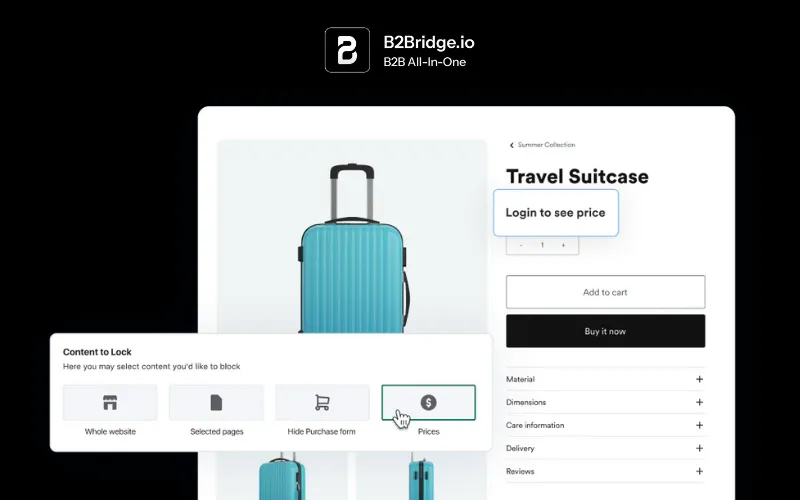
Shopify’s native B2B features require customer accounts. B2B customers must sign in before they can see B2B pricing or products.
By default, a B2B-enabled store is publicly browsable, and only logged-in B2B customers see their assigned B2B pricing. If you want a full login-wall, you’ll need a third-party app or custom Liquid code.
Since April 2026, Shopify extended native B2B features to all paid plans. You no longer need Shopify Plus.
All paid plans now include company profiles, up to three catalogs, volume discounts, and net payment terms. Merchants using Shopify’s B2B features have seen up to a 33% increase in self-serve orders within six months, according to Shopify’s 2026 B2B update.
That said, native B2B has limits. The built-in tools work for simple setups with a few customer tiers. Complex pricing, custom approval workflows, sales rep portals, and ERP integrations typically require additional apps.
The Three Ways to Gate Wholesale Pricing on Shopify
You have three options for gating wholesale pricing on Shopify, each with its own trade-offs.
| Method | Best For | Trade-off |
|---|---|---|
| Native Shopify B2B | Simple setups with 1–3 pricing tiers | Limited catalogs and thin approval workflows |
| Theme or Code (No App) | Budget-conscious stores with dev resources | Maintenance burden and theme fragility |
| Dedicated Wholesale App | Complex pricing, approval, and integrations | Monthly app cost |
The right choice depends on how many price lists you need, how you verify buyers, and whether you want to edit code or install an app.
Method 1: Native Shopify B2B (Company Accounts + Catalogs)
Shopify’s native B2B tools let you create company accounts, assign price lists (catalogs), and require sign-in before showing wholesale prices. After a buyer logs in, they see their company-specific pricing.
To set this up:
- Enable customer accounts in your Shopify admin under Settings > Customer accounts.
- Create a company profile for each wholesale account.
- Assign a catalog (price list) to that company.
- The buyer logs in and sees only their assigned pricing.
This method works well if you have one, two, or three wholesale tiers and don’t need custom approval workflows. For more on setting up customer-specific pricing, see B2B price lists and catalogs.
Method 2: Theme or Code (No App)
The no-app method uses Liquid (Shopify’s templating language) and the theme editor to hide prices and the add-to-cart button from logged-out visitors. You wrap your price output in a conditional:
{% if customer %}
  {{ product.price | money }}
{% else %}
  <a href="/account/login">Login to view price</a>
{% endif %}
This approach is free and gives you full control. But it comes with maintenance overhead. Theme updates can overwrite your edits. Switching themes means redoing the work. Liquid code gaps can let prices leak on certain templates.
This method is common for stores with developer resources and straightforward gating needs. For stores without a developer on call, a dedicated app is usually faster and more reliable.
Method 3: A Dedicated Wholesale App
A dedicated wholesale app handles lock/hide logic without requiring you to edit theme code. Apps can gate prices, products, collections, and even entire pages so only tagged, logged-in buyers see them.
Apps also add features beyond simple hiding: customer groups, price lists, wholesale registration forms, approval workflows, and ERP integrations. If you need more than native Shopify offers and don’t want to maintain custom code, an app is the fastest path on any plan.
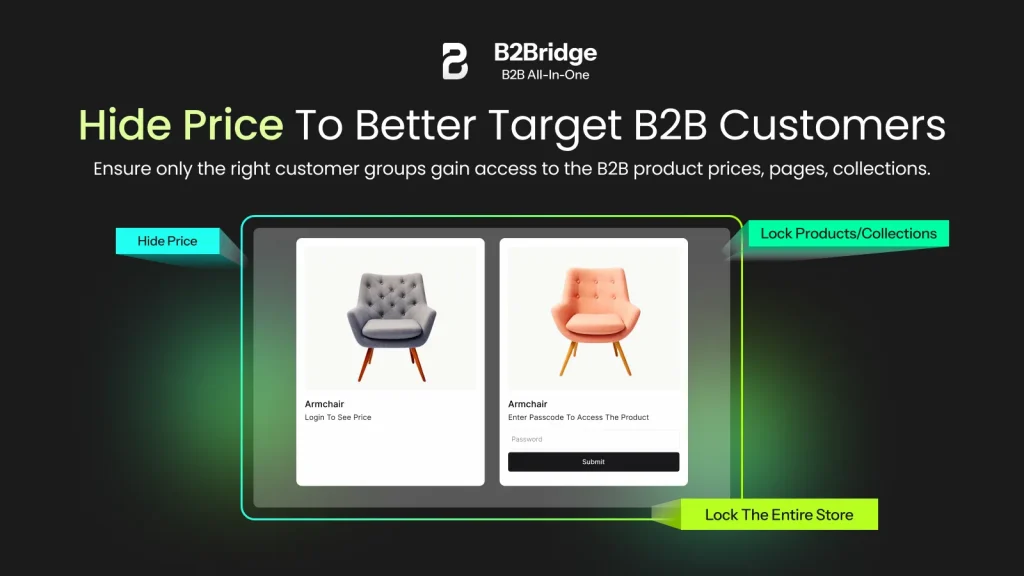
B2Bridge, for example, lets you lock and hide pricing at the store, product, collection, or page level. Approved buyers log in and see their assigned wholesale experience. Everyone else sees your retail storefront (or a login prompt).
Step-by-Step: Setting Up Login-Gated Wholesale Pricing
Here’s the workflow for gating wholesale pricing behind a login, whether you use native B2B, code, or an app.
Step 1: Enable customer accounts
Go to Settings > Customer accounts in your Shopify admin. Turn on customer accounts so buyers can register and log in. Without this, there’s no login to gate behind.
Step 2: Create a wholesale registration or application
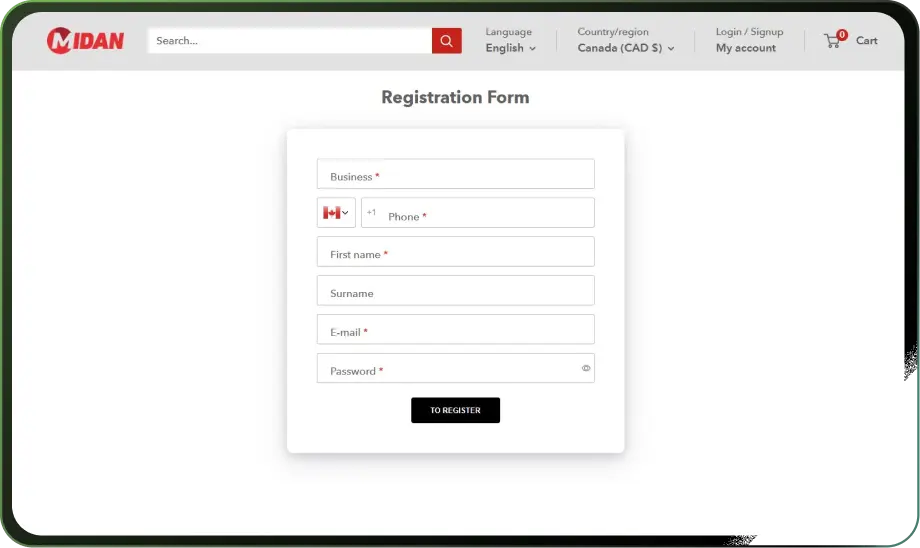
Give potential wholesale buyers a way to apply. This could be a wholesale registration form on your site, a linked application page, or a contact form.
Collect the information you need to verify them: business name, tax ID, resale certificate, references.
Step 3: Approve and tag verified buyers
Review each application. Once approved, tag the customer in Shopify (e.g., “wholesale” or “trade”). This tag determines what pricing they see.
You can also assign them to a company account or customer group, depending on your setup.
Step 4: Assign wholesale price lists
Create a price list or catalog with your trade pricing. Assign it to the approved customer’s tag, company, or group.
When they log in, they see their assigned prices instead of retail pricing.
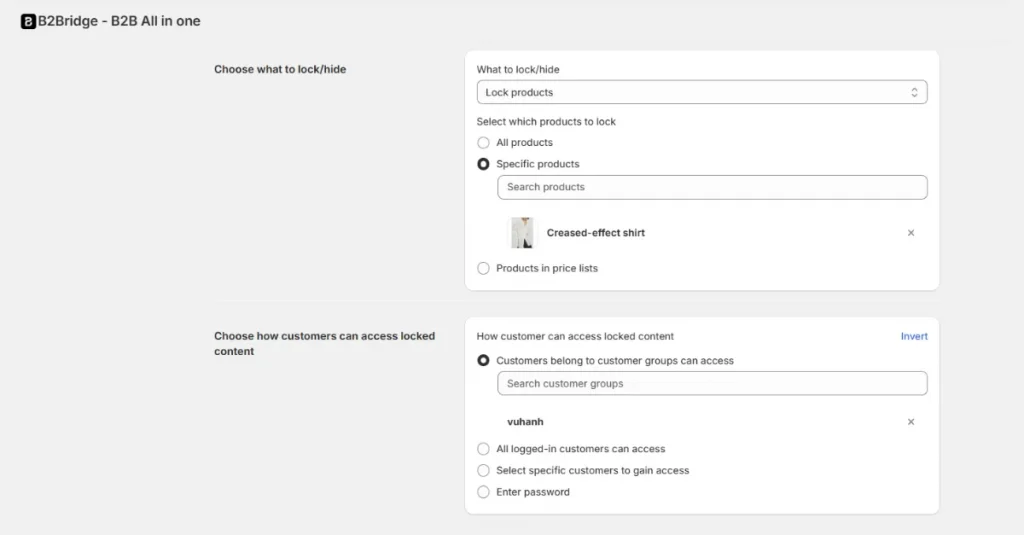
Step 5: Hide or lock prices from the public
Use your chosen method (native B2B, Liquid code, or app) to hide prices and add-to-cart from logged-out visitors. Display a “Login to view price” message or redirect them to your login page.
Step 6: Test logged-out vs logged-in views
Open your store in an incognito window (logged out) and verify that prices are hidden. Then log in as a tagged wholesale customer and confirm the correct pricing appears.
Test on product pages, collection pages, and the cart.
For a full self-service experience, set up a Shopify B2B portal where approved buyers can view orders, reorder, and manage their account.
Running Retail and Wholesale From One Store
A blended store serves both audiences from a single Shopify site. Retail shoppers browse your public catalog and see standard pricing. Approved wholesale buyers log in and see gated trade pricing, different products, or both.
Key point: A blended store simplifies operations because you manage one product catalog, one inventory pool, and one checkout flow.
This model works well when your retail and wholesale products overlap significantly, you want a single brand presence online, order volumes justify shared inventory management, and you don’t want to maintain two separate Shopify stores.
A dedicated B2B store makes more sense when your wholesale catalog differs completely from retail and your B2B buyers need a separate brand experience.
Most hybrid brands start with a blended store because it’s faster to launch and easier to manage. If you outgrow it, you can split later. For more on running both channels from one site, see how to run retail and wholesale together.
| Approach | Pros | Cons |
|---|---|---|
| Blended store | One catalog, one inventory, simpler ops | More complex gating logic |
| Dedicated B2B store | Cleaner separation, custom B2B UX | Two stores to manage, inventory sync needed |
Avoiding Price Leaks and Protecting SEO
Gated prices can still leak. If you hide prices with CSS or client-side JavaScript, the price data may still appear in your page source or product JSON-LD markup.
Crawlers (including Google) can read that data even if human visitors don’t see it.
Key point: True price protection requires server-side logic that doesn’t output price fields for logged-out sessions, not just visual hiding.
To avoid leaks:
- Use Liquid conditionals or app logic that omits the price entirely from the HTML when the visitor is logged out.
- Check your product pages’ structured data (JSON-LD) to confirm prices aren’t embedded for logged-out users.
- Test by viewing your page source in an incognito window.
- Audit collection pages separately, since they often use different templates than product pages.
Hiding prices does not hurt your SEO if you do it correctly. Google can still index your product titles, descriptions, images, and URLs. Your pages remain discoverable.
You simply won’t have a price in the search snippet. That’s often fine for B2B products that require a quote anyway.
The main risk is accidental leakage from exposed price data. Fix the leak at the source, and your gated catalog stays protected.
When Native Shopify B2B Is Not Enough
Shopify’s native B2B features have grown, but they still have ceilings. You’re limited to three catalogs. Approval workflows are basic.
Permissions are thin, with no sales rep roles or company hierarchies. There’s no built-in RFQ or quote-to-order flow. And if your pricing lives in an ERP, you’ll need middleware to sync it.
Shopify reported more than 140% B2B GMV growth in 2024, though it noted B2B represents a very small portion of GMV today, according to Shopify 2024 earnings. The platform is investing in B2B, but the native tools are still catching up to merchant needs.
Meanwhile, B2B ecommerce is becoming table stakes. The McKinsey B2B Pulse Survey found that 71% of B2B respondents offer some form of e-commerce. Online sales now account for 34% of revenue.
If your wholesale operations need more than native provides, a dedicated app fills the gap.
B2Bridge, for example, adds unlimited price lists, customer groups, sales rep portals, RFQ workflows, net terms, and ERP sync to any Shopify plan. More than 500 Shopify merchants use B2Bridge to run retail and wholesale from a single store. It runs inside your existing site without requiring Shopify Plus or a second platform. For a full breakdown of where native falls short, see native B2B limitations.
Frequently Asked Questions
Do I need Shopify Plus to hide prices until login?
No. Since April 2026, Shopify’s native B2B features (company accounts, catalogs, volume discounts) are available on all paid plans. You can also use Liquid code or a wholesale app on any plan to hide prices from logged-out visitors.
Can I hide prices for some products but not others?
Yes. You can apply gating at the product, collection, or page level. Native B2B lets you assign catalogs to specific companies. Apps and Liquid code let you hide prices based on product tags, collections, or customer tags.
Will Google penalize me for hiding prices?
No. Google does not penalize sites for hiding prices behind a login. Your product pages remain indexable as long as titles, descriptions, and images are visible. You simply won’t display a price in search snippets.
Can I run both retail and wholesale in one store?
Yes. A blended store shows retail pricing to the public and gated wholesale pricing to logged-in, approved buyers. This is the most common setup for hybrid B2C/B2B brands on Shopify.
How do I add a wholesale login to Shopify?
Enable customer accounts in your Shopify admin, create a wholesale registration form or application page, approve and tag verified buyers, assign them a wholesale price list, and hide prices from logged-out visitors using native B2B, Liquid code, or a wholesale app.

Hi, I’m Ha My Phan – an ever-curious digital marketer crafting growth strategies for Shopify apps since 2018. I blend language, logic, and user insight to make things convert. Strategy is my second nature. Learning is my habit. And building things that actually work for people? That’s my favorite kind of win.


