Shopify net terms are B2B payment conditions that let approved wholesale buyers place an order and pay within a set window instead of at checkout. Shopify supports net terms natively on every paid plan as of April 2026, assigned through company profiles. Merchants who need credit limits, tag-based eligibility, or custom term lengths add a B2B app on top.
If a distributor has asked you for Net 30 and you are not sure whether your Shopify store can do it, the short answer is yes. The longer answer is that native net terms solve the checkout experience and leave the credit side of the relationship to you. This guide covers what Shopify gives you, where it stops, and how to run a terms program that does not put your cash flow at risk.
What Are Shopify Net Terms
Shopify net terms let an approved business buyer complete an order without paying at checkout, then settle the invoice within an agreed window. Shopify supports Net 7, Net 15, Net 30, Net 45, Net 60, Net 90, and due on fulfilment. Terms are attached to a buyer’s company location, and the checkout applies them automatically once that buyer logs in.
The mechanism matters more than the label. When a buyer on Net 30 submits an order, Shopify records it with a payment due date and releases it into your fulfilment workflow. You ship first and collect second. That inversion is the entire reason net payment terms exist in wholesale, and it is also why they carry risk.

How Net 30 Works on a Wholesale Order
A boutique places a $6,000 order on 1 March with Net 30 assigned to their account. Shopify creates the order with a due date of 31 March and no payment collected. You pick, pack, and ship that week. The buyer sells through the stock during March and pays your invoice on 30 March.
For those 29 days, that $6,000 sits on your balance sheet as a receivable, not as cash. You have financed the buyer’s inventory. Most wholesale relationships work exactly this way, which is why buyers treat terms as a baseline expectation rather than a favour.
Net Terms Compared With Paying at Checkout
Net terms defer 100% of the payment; checkout payment collects 100% immediately. The difference shows up in three places.
| Pay at checkout | Net terms | |
|---|---|---|
| When you get paid | Immediately | After the agreed window |
| What the buyer needs | A card | An approved account |
| Your exposure | None | Full order value until paid |
For a B2C shopper, a card at checkout is normal. For a procurement team, it is a blocker. Their accounts payable process runs on invoices and purchase order numbers, not card authorisations, so a store that only accepts cards quietly loses those orders.
Net Terms Compared With Deposits and Partial Payments
A deposit collects part of the order value upfront and defers the balance to the terms due date. Net terms defer everything. Shopify supports a percentage-based deposit requirement configured per company location, which is useful for made-to-order production where you want commitment before you start manufacturing.
Choose deposits when the order carries production risk. Choose straight net terms when the buyer is reselling finished stock and needs the full window to turn inventory into cash.
Which Shopify Plans Include Net Terms
Net terms are included on every paid Shopify plan. Basic, Grow, Advanced, and Plus all support native B2B payment terms after Shopify moved its foundational B2B features to all plan tiers in April 2026. Before that change, net terms required a Shopify Plus contract.
This is the single most out-of-date fact in most guides on this topic. If an article tells you that offering Net 30 on Basic requires a draft order workaround, it was written for the pre-April 2026 platform.
Two plan-level limits still shape what you can build around terms. Basic, Grow, and Advanced allow up to 3 active catalogs across all B2B markets, while Plus allows an unlimited number. Contextual checkout through Markets requires Advanced or higher. Neither blocks net terms directly, but both constrain how many distinct buyer tiers you can price and check out separately.
How Net Terms Work at Checkout for B2B Buyers
Native net terms run through four stages, and only the first requires you to do anything per buyer.
Step 1: Assign Payment Terms to the Buyer Account
You set payment terms on a company location in your Shopify admin, and every order from that location inherits them. Terms can be set once for all locations under a company, or varied by location when regional offices negotiate separately. Shopify Flow can update a company location’s payment terms automatically, which is how larger programs handle tier changes without manual edits.
Outcome: terms apply to every future order without per-order intervention.
Step 2: The Buyer Checks Out on Account
Once the buyer logs in, checkout presents their assigned terms as the payment method and no card is required. They see the due date before submitting and can enter their internal purchase order number, which flows through to the order record and any invoice generated from it.
Outcome: the buyer completes a purchase their finance team will actually approve.
Step 3: You Fulfil and Send the Invoice
The order enters your normal fulfilment workflow with payment still outstanding. Shopify generates a payment request email with a hosted payment link, which you send on fulfilment or time to the due date. Buyers who pay by bank transfer or cheque are marked as paid manually in the admin.
Outcome: the shipment moves before the cash does, which is the point of the arrangement.
Step 4: You Collect and Reconcile
Shopify sends automated reminders at intervals you configure around the due date and tracks each order as paid or outstanding. What it does not do is roll those order-level statuses into a receivables view or push them into your accounting system.
Outcome: individual invoices get chased; the portfolio view is yours to build.
What Shopify Native Net Terms Do Not Cover
Native net terms handle the buyer-facing side well and stop short of the credit-management side. For a merchant running a small wholesale program with a handful of trusted accounts, that is a fair trade. Four gaps become expensive as the account list grows.
No Credit Limit Enforcement at Checkout
Shopify does not check a buyer’s outstanding balance before accepting an order on terms. A buyer sitting at $23,000 against a $25,000 limit can place another $30,000 order and the platform will process it. Your credit policy exists in your ERP or a spreadsheet, not at the point of purchase, so the first person to notice is whoever reconciles the account days later.
No Terms for Buyers Outside Company Profiles
Native terms only reach buyers set up as companies. Shopify’s own documentation is explicit that B2B customers must be structured as companies to use Shopify B2B, and payment terms attach to a company location rather than to a customer.
That is a structural problem for hybrid stores. If you are running B2C and B2B from one store and you segment wholesale buyers with customer tags, none of those buyers can be offered native net terms until you rebuild them as company profiles. Many brands discover this after they have already tagged several hundred accounts.
No Custom Term Lengths Beyond the Presets
The preset list covers most wholesale arrangements and nothing outside it. Net 28, end-of-month plus 30, or terms that start counting from the delivery date rather than the order date all require Shopify Functions or metafield workarounds. Terms measured from fulfilment are a common ask in categories with long production lead times.
No Receivables Aging or ERP Sync
Shopify tracks payment status per order and produces no aged receivables report. With 50 accounts on terms at different points in the cycle, knowing which are current and which are 40 days past due means exporting orders and building the view yourself. Net terms orders also do not create accounts receivable records in your ERP, so syncing wholesale orders with your ERP is a separate integration project rather than a setting.
Native Shopify Net Terms Compared With a B2B App
Native net terms are enough when your wholesale buyers are set up as companies, your term needs fit the presets, and you extend credit to few enough accounts that you can track exposure by hand. Past any of those three lines, you are choosing between a stack of apps, custom development, or a purpose-built B2B app.
| Capability | Shopify native B2B | Net terms app or custom build | B2Bridge |
|---|---|---|---|
| Term lengths | Net 7 to Net 90 plus due on fulfilment | Varies by tool | Net 15, 30, 60, 90 per customer group |
| Buyers eligible | Company profiles only | Varies | Any customer group, assigned by Shopify customer tag |
| Credit limit enforced | No | Usually custom development | Yes, per customer |
| Custom checkout fields such as PO number | Limited | Varies | Configurable per customer group |
| Admin review before finalising | Draft orders, manual | Varies | Net terms orders save as draft orders by default |
| ERP sync | No | Connector or middleware required | Public API sync with NetSuite, Zoho, Odoo, or a custom ERP |
| B2B order volume | Plan-dependent | Often tiered by order count | Unlimited from Professional |
| Cost | Included with your plan | Verify current pricing | $99 Professional, $199 Growth for credit limits and RFQ |
The stacking route deserves a clear look, because it is what most merchants try first. A typical net terms setup assembled from parts runs to a wholesale pricing app, a checkout lock app, a receivables app, an automation tool, and an accounting connector. Each one is reasonable on its own. Together they are five billing relationships, five points of failure at checkout, and five places where a customer group definition can drift out of sync.
How to Set Credit Limits on Shopify Net Terms Orders
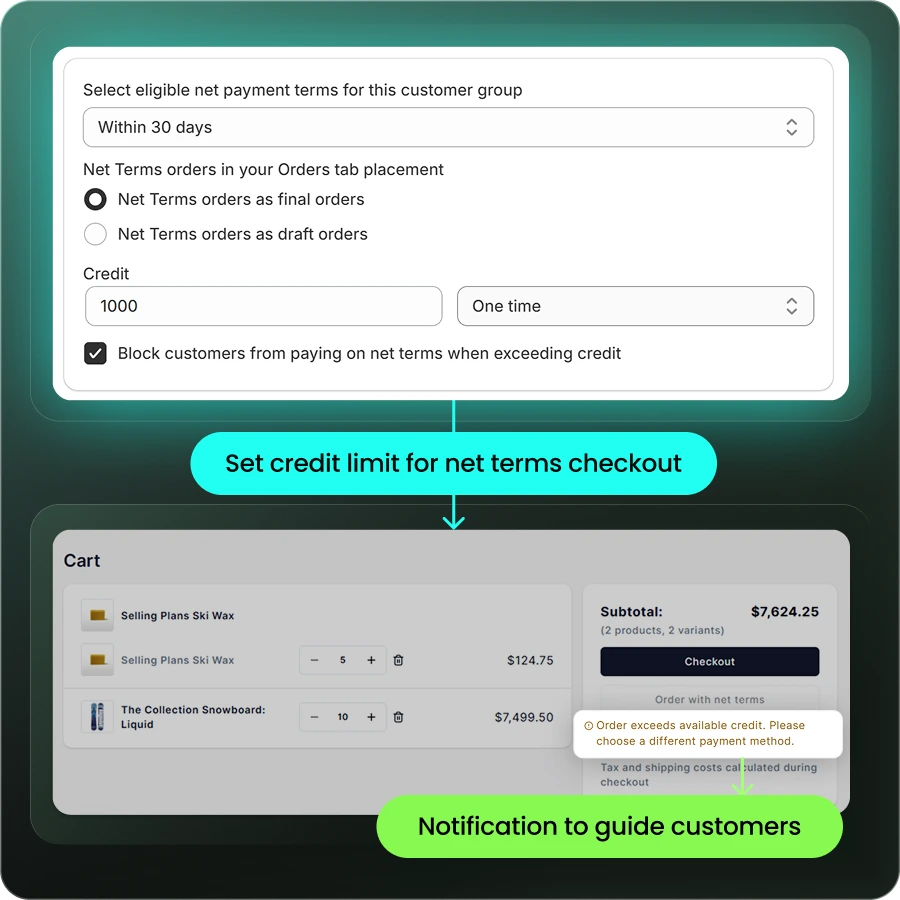
A credit limit caps the total outstanding balance a buyer can carry at any one time, and it is the control that makes net terms safe to offer widely. Shopify has no native equivalent, so you either enforce it in software or you enforce it in someone’s memory.
Start conservative and let payment behaviour earn increases. A workable opening position for a new wholesale account is a limit around the value of one typical order on the shortest term you offer. After three or four settled invoices, raising the limit costs you little and signals trust the buyer will remember.
| Account stage | Suggested term | Suggested limit |
|---|---|---|
| New, verified | Net 15 or Net 30 | One typical order value |
| Three or more clean payments | Net 30 | Two to three order values |
| Established, high volume | Net 60 | Negotiated against annual spend |
| Any account past due | Hold new terms orders | Freeze until cleared |
Enforcement is where most programs break down. B2Bridge sets credit limits on net terms accounts per customer, so the ceiling is applied in the store rather than tracked outside it, and net terms orders save as Shopify draft orders by default. That draft step gives your team a moment to adjust shipping, tax, or the payment term period before the order is finalised.
Outcome: credit exposure stays inside the limit you set, without anyone remembering to check.
How to Decide Which Buyers Qualify for Net Terms
Terms are a credit decision, not a checkout setting. Four steps keep that decision consistent as the account list grows.
1. Verify the Business Before You Extend Credit
Collect the business credentials before the first terms order, not after the first missed payment. A wholesale registration and approval form should capture company name, tax ID, resale certificate, business licence, and expected order volume, with approval gated on an actual review of those documents.
2. Start With a Short Term and a Conservative Limit
Give new accounts Net 15 or Net 30 rather than the terms they asked for. Longer windows are something you extend to buyers who have demonstrated they pay, and starting short gives you a low-cost way to find out quickly.
3. Assign Terms to a Customer Group Rather Than a Person
Define terms at the segment level so a distributor tier, a retailer tier, and a VIP tier each carry their own payment options. Managing terms per individual buyer works until you have thirty accounts, then becomes a source of inconsistency nobody can audit.
4. Review Limits Against Payment History
Set a recurring review of every account on terms. Buyers paying consistently early are candidates for a higher limit or a longer window. Buyers drifting later each cycle are a warning to act on before the balance grows.
Net Terms Best Practices for Shopify Wholesale Programs
Five practices separate a terms program that grows revenue from one that grows receivables.
- State the terms before checkout. Put the available payment terms on your wholesale page and in the cart, not only on the invoice. Buyers who know they qualify for Net 30 place larger orders.
- Send reminders before the due date, not after. A note three days out is a courtesy. A note three days late is a collections call, and it changes the tone of the relationship.
- Offer an early payment discount. Terms such as 2/10 Net 30 give the buyer a reason to pay in ten days and give you a predictable cost for faster cash.
- Block new terms orders on overdue accounts. Automatic is better than awkward. A buyer stopped at checkout with a clear message is easier to handle than a fulfilled order you should not have shipped.
- Keep terms and pricing in one system. When customer group pricing and payment terms live in separate tools, the two definitions eventually disagree and the buyer sees the mismatch first.
What Offering Net Terms Costs Your Cash Flow
Net terms are a financing product you are giving away, and the cost is real even when every buyer pays on time. Most guides skip this math. You should do it before you set your terms policy.
The working capital you tie up is straightforward to estimate:
Average monthly terms revenue ÷ 30 × average days to payment = cash locked in receivables
A brand doing $150,000 a month in wholesale on Net 30, collecting on average in 38 days, has roughly $190,000 permanently out on loan to its buyers. That money cannot buy inventory or fund marketing. If the business is growing, the receivable grows with it, which is why fast-growing wholesale brands often feel poorer as they scale.
Three levers reduce the cost. Shorten the term for accounts that do not need the full window. Use an early payment discount to buy back days at a known price. Enforce limits so a single account cannot absorb a disproportionate share of the balance.
Outcome: you offer terms as a deliberate commercial decision with a known cost, not as a concession granted under pressure.
Running Net Terms on Shopify with B2Bridge
Shopify’s native net terms will carry you a long way if your buyers fit inside company profiles and your credit policy fits inside your head. The moment you are tagging wholesale customers, managing credit across dozens of accounts, or syncing receivables to an ERP, you need a layer that treats terms as part of a wholesale operation rather than a checkout option.
B2Bridge is an enterprise B2B solution built for Shopify that runs payment terms alongside pricing, registration, and the B2B cart in a single app.
- Unlimited at scale. Unlimited price lists, customer groups, and B2B orders from the Professional plan at $99 per month, so a growing wholesale channel never triggers a forced upgrade or an order-count penalty.
- All-in-one. Net terms, credit limits, RFQ, wholesale registration, storefront lock, and customer group pricing in one app instead of a stack of four.
- Sales Rep Portal and ERP sync. Reps place orders on behalf of assigned customers at contracted prices, while pricing, customers, and orders stay aligned with NetSuite, Zoho, Odoo, or a custom ERP through the Public API.
Terms are configured per customer group, so the same store can offer Net 30 to distributors, Net 15 to new accounts, and card-only checkout to retail shoppers, with credit limits applied per customer on the Growth plan.
Book a Demo to see how net terms, credit control, and your pricing rules work together in one Shopify store.
FAQs about Shopify net terms
Do I need Shopify Plus to offer net terms?
No. Native net payment terms are available on every paid Shopify plan since April 2026, including Basic. Shopify Plus adds unlimited B2B catalogs and other enterprise capabilities, but the ability to assign Net 30 to a wholesale buyer is no longer gated behind it.
Can I offer net terms to customers who are not set up as a company?
Not with native Shopify B2B. Payment terms attach to a company location, so a buyer you have only tagged as wholesale cannot be given terms natively. A B2B app that assigns terms by customer group solves this without rebuilding your customer records as companies.
What happens if a buyer does not pay by the due date?
Shopify marks the order as outstanding and continues sending the reminders you have configured. It does not automatically place the account on hold or block new orders, so escalation and any credit freeze are manual unless you add a tool that enforces limits and holds at checkout.
Can I offer different payment terms to different customer groups?
Yes. Natively you vary terms by company or company location, giving each business its own arrangement. With customer group logic, you set terms once per segment so every buyer tagged into that group inherits the same payment options and limits.
Do net terms work alongside my existing B2C checkout?
Yes. Terms appear only for logged-in buyers whose account has them assigned, so retail shoppers continue through your standard card checkout untouched. This is what makes a single store viable for both channels rather than requiring a separate wholesale site.
How long does it take to set up net terms on Shopify?
Assigning native terms to an existing company location takes minutes. Building the surrounding program takes longer: registration and approval, credit limits, customer group pricing, and ERP sync are typically a matter of days with a purpose-built app, or weeks to months if built custom.

As a Product Marketing Executive at B2Bridge, I focus on the Enterprise B2B Ecommerce domain. I leverage my understanding of product and user psychology to deliver customer-centric content that addresses business challenges and fuels growth.


