B2B ecommerce checkout is the purchasing flow where verified wholesale buyers complete orders online—typically involving contract pricing, purchase orders, net payment terms, and approval workflows rather than standard consumer payment. It’s designed for company accounts and procurement processes, not individual shoppers with credit cards.
Most B2B checkout friction comes from systems built for consumers. When your checkout doesn’t support PO numbers, net 30 terms, or the pricing your buyers negotiated, orders move to phone calls and email threads instead. This guide covers what makes B2B checkout different, the most common problems that block wholesale conversion, and 7 specific optimizations you can apply to reduce friction and process orders faster.
What is a B2B ecommerce checkout
B2B ecommerce checkout is a purpose-built purchasing flow designed for complex corporate buying. Unlike consumer checkouts that assume a single shopper paying by credit card, B2B checkout supports purchase orders, multi-level approvals, net terms like Net 30 or Net 60, contract-specific pricing, and tax exemptions—all within a single transaction flow.
Think of it this way: a consumer checkout asks for a shipping address and card number. A B2B checkout handles company account billing, purchase order validation, and credit limit enforcement. The buyer is often a procurement manager placing an order on behalf of their organization, not an individual spending their own money.
This distinction matters because wholesale buyers operate under internal purchasing rules. Many cannot complete an order without entering a PO number or routing it through an approval workflow first.


How B2B ecommerce checkout differs from B2C checkout
The differences go deeper than order size. B2C checkout assumes one person, one payment method, and an immediate transaction. B2B checkout assumes a company, multiple stakeholders, and a purchasing process that might span days or weeks.
| Element | B2C Checkout | B2B Checkout |
|---|---|---|
| Buyer | Individual consumer | Company or purchasing agent |
| Pricing | Fixed retail price | Contract, tiered, or role-based pricing |
| Payment | Credit card at checkout | Net 30/60 terms, purchase orders, invoicing |
| Order size | Single items | Bulk quantities, case packs, MOQs |
| Approval | None | Multi-user roles and approval workflows |
B2B buyers also expect to see their negotiated pricing automatically—not a retail price they then have to dispute. And while a consumer might abandon a cart over a $5 shipping fee, a wholesale buyer abandons checkout when the system doesn’t accept their purchase order or offer payment terms.
Why optimizing your B2B ecommerce checkout matters
When checkout doesn’t match how wholesale buyers actually purchase, you lose orders. Buyers abandon carts, call sales reps to place orders manually, or go to a competitor whose system works the way they expect.
The operational impact compounds quickly. Every order placed by phone or email instead of online creates manual work—data entry, error correction, and reconciliation between systems. A checkout optimized for B2B workflows reduces support tickets, speeds order processing, and increases wholesale conversion rates.
Common problems with B2B ecommerce checkouts
Disconnected ERP and CRM systems
When your checkout doesn’t sync with backend systems, teams re-enter orders manually. This creates delays, introduces errors, and forces someone to reconcile data between your storefront and your ERP—the enterprise resource planning system that manages inventory, orders, and accounting.
Pricing rules that do not reflect contracts
B2B buyers expect their negotiated or contract pricing at checkout. When the system shows retail prices or incorrect rates, buyers either abandon the cart or call your sales team to place the order manually.
Missing net terms and purchase order support
Unlike consumers, wholesale buyers often cannot pay by credit card at checkout. They operate on net 30 or net 60 terms, paying via invoice after the order ships. Without PO fields and invoicing options, checkout becomes unusable for their procurement process.

Friction with bulk and variant heavy orders
B2B buyers order dozens or hundreds of SKUs at once. Standard checkout flows designed for single-item purchases create painful friction—clicking “add to cart” repeatedly, navigating back to product pages, losing track of quantities.
Manual quote and approval workflows
Large orders often require a quote request (RFQ) or internal approval before purchase. Without embedded quote-to-order workflows, buyers resort to email, and your team spends time on back-and-forth that could be automated.
7 ways to optimize your B2B ecommerce checkout
1. Apply role based and contract pricing at checkout
Verified B2B customers see their specific prices—by customer group, contract, or account—automatically at checkout. No manual adjustments, no pricing disputes, no calls to confirm rates.
Outcome: Buyers trust the checkout price, reducing abandoned carts and support calls.
2. Offer net 30 and net 60 payment terms
Net terms let buyers pay on invoice within 30 or 60 days rather than at checkout. Wholesale buyers expect this option, and requiring card payment blocks their standard procurement workflow.
Outcome: Buyers complete orders using their normal purchasing process.
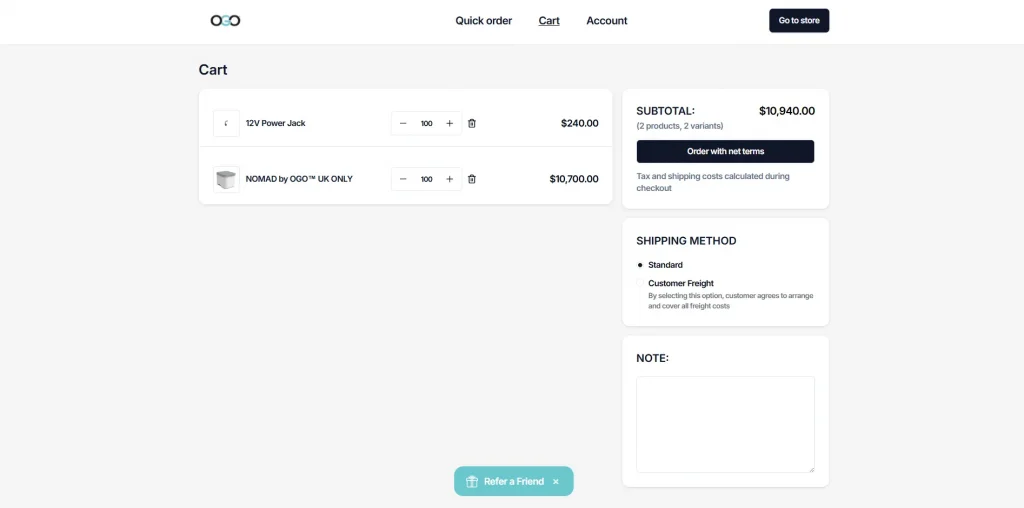
3. Support purchase orders and credit limits
Allow buyers to enter a PO number at checkout and set credit limits per account. This matches how B2B purchasing departments actually operate—orders flow through internal approval without manual sales intervention.
4. Multi-User Order Approval Workflows
Large B2B purchases often need sign-off from a manager, finance lead, or procurement team before they finalize. A checkout built for a single buyer forces every large order into email and phone follow-up instead. Supporting multiple users per account, with roles like purchaser and approver, lets an order move from cart to approved purchase without leaving the platform. It mirrors the internal process the buyer’s company already runs.
5. Tax Exemption Handling
Most wholesale buyers are tax-exempt on resale purchases, and crediting tax back manually after the fact creates avoidable friction and accounting errors. The checkout should recognize a buyer’s exempt status automatically, tied to their account or customer group, and remove tax at the point of sale. This single fix removes one of the more common reasons a B2B buyer contacts support mid-purchase.
6. Flexible Shipping For Bulk Orders
B2B orders frequently need freight, LTL (less-than-truckload), or full-truckload shipping options that a standard parcel-rate checkout simply doesn’t support. Buyers managing multiple warehouses or job sites often need to split one order across several delivery addresses. They need to select carriers and delivery windows that match their own logistics schedule, not a one-size-fits-all rate built for home delivery.
7. Sync checkout with your ERP and CRM
Orders, customers, and pricing flow automatically between your storefront and backend systems like NetSuite, Zoho, or Odoo. This eliminates manual data entry and the reconciliation work that follows.
Outcome: Teams spend less time fixing errors and orders process faster.
How to choose the right B2B ecommerce checkout solution
Native Shopify integration without replatforming
If you’re on Shopify, you want a B2B checkout that embeds directly—not a separate wholesale site or a Shopify Plus requirement. Solutions like B2Bridge add enterprise B2B checkout to standard Shopify plans without forcing a platform migration.
Depth of pricing and discount logic
Evaluate whether the solution supports contract pricing, volume tiers, customer-specific rates, and complex discount rules. Basic wholesale discounts aren’t enough for operations with negotiated pricing or multi-tier customer groups.
ERP and CRM integration coverage
Check for native connectors or APIs to your specific ERP—NetSuite, Zoho, Odoo, or custom systems. Shallow integrations create the same manual work you’re trying to eliminate.
B2B UX built for wholesale buyers
Look for quick order forms, bulk ordering, saved carts, and a dedicated B2B cart. A consumer checkout with added fields isn’t the same as a checkout designed around how wholesale buyers actually purchase.
Implementation and ongoing technical support
Complex B2B setups benefit from hands-on implementation and ongoing support—not just documentation. Evaluate whether the vendor offers onboarding, customization, and post-launch partnership as your operation grows.
Frequently asked questions about B2B ecommerce checkout
What is an example of a B2B ecommerce transaction?
A retailer logs into a supplier’s wholesale portal, sees their contract pricing, orders 500 units across multiple SKUs, enters a purchase order number, and checks out with net 30 payment terms. The order syncs to the supplier’s ERP automatically.
Is B2B considered an ecommerce transaction?
Yes. When one business sells products or services to another business through an online platform, it qualifies as B2B ecommerce—regardless of whether payment happens at checkout or via invoice.
Do you need Shopify Plus to run a B2B checkout on Shopify?
No. Solutions like B2Bridge embed enterprise-grade B2B checkout functionality directly into standard Shopify plans without requiring an upgrade to Shopify Plus or a separate wholesale site.
How long does it take to launch an optimized B2B checkout?
With a dedicated B2B solution and implementation support, most merchants launch a fully configured B2B checkout in days to a few weeks, depending on ERP integration complexity and pricing rule setup.
How does ERP integration improve B2B checkout accuracy?
When your checkout syncs with your ERP, pricing, inventory, and customer data stay aligned automatically. This eliminates manual order entry, reduces errors, and ensures buyers always see accurate information.
Run a frictionless B2B ecommerce checkout on Shopify with B2Bridge
The checkout optimizations covered here—contract pricing, net terms, PO support, quick ordering, ERP sync, and quote-to-order workflows—are exactly what B2Bridge delivers for Shopify merchants.
B2Bridge embeds enterprise B2B operations directly into your Shopify store, so you run wholesale without a separate platform or a Shopify Plus requirement. The advanced pricing engine handles role-based and contract pricing, volume rules, and customer-specific rates. Deep integrations with NetSuite, Zoho, Odoo, and custom ERPs keep orders, customers, and pricing aligned across systems.
Beyond software, B2Bridge works with your team from day one to configure the right setup for your pricing models, workflows, and growth stage—and supports you long after launch.
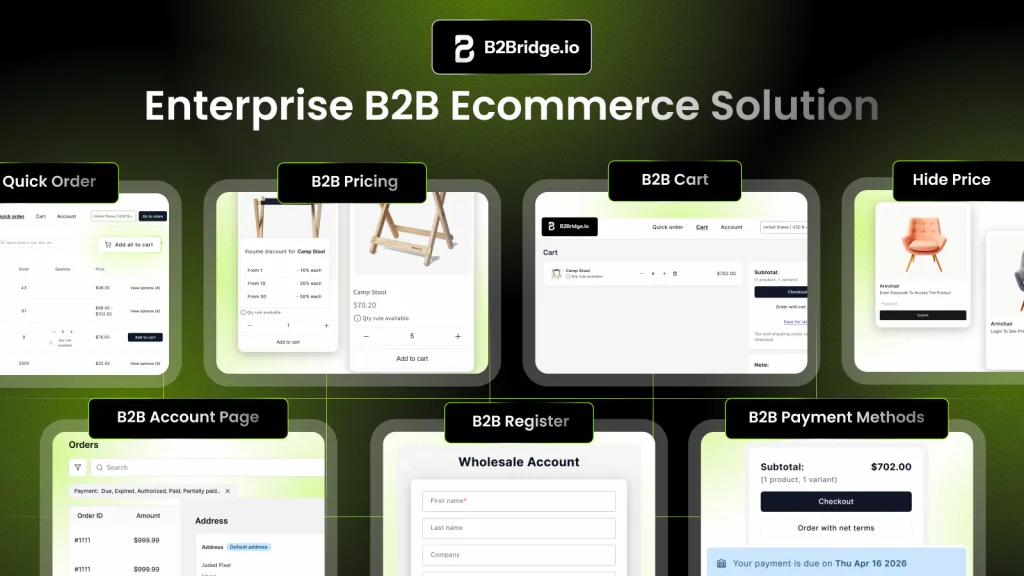
Book A Demo to see how B2Bridge builds a B2B checkout that matches how your wholesale buyers actually purchase.

As a Product Marketing Executive at B2Bridge, I focus on the Enterprise B2B Ecommerce domain. I leverage my understanding of product and user psychology to deliver customer-centric content that addresses business challenges and fuels growth.