Shopify API integration can be achieved by creating a custom app in your store’s admin to generate API credentials, or by building a public app through a Shopify Partner account for broader use. The process includes creating the app, setting permissions (scopes), generating credentials, and using them to access Shopify’s APIs.
This comprehensive guide walks you through the entire journey: step-by-step API setup, understanding Shopify’s authentication framework, exploring the B2Bridge Public API for enterprise B2B operations, mastering rate limits and best practices, and implementing a production-ready checklist.

Does Shopify Allow API Integration?
Yes, Shopify not only allows API integration but actively encourages it through a comprehensive suite of tools designed for developers. The platform provides both REST and GraphQL Admin APIs that support virtually every B2B need imaginable – from order processing and wholesale pricing management to inventory synchronization and customer data handling.
Shopify API integration has become the powerhouse that enables modern Ecommerce operations, allowing developers to automate workflows, sync data across enterprise systems like ERPs and CRMs, and build sophisticated B2B solutions that meet 2026’s demands for real-time commerce. As wholesale businesses scale and customer expectations evolve, the ability to seamlessly integrate Shopify with external platforms is no longer optional – it’s essential for competitive advantage.
Shopify’s API ecosystem is built to accommodate businesses of all sizes. For enterprise wholesale operations, the Admin API offers complete control over products, orders, customers, pricing rules, and more. This means you can build custom B2B portals, automate order flows from ERP systems like NetSuite or SAP, and create sophisticated pricing tiers that adapt to different customer segments.
Shopify API Types Deep Dive
Shopify offers several API types, each serving specific integration needs:
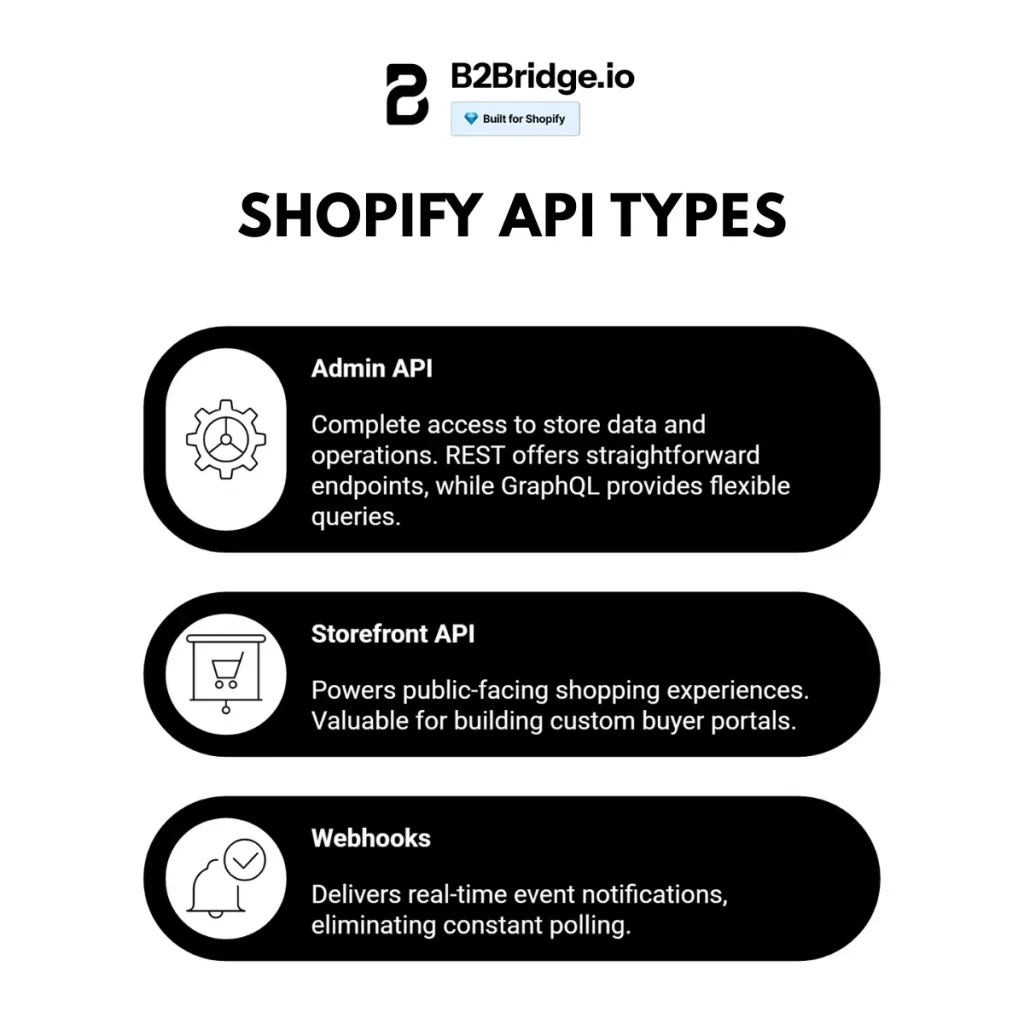
Admin API (REST and GraphQL)
The Admin API is the workhorse for B2B operations, providing complete access to store data and operations. The REST version offers straightforward endpoints with predictable structures, while GraphQL provides flexible queries that fetch exactly the data you need in one request.
Key B2B capabilities:
- Create and manage wholesale orders with custom pricing
- Update inventory across multiple warehouse locations
- Manage customer groups and tiered pricing structures
- Process bulk operations for high-volume order imports
Storefront API
The Storefront API powers public-facing shopping experiences. While less commonly used for B2B integrations, it’s valuable for building custom buyer portals where wholesale customers can browse products, check inventory availability, and place orders through a branded interface.
Webhooks
Webhooks deliver real-time event notifications, eliminating the need for constant polling:
- orders/create: Triggered when new orders are placed, perfect for syncing to ERP systems
- inventory_levels/update: Notifies when stock changes, enabling real-time inventory synchronization
- customers/create: Captures new wholesale customer registrations instantly
API Comparison for B2B Integration
| Feature | Admin REST | Admin GraphQL | Storefront API | Webhooks |
| Order Management | ✓ Full | ✓ Full | Limited | Events only |
| Wholesale Pricing | ✓ Yes | ✓ Yes | No | N/A |
| Bulk Operations | Limited | ✓ Excellent | No | N/A |
| Real-time Updates | No | No | No | ✓ Yes |
| B2B Relevance | High | Very High | Medium | High |
How to Set Up API for Shopify?
Setting up Shopify API access involves four critical steps. Let’s walk through each one with practical examples you can implement immediately.
The first decision is whether you need a private app or public app:
- Private apps are ideal for single-store integrations, like connecting your wholesale store to your warehouse management system
- Public apps are designed for solutions that multiple merchants will use, requiring submission to Shopify’s app marketplace
Step 1: Create Your Custom App
For most B2B integrations, custom apps are the simplest path. Here’s how to create one:
- Access the Apps Section: From your Shopify admin, navigate to Settings > Apps and sales channels
- Enable App Development: Click “Develop apps” and allow custom app development by following the prompts
- Create New App: Click “Create an app” and give it a descriptive name like “Wholesale Integration” or “ERP Connector”
- Accept Terms: Read and accept Shopify’s terms and conditions for custom app development
Step 2: Configure API Access Scopes
Access scopes define what store data your app can access or modify. This granular permission system keeps merchant data secure while giving you the access you need.
To configure scopes:
- Click on your newly created app
- Navigate to “Configuration”
- In the Admin API Integration section, click “Configure”
- Select the scopes your integration requires:
- read_products and write_products for catalog management
- read_orders and write_orders for order processing
- read_customers and write_customers for customer data
- write_draft_orders for creating B2B quotes
- read_inventory for stock management
Important: Apps should request only the minimum amount of data necessary for functionality, as Shopify restricts access to scopes that apps don’t legitimately require.
Step 3: Install the App and Generate Access Token
Once you’ve configured your scopes, you need to install the app to generate credentials:
- Click “Install app” in the app configuration page
- Review the permissions carefully
- Click “Install” to confirm
- Copy your API credentials immediately:
- Admin API access token (this is your authentication key)
- API key
- API secret key
Critical: Store these credentials securely, as the access token is permanent until you uninstall the app. Never expose tokens in client-side code or commit them to public repositories.
Step 4: Test Your API Connection
After installing the app, you’ll see the Admin API access token, API key, and API secret key. These credentials authenticate your app and allow it to access Shopify’s APIs.
- Important: The Admin API access token is displayed only once. Save it securely and treat it like a password. Share it only with trusted developers.
- API Key: A unique identifier that verifies your app’s identity when making API requests and helps Shopify track API usage.
- API Secret Key: A confidential key paired with the API key to provide an additional layer of security. It should never be exposed or shared publicly.
Step 5: Implement Production-Ready Practices
Before deploying to production, implement these essential strategies:
Rate Limit Management
Custom apps created in the admin have a rate limit of 40 requests per second with a burst capacity of 80 requests. Implement these protections:
- Caching: Store frequently accessed data like product catalogs locally, reducing API calls by 60-70%
- Retry Logic: When you receive a 429 response, implement exponential backoff (wait 1 second, then 2, then 4 before retrying)
- Request Queuing: Process requests through a queue that respects rate limits automatically
Webhook Integration
Instead of constantly polling endpoints, use webhooks for real-time updates. Configure them in your app settings to receive notifications for events like order creation, inventory changes, or customer updates – this dramatically reduces unnecessary API calls.
Security Best Practices
- Store access tokens in environment variables, never in code
- Use HTTPS for all API communications
- Implement IP whitelisting if your integration runs from fixed servers
- Rotate credentials periodically by uninstalling and reinstalling the app (note: you can’t rotate credentials without recreating the app)
B2Bridge Public API: Enterprise B2B Integration Solution
While Shopify’s native APIs provide foundational Ecommerce functionality, B2Bridge’s Public API is purpose-built specifically for wholesale and B2B operations. It bridges the gap between Shopify’s retail-focused features and the complex requirements of enterprise wholesale businesses.
B2Bridge offers real-time order synchronization, dynamic pricing tiers that adapt to customer segments, multi-location inventory management, and wholesale-specific features like net payment terms, minimum order quantities, and customer-specific catalogs. These capabilities transform Shopify into a true B2B powerhouse without requiring extensive custom development.
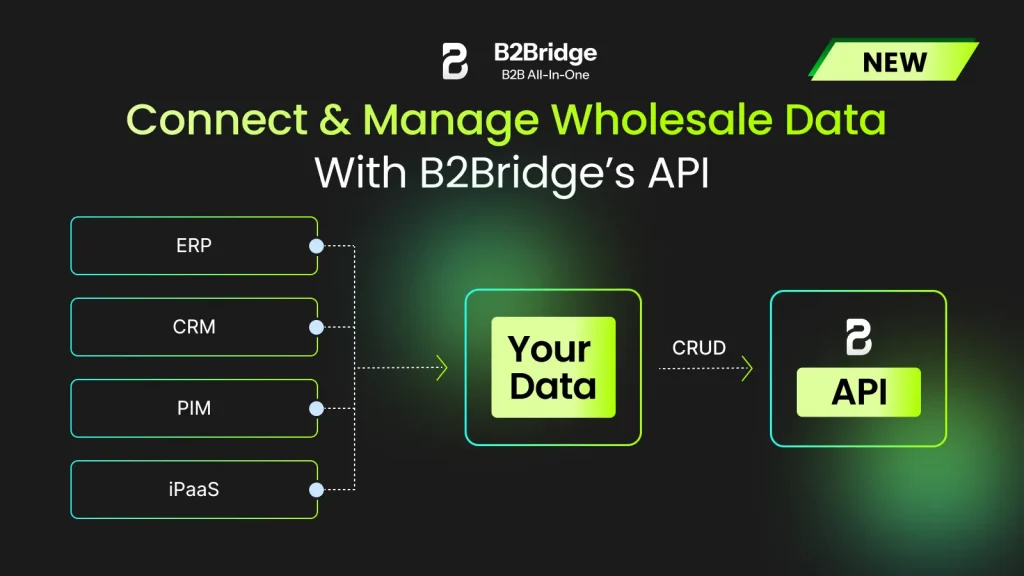
B2Bridge’s Public APIs focus on two core areas:
- Public API for Customer Groups: Enables merchants to manage customer groups by assigning customers to specific groups and controlling payment options and pricing visibility.
- Public API for Price Lists:: Allows the creation and updating of price lists, including custom discounts, volume-based pricing, and purchase limits.
Built on RESTful principles, these APIs support full CRUD operations. Merchants and developers can securely authenticate and integrate them with existing systems to sync B2B customer and pricing data – ensuring buyers always see the correct B2B prices when logged into the store.
Read the full step-by-step guide to API Integration in Shopify:
Public API for Customer Groups: https://docs.b2bridge.io/integration/api-integration/public-apis-for-customer-groups
Public API for Price Lists: https://docs.b2bridge.io/integration/api-integration/public-apis-for-price-lists
API Use Case: How Brooklyn Bicycle Co. Streamlined Shopify – NetSuite Integration with B2Bridge
Brooklyn Bicycle Co., a hybrid B2C and B2B bicycle brand, faced challenges managing wholesale alongside retail sales on Shopify, especially syncing orders and fulfillment with their NetSuite ERP while clearly distinguishing between wholesale and retail channels. They needed accurate variant pricing, gated wholesale access, and transparent order histories for business customers – all without manual data entry or process fragmentation.

To solve this, Brooklyn Bicycle Co. implemented B2Bridge – Enterprise B2B Ecommerce solution on their Shopify store. B2Bridge enabled variant-specific wholesale pricing, private login-only wholesale pages, and real-time syncing of orders and fulfillment data between Shopify and NetSuite. This ensured smooth data flow between both systems, reducing errors and manual work while maintaining clarity between wholesale and retail operations.
With B2Bridge, wholesale customers can view order histories, access accurate shipping rates and cart-level discounts, and benefit from business checkout terms. Meanwhile, Brooklyn Bicycle Co. gained operational efficiency, improved data accuracy, and stronger partner relationships, allowing their team to focus on growth rather than backend processes.
Shopify API Best Practices + Rate Limits Mastery (2026)
Use secure authentication, respect rate limits, and design for reliability and maintainability when integrating with the Shopify API.
Authentication and Security
- Use OAuth 2.0 for public apps and Shopify’s recommended auth patterns for all integrations to protect merchants’ stores.
- Store API keys and tokens in encrypted secrets or environment variables, never in source control, and apply least-privilege scopes with periodic key rotation and monitoring.
Performance and Rate Limits
- Monitor X-Shopify-Shop-Api-Call-Limit headers, and implement exponential backoff and retries when approaching or hitting 429 errors.
- Reduce calls by batching operations, leveraging bulk/async endpoints, and caching frequently read data to avoid unnecessary requests.
Reliability and Architecture
- Test thoroughly in development or staging environments before going live, including error handling for timeouts, 4xx/5xx responses, and webhooks.
- Use a modular, service-based architecture (e.g., separate services for products, orders, inventory) and structured logging to simplify scaling, debugging, and future extensions.
B2Bridge vs Native Shopify API: B2B Comparison
Choosing between B2Bridge and building directly on Shopify’s API depends on your wholesale complexity and development resources:
| Feature | Native Shopify API | B2Bridge API |
| Wholesale Pricing Tiers | Manual setup required | ✓ Built-in, dynamic |
| Net Payment Terms | Custom development | ✓ Native support |
| Customer-Specific Catalogs | Complex workaround | ✓ Purpose-built |
| Bulk Order Processing | Limited | ✓ Optimized |
| ERP Integration | Build from scratch | ✓ Pre-built connectors |
| Minimum Order Quantities | Custom code | ✓ Automated enforcement |
| Volume Discounts | Manual calculation | ✓ Automatic application |
| Setup Time | 8-12 weeks | 1-2 weeks |
| Maintenance Overhead | High | Low |
When to choose native Shopify API: Simple B2B needs, small wholesale catalog, limited customer segments, in-house development team available for ongoing maintenance.
When to choose B2Bridge: Complex pricing structures, multiple customer tiers, ERP integration requirements, need rapid deployment, prefer managed solution with support.
15-Point Shopify + B2Bridge API Implementation Checklist
Pre-Development Phase
- [ ] Document all integration requirements and data flows
- [ ] Map ERP/CRM fields to Shopify product and customer attributes
- [ ] Define API scopes needed for your use case
- [ ] Set up development and staging environments
Development Phase
- [ ] Generate API credentials and test authentication flow
- [ ] Implement rate limit handling and retry logic
- [ ] Build error logging and monitoring systems
- [ ] Create data transformation layers for ERP compatibility
- [ ] Develop webhook handlers for real-time updates
Testing Phase
- [ ] Test all CRUD operations with production-like data volumes
- [ ] Verify rate limit behavior under peak load (simulate 10K orders/month)
- [ ] Validate data accuracy across all integrated systems
- [ ] Test failure scenarios and recovery procedures
Production Phase
- [ ] Implement comprehensive logging and alerting
- [ ] Set up performance monitoring dashboards
- [ ] Document API usage patterns and optimization opportunities
- [ ] Train team on troubleshooting common integration issues
Get Started with B2Bridge Public API for B2B
Ready to transform your Shopify store into a B2B powerhouse? B2Bridge’s Public API makes wholesale management simple and scalable:
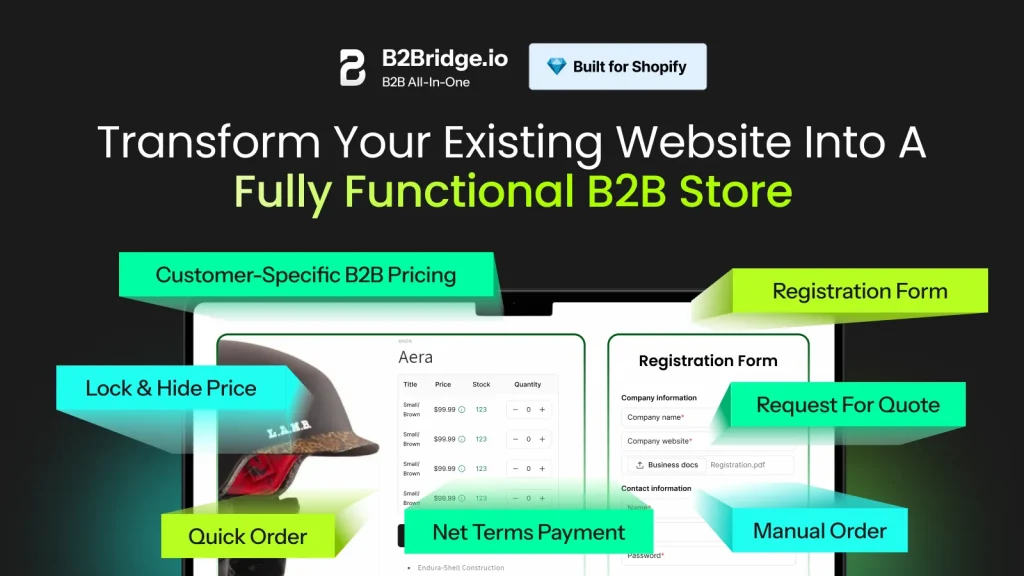
Simplify wholesale management: Run B2B operations as smoothly as B2C with B2Bridge’s all-in-one suite of wholesale tools that handle everything from customer onboarding to order processing.
Protect your pricing: Hide wholesale prices from retail shoppers and automatically display the right price to the right customer based on their tier, volume, or negotiated terms.
Scale with confidence: Grow your B2B channel from 10 to 10,000 orders per month without messy spreadsheets, manual processes, or system limitations holding you back.
Save time on operations: Automate customer registration approvals, price list assignments, and order handling workflows so you can focus on growing relationships instead of administrative tasks.
Offer a seamless buyer experience: Give your B2B buyers a smooth, self-serve shopping journey with personalized catalogs, quick reordering, and real-time order tracking.
Close more wholesale deals: Turn requests for quotes into confirmed orders faster with built-in negotiation tools, draft order workflows, and automated approval processes.
Future-proof your store: B2Bridge adapts as your wholesale business evolves – no need to juggle multiple apps or rebuild integrations as requirements change.
FAQs: Shopify API Integration Mastery
Shopify’s native API supports basic price rules through the Price Rules API, but implementing sophisticated wholesale pricing tiers and net payment terms requires significant custom development. B2Bridge’s API provides these features out-of-the-box, including automatic tier assignment, volume-based discounts, and flexible payment terms (net 15, net 30, net 60) with credit limit management.
For B2B order synchronization, GraphQL is generally superior because it allows you to fetch exactly the data you need in a single request. Instead of making multiple REST calls to get order details, line items, customer info, and fulfillment status, one GraphQL query can retrieve everything. This dramatically reduces API call consumption – critical when syncing thousands of wholesale orders. However, REST remains simpler for straightforward CRUD operations and has more extensive documentation for common use cases.
B2Bridge provides pre-built connectors for major ERP systems including NetSuite, SAP, Microsoft Dynamics, and QuickBooks. The API normalizes data between Shopify and your ERP, handling field mapping, data transformation, and conflict resolution automatically. For custom ERPs, B2Bridge offers webhook endpoints and RESTful APIs that your system can consume, with comprehensive documentation and technical support for implementation.
Shopify’s APIs are free to use – there’s no additional charge for API access beyond your standard Shopify plan subscription. However, Shopify Plus merchants get significantly higher rate limits (40 requests per second vs 2 for basic plans), which is essential for high-volume B2B operations. B2Bridge’s API access is included with their B2B solution subscription, with pricing based on features and order volume rather than API calls.
Conclusion
Mastering how to API integration in shopify opens unlimited possibilities for automating and scaling your Ecommerce operations. Whether you’re syncing orders to NetSuite, building a custom buyer portal, or automating inventory across multiple warehouse locations, successful API integration comes down to following best practices, testing thoroughly, and monitoring continuously.
Ready to streamline your wholesale operations? Explore B2Bridge’s developer documentation and discover how their Public API can transform your Shopify store into a complete B2B solution that drives growth and delights customers.

Hi, I’m Ha My Phan – an ever-curious digital marketer crafting growth strategies for Shopify apps since 2018. I blend language, logic, and user insight to make things convert. Strategy is my second nature. Learning is my habit. And building things that actually work for people? That’s my favorite kind of win.